RPA vs Intelligent Automation: Key Differences, Examples, and Use Cases

Businesses automate work to save time and reduce repetitive tasks. But not every process needs AI. Some tasks follow the same steps every time, while others involve documents, changing inputs, or decisions that fixed rules cannot handle.

That difference is what separates robotic process automation (RPA) from intelligent automation (IA). RPA follows predefined rules to complete repeatable tasks. Intelligent automation adds AI when a process needs to read information, handle different inputs, or decide what should happen next.
The investment in automation is growing. In PwC's 2026 Digital Trends in Operations Survey of 767 operations and supply chain leaders at US companies, 72% ranked automating operations among their top three AI investment priorities. Adding more technology does not always make a process better. If a task follows clear, fixed rules, RPA may be enough. If the process involves changing inputs or needs more judgment, AI may be a better fit.
This guide compares RPA vs. intelligent automation with practical examples, costs, build effort, and use cases. It also includes a six-question test to help you decide whether your process needs RPA, intelligent automation, or a mix of both.
What Is the Difference Between RPA and Intelligent Automation?
RPA is used for tasks that follow the same steps each time. It works with set rules and is a good fit for jobs such as copying data, updating records, or moving information between systems.
Intelligent automation can handle work that is less predictable. It combines automation with AI and other technologies to read documents, understand text, work with different types of data, and decide what should happen next.
Here is a quick comparison:
| Area | RPA | Intelligent Automation |
|---|---|---|
| How it works | Follows set rules | Uses rules with AI |
| Best for | Simple, repeatable tasks | More complex processes |
| Data | Mostly structured data | Structured and unstructured data |
| Decisions | Follows predefined conditions | Can use AI to help make decisions |
| Changes | Needs new rules when the process changes | Can handle more variation in the process |
| Exceptions | Often needs human help | Can handle some exceptions before sending them to a person |
| Common technologies | Bots, scripts, APIs | RPA, AI, ML, OCR, NLP, and workflow tools |
| Setup | Usually simpler | Usually needs more planning and integration |
| Published build cost, one process | $2,000–$8,000 simple; $10,000–$25,000 moderate; $15,000–$40,000+ complex | No delivery guide publishes a per-process figure |
| Published developer effort | 80–200 hours straightforward; 200–500 hours complex | Adds document AI, labeled test data, exception design, and per-run model cost on top |
Comparison checked September 2026. Cost and effort figures are quoted from published delivery guides; see the cost section below.
The two rows that decide most projects are Changes and Exceptions. When a field moves or a rule changes, an RPA bot often stops because the expected path no longer matches what it was built to do. AI-based automation creates a different problem: it can continue running while producing a wrong result. That makes output monitoring as important as uptime.
What Is Robotic Process Automation (RPA)?
Robotic process automation (RPA) uses software bots to complete repetitive tasks that people would normally do on a computer. The bot follows a set of rules and performs the same steps each time.
For example, an RPA bot can open an email attachment, copy information from a spreadsheet, enter it into another system, and update a record. It can do this without a person repeating the same steps for every file.
RPA works best when a task has clear rules and doesn't change often. It is commonly used for data entry, report creation, invoice processing, record updates, and moving data between business systems.
How Does RPA Work?
An RPA bot follows a set of steps. A basic process looks like this:
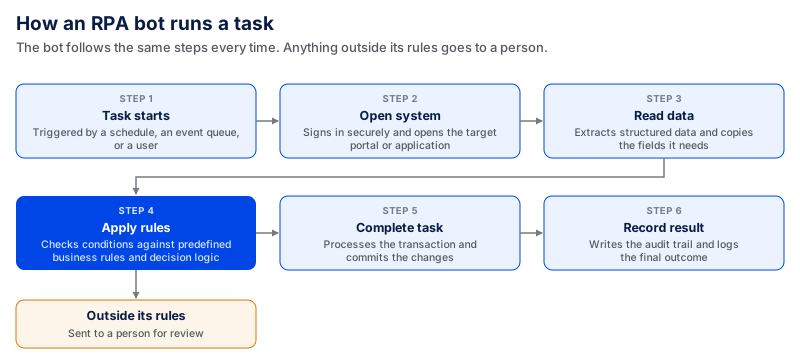
The bot does not decide what to do on its own. If the process changes or it receives something outside its rules, it sends the task to a person for review.
Common RPA Examples
Businesses use RPA for tasks such as:
- Entering customer or employee data into a system
- Moving information between spreadsheets, CRM, and ERP systems
- Creating regular reports
- Processing invoices with the same format
- Updating customer records
- Sending standard emails or notifications
- Checking data against set rules
The common thread is that the steps are known in advance when the bot starts.
Volume is also part of that known-in-advance quality that determines whether to build a bot. Besides rule-based logic, stable systems, and structured inputs, Rapson Technologies says another sign of a good automation candidate is 500+ runs per month. Don't read it as a payback cliff; treat it as a marker of a good candidate. This is a process-selection criterion for one delivery company, not the result of independent research.
Below that volume, do the arithmetic yourself against the build costs later in this article. An activity that takes a person 15 minutes per week, no matter how well it fits the rules, will not pay for 80 hours of development.
What Is Intelligent Automation (IA)?
Intelligent automation (IA) combines automation with artificial intelligence (AI) to handle work that cannot always follow the same set of rules. It can read information, understand different inputs, and use that information to decide what should happen next.
Take invoice processing as an example. An RPA bot can copy data when every invoice follows the same format. Intelligent automation can handle invoices that look different, pull out the needed details, validate the information, and route unusual cases to a person.
This covers more of the average workload than most teams expect. A Cloud Security Alliance survey of 210 IT and security professionals, fielded in November 2025, found unstructured data made up about 33% of enterprise data, with a further 21% semi-structured. So roughly half of what an organization holds is something a rule-based bot cannot reliably read.
You will see a bigger number quoted elsewhere. The claim that 70–90% of enterprise data is unstructured is an analyst estimate, not a measurement; the survey above actually asked, and got 33%. The conclusion holds either way, but the smaller figure has a method behind it.
IA can use several technologies together, including artificial intelligence, machine learning, natural language processing (NLP), optical character recognition (OCR), RPA, and workflow tools.
How Does Intelligent Automation Work?
The steps depend on the process, but a simple flow looks like this:
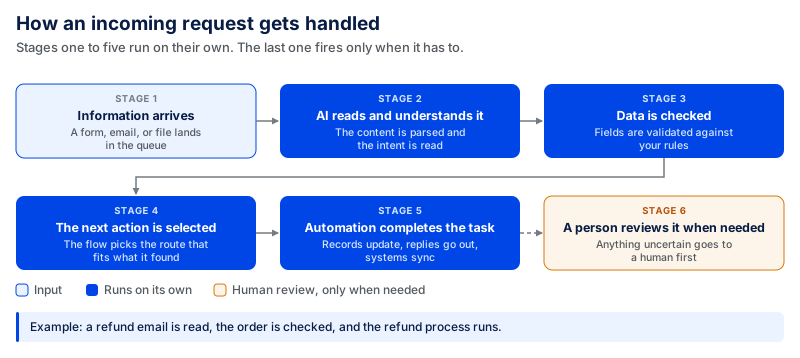
For example, a customer sends an email asking about a refund. AI reads the message and identifies what the customer needs. The system then checks the order details and follows the refund process. If the request falls outside the set conditions, it goes to a person.
What Technologies Are Used in Intelligent Automation?
The list below is ordered by how often each one actually turns up in a delivered project, not alphabetically and not by how impressive it sounds.
| Technology | What it does | How often it is actually needed |
|---|---|---|
| RPA | Completes repetitive actions across business systems | Almost always. The last mile of an IA process is usually still a bot writing to a system of record. |
| Workflow tools | Connect steps, systems, and approvals | Almost always. This is where the human-review path lives. |
| OCR | Turns text from scans or images into usable data | Whenever paper or scanned documents are in scope. Skip it if every input is born digital. |
| NLP / generative AI | Works with written or spoken language; classifies, summarizes, extracts | Common now. Needs a labeled set of real examples to test against before you trust it. |
| Machine learning (custom models) | Finds patterns in your own historical data | Rarer than vendor decks suggest. Worth it only when you have thousands of labeled historical cases and an off-the-shelf model has already been tried and failed. |
The last condition matters most. Custom ML is often proposed early and dropped later because the historical data doesn't exist or wasn't labeled consistently. Check the data before anyone scopes it.
RPA vs Intelligent Automation Examples
When both are used in the same work, it's easier to see the difference. RPA automates tasks based on logical rules. Intelligent automation handles the components where information or the next step in the process changes.
| Process | RPA | Intelligent Automation |
|---|---|---|
| Invoice processing | Copies invoice data into an accounting system when the format is fixed | Reads different invoice formats, pulls out key details, checks the data, and sends unusual cases for review |
| Customer support | Updates ticket details or sends a standard response based on set rules | Reads the customer message, finds the issue, checks available information, and sends the request to the right team |
| Employee onboarding | Creates accounts and enters employee details into different systems | Reads employee documents, checks the information, and starts the correct onboarding steps |
| Insurance claims | Moves claim information between systems | Reads claim documents, checks the details, and flags cases that need a person to review them |
| Government forms | Fills a fixed form from data already captured in structured fields | Turns plain-language answers into the correct form, picks the right document set, and retries failed submissions |
| Sales | Copies lead information into a CRM and updates records | Reviews lead information, sorts leads, and helps decide what action should come next |
A Worked Example From One of Our Builds
The government forms example comes from a real project. We developed an AI-powered government paperwork platform for U.S. passport, visa, and renewal applications.
The AI layer handled the parts that varied from one user to another. It identified what the user was trying to do, matched the request to the right form set, and mapped plain-language answers to the correct fields. The predictable parts followed fixed rules and scripted automation, including form completion based on published government requirements, submission, routing, and retries.
Three numbers from that build show what each half was worth:
- The platform-wide average completion time dropped from about 50 minutes to under 15 minutes across all submissions since launch, compared with those before launch. That's the AI layer at work: Users answer questions in natural language instead of reading the form.
- Payments were rejected on the first try about 15–20% of the time. It wasn't an intelligence problem; it was a routing and retry problem, and we solved it with rules.
- Submissions were being blocked 5–10 times a day at peak. We also used rules, IP rotation, and scheduled retries.
Two of the three wins came from the unglamorous half. This ratio is normal, which is why we start by splitting the process before choosing a platform.
When Should You Use RPA?
When a task has well-defined steps and occurs frequently, RPA is a suitable option. The bot doesn't have to understand the information or make complex choices. It just has to obey the rules imposed on it.
The percentage thresholds in this section and the IA section below are Coding Crafts' working scoping rules, not published industry standards. They are supposed to make “few exceptions” more concrete for a team.
- The same task runs at least 500 times a month.
- Over 90% of runs go exactly to plan. Below that, you have an exception queue, not an automation.
- Data is delivered in a fixed format and fixed layout.
- You can write the rules down without the word "usually."
- The task requires transferring data from one system to another.
- The underlying applications change no more than once or twice a year.
Consider a finance department manually entering payment information from a spreadsheet into an accounting system daily. If the process follows fixed rules and the spreadsheet always has the same format, an RPA bot can perform those steps.
The last condition is the one that catches people out. A bot is tied to the screens and fields it was built on. Every interface change, moved field, or new business rule stops it until someone rebuilds and retests it, so the maintenance line in an RPA budget is not optional: plan for 15–25% of the build cost each year.
When Should You Use Intelligent Automation?
Intelligent automation adds more value when fixed rules can't handle the input: information arrives in different forms, or the next action depends on what the system finds.
Intelligent automation is required when:
- The process involves emails, PDF files, images, or scanned files.
- Over 30% of cases deviate from the usual course. Between 10% and 30%, a human exception queue is usually cheaper than more automation. If the exceptions become this frequent, also consider if the underlying process needs fixing or remediation before adding more technology.
- Information comes in forms you can't control.
- The next step is reading and judging content.
- Multiple ways of working are required.
- Some cases must be routed to a person for review.
Imagine a business that receives customer requests via email. The messages aren't the same word for word, and they don't ask the same question. Basic RPA cannot understand what each customer wants.
But be careful: intelligent automation doesn't eliminate the need for human review. Hypatos, 2026 reports that traditional AP automation typically reaches 65–75% touchless processing in complex environments, while agentic AP automation that can also handle matching, coding, and exceptions reaches 80–90%. It also reports exception rates of 15–30% for traditional automation and 8–15% for agentic automation. These are vendor-published figures, not an independent industry average, so treat them as reference ranges rather than guaranteed results. Plan for human review for cases the system cannot resolve on its own. A business case that assumes 100% automation is likely to underestimate the work that remains.
Can RPA and Intelligent Automation Work Together?
Yes, and in most real processes this is the answer, not a compromise.
Invoices are the most obvious example. Businesses receive them in various formats. The AI identifies the supplier name, invoice number, date, and amount on each invoice. The system then compares the information with the company's policies. Once the data is ready, the RPA bot enters it into the accounting system, updates the record, and advances the invoice to the next process stage. When information is missing or doesn't match, the invoice is sent to a person.
The process looks like this:
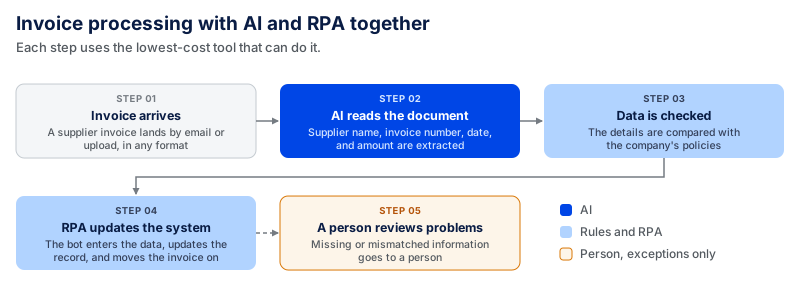
The point is not to pick one technology for the entire process, but to divide the process into steps. AI isn't necessary for every step. Price each step at the lowest-cost option that can do it, and the total price is usually much lower than a one-platform quote.
RPA vs IA vs AI: What Is the Difference?
RPA, intelligent automation, and artificial intelligence are related but have different functions.
RPA follows set rules to complete a task. AI processes information like text, images, and data to identify patterns, generate text, or support decisions. Intelligent automation combines the power of AI and automation into a single process to enable it to translate information into action.
| Technology | What It Does | Simple Example |
|---|---|---|
| RPA | Follows set steps to complete repetitive work | Copies customer data from one system to another |
| AI | Reads, creates, classifies, or analyzes information | Reads an email and identifies what the customer is asking |
| Intelligent automation | Uses AI with automation to complete more of a process | Reads the email, identifies the request, checks customer data, and sends it to the right team |
AI isn't required for RPA, and RPA doesn't require AI.
RPA and AI can work together in the same process. AI can read and understand information, while RPA handles simple, repeatable tasks. For example, AI can read a customer request and identify what it is about. RPA can then enter the information into a system or update a record. This way, AI is used where understanding is needed, while RPA handles the steps that follow clear rules.
Where Does Agentic AI Fit Into Intelligent Automation?
That's where agentic AI steps in. RPA has a predetermined sequence. Intelligent automation uses artificial intelligence to comprehend information and manage parts of a process. An AI agent takes action toward a goal and chooses the tools or actions it will use along the way.
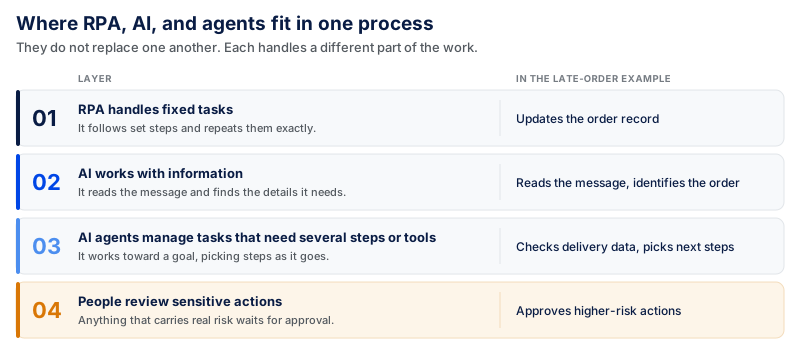
Assume a customer calls about a late order. An RPA bot updates the order record when given the right information. Intelligent automation reads the message, determines where to send the request, and identifies the order details. An agent, on the other hand, does more: it validates the order status, reviews delivery data, selects the next steps, updates the system, and crafts a response. A person approves higher-risk actions.
These technologies do not replace one another. They handle different parts of the same process:
What Can Go Wrong When AI Agents Replace RPA Bots?
Agents fail in ways bots don't.
- Runs stop being repeatable. A bot given the same input always produces the same output. An agent chooses its own path, so two runs on the same input can go different ways. If a process is audited, that's a compliance issue, not a technical one.
- Costs shift from fixed to variable. Once a bot is built, it costs little to run. An agent pays per model call, and the runs where it has to reason its way around an obstacle cost the most.
- Testing takes more time. RPA bots follow fixed steps, so teams know what they need to test. AI agents can take different steps depending on the task. This means teams need to test more situations and keep checking the agent after it goes live.
- Mistakes can be harder to notice. An RPA bot will usually stop when something goes wrong. An AI agent may continue even after it misunderstands information or makes a wrong decision. Teams need monitoring and human checks to catch these problems.
There is also a risk of using AI agents when simpler automation would be enough. In its June 2025 forecast, Gartner predicted that more than 40% of agentic AI projects would be canceled by the end of 2027 because of high costs, unclear business value, or poor risk controls.
Gartner also warned about "agent washing." This happens when companies label existing AI assistants, RPA tools, or chatbots as AI agents even when they do not have real agent capabilities. Gartner estimated that only about 130 of the thousands of agentic AI vendors had genuine agentic capabilities.
When an Agent Is the Right Answer
Four things should be true before you reach for one:
- Each run is different. If you can draw the flowchart, make the flowchart.
- The set of tools it can call is a short, limited list. When tool access is open-ended, cost and risk can both fly out the window.
- There is a human approval step after the consequential actions. There must be a clear path for refunds, submissions, payments, and customer record access.
- All decisions are recorded for future review. Without knowing the reason for its behavior, you cannot justify it.
With fewer than three of those, intelligent automation with a well-designed exception queue is probably cheaper, more predictable, and easier to review for risk. Our guide to creating AI agents covers workflow mapping, limited tool access, human approval points, and logging for production AI agents.
Benefits of RPA and Intelligent Automation
Both work to eliminate manual tasks, but in different ways. RPA is ideal for repetitive tasks with predetermined rules. Intelligent automation can handle more complex tasks where information must be read, understood, or verified. The sections below explain the main benefits of each.
Benefits of RPA
When people repeat the same steps across business systems, RPA drives ROI. Rapson Technologies' ROI guide puts the effect at 80–95% of manual handling time removed for a well-chosen unattended process and 40–70% for attended automation where a person stays in the loop, with error rates on carefully built bots 95–100% lower than manual entry.
These are the figures from one delivery company; no independent study backs them up, so view the top of each range as the maximum rather than the average. They assume clean inputs and no drift in the process.
The other benefit is hard to quantify but easy to see: a bot's answer is the same from one run to the next. Reproducibility can be as important as speed for anything with an audit trail.
Benefits of Intelligent Automation
Intelligent automation can handle work that RPA alone can't. It can read information from emails, PDFs, scanned documents, and different types of forms. This reduces the amount of work a person needs to check or complete.
The clearest example is our own government forms build, where completion time dropped from about 50 minutes to under 15, roughly a 70% cut, compared with users interpreting the form themselves.
The key difference is that IA benefits are probabilistic, while RPA's are deterministic. A bot either does the task or clearly fails. Monitoring and exception handling must be part of an IA process, as some outputs may still require review.
Where Automation Can Go Wrong
RPA succeeds when a process stays consistent. Issues begin whenever an application changes, a field moves, or a new business rule is added. The bot can't complete the task properly and must be updated and retested. RPA also struggles when data comes in different formats, or there are too many unusual cases.
Intelligent automation can deal with more variation but comes with risks. When the input data is ambiguous, AI can misread the document, provide incorrect answers, or make the wrong choice. The system is limited by data quality. Test these situations, and decide which actions stay with a human.
Security is a concern with automation involving customer, employee, health, or financial information. The system should have access only to the data and actions it needs, and sensitive actions should require approval before completion. This matters more when AI is involved than when a bot is involved; a bot can only do what it is programmed to do, but a model with broad system access can do what it wants.
The biggest risk comes before either one. If the process isn't documented, isn't clear, or changes frequently, automation doesn't save time; it makes work harder. Fix the process first. Not every costly automation project is complex; some are built on a process nobody agreed on.
What RPA and Intelligent Automation Cost, and How Long They Take
RPA costs depend on the process you want to automate. A simple task in one system costs much less than a workflow that connects several tools or uses OCR or AI.
Here are the published ranges per process:
| RPA, per process | Build cost | Developer effort |
|---|---|---|
| Simple, single-system task | $2,000–$8,000 | 80–200 hours |
| Moderate, multi-application process | $10,000–$25,000 | Not separately published |
| Complex, legacy systems, and OCR | $15,000–$40,000+ | 200–500 hours |
| Full production deployment | $5,000–$150,000 | – |
| Annual maintenance | 15–25% of build cost | – |
| Licensing | 25–30% of first-year spend | – |
What Does Intelligent Automation Cost?
There is no reliable published per-process price for intelligent automation that we can compare directly with the RPA figures above.
The cost depends on what you add to the workflow. For example, reading documents with AI may require a model or document AI service, real examples to test it with, rules for cases that need human review, and more testing.
There may also be usage costs. If you pay each time a model processes a document or request, the bill grows as usage grows. Use your expected monthly volume when estimating this cost.
Don't Look at the Build Price Alone
The initial development cost is only part of what you will spend.
Prioxis estimates that licensing makes up around 25–30% of first-year RPA costs. The rest can include setup, development, support, and maintenance.
You should also plan for maintenance. The same guide puts annual RPA maintenance at around 15–25% of the original build cost. Intelligent automation may have extra ongoing costs for model usage and checking AI outputs.
Payback is another number to check carefully. Deloitte surveyed 479 executives across 35 countries and found that the average payback period for organizations piloting intelligent automation increased from 16 months in 2020 to 22 months in 2021/22.
So, if a project is expected to pay for itself in less than a year, look at the numbers behind that estimate. Check the expected transaction volume, labor savings, build cost, and ongoing costs.
Project size matters too. Our government paperwork platform took eight months to build, but it included payment routing, courier coordination, and submission automation. Adding a single document-reading workflow to an existing system would be a much smaller project.
How to Choose Between RPA and Intelligent Automation
Run your process through this six-question test.
The 500-run figure comes from the delivery guidance mentioned above. The percentages are working rules, not industry standards; they are there to make the decision easier to test.
| # | Question | If the answer is… | Then |
|---|---|---|---|
| 1 | How many times does this run per month? | Under 500 | Check the payback arithmetic before you build. Lower volume doesn't rule out automation, but the savings need to justify the build. |
| 2 | How often does the process itself change? | More than once a quarter | Fix the process first. You will be rebuilding faster than you deliver. |
| 3 | Can you write every step down without using the word "usually"? | Yes | RPA |
| No | Intelligent automation | ||
| 4 | What share of runs go exactly to plan? | Over 90% | RPA |
| 70–90% | RPA plus a human exception queue | ||
| Under 70% | Intelligent automation | ||
| 5 | Do the inputs arrive in a fixed format and layout? | Yes | RPA |
| Mixed PDFs, emails, scans, free text | Intelligent automation | ||
| 6 | Does choosing the next step require reading and judging content? | No | RPA |
| Yes | Intelligent automation |
How to Read the Result
Questions 1 and 2 come first. If the process doesn't run often enough or changes frequently, it might not be the right time to automate yet. If the answers to questions 3–6 mostly point to RPA, it's likely that the process is organized well enough for a rule-based approach to automation. If they mostly point to intelligent automation, the process requires more than simply a set of rules.
Answers are sometimes a combination. That is normal. In some cases, one part of the process might require AI to read or evaluate data, while other parts can proceed with RPA. You don't need to use one technology throughout the process. Break the process into tasks and choose the simpler option if it can do the job.
Need Help Choosing the Right Automation? Let Coding Crafts Help
At Coding Crafts, we help businesses find the right way to automate their processes. We start by understanding the workflow, finding where time is being lost, and deciding which tasks need RPA and where artificial intelligence can add real value.
The goal is not to add more technology. It is to build automation that solves a real problem, works with your existing systems, and can grow with your business.
Ready to automate your workflows? Explore our business process automation services to see how Coding Crafts can help you plan and build the right solution.
FAQs About RPA and Intelligent Automation
How Long Does an RPA or Intelligent Automation Project Take?
The timeline depends on the process, team size, and testing required. The delivery guides above indicate that a basic RPA bot requires about 80–200 developer hours. A more complex process may take around 200–500 hours. The time to recover the investment differs from development time.
What Happens to the RPA Bots We Already Run?
They can continue to run in most cases. You do not have to create a new RPA bot when you add AI. The two can work together. For example, AI can read a document or classify information. The existing bot can then enter that information into a system or update a record. If a bot still can't process a given input or exception, you should replace or modify it.
Do Our Existing RPA Licenses Carry Over to Intelligent Automation?
It depends on your vendor and current plan. Your existing license may continue to cover the RPA bot. You may incur additional costs for AI models, document processing, or other AI functionality.
Some vendors also charge based on how much you use these features. Verify what your plan covers prior to estimating total cost.
Should We Pilot an AI Agent Before or After We Have an RPA Layer?
For most processes, begin with the steps that follow rules. Automate those steps first. Then check what is remaining.
An AI agent can help if what remains requires judgment or varies by case. This way, AI is added only where it is really needed.
What Happens to Maintenance Costs When We Add AI to an RPA Bot?
Even with AI, RPA still requires maintenance. Delivery guidance puts annual RPA maintenance at approximately 15–25% of the original build. This can include interface changes, field changes, business rule changes, etc. of any systems the bot interacts with.
AI adds its own ongoing costs. These may include model usage and checking whether AI outputs are accurate. Plan for both RPA maintenance and AI costs when working out the long-term budget.
How Is Agentic AI Different From Intelligent Automation?
Typically, intelligent automation happens within a defined workflow. AI assists with some of the work within that workflow. Agentic AI has more freedom. It can choose its actions and tools to achieve an objective. Its actions must also be carefully tracked and checked since it can make more decisions on its own.
The Bottom Line
RPA works well for repetitive tasks with strict rules. When the process also involves reading information, processing various inputs, and making decisions, intelligent automation can be useful.
Both might be required in the same workflow. RPA can handle repetitive tasks, while AI can handle tasks that require more discretion.
Before requesting a quote, check three things: how often the process runs, how often it changes, and how often it runs without an exception.
These numbers can provide insights into what can be automated and what kind of automation makes sense.
Automation that earns its keep
Coding Crafts builds automation systems from rule-based bots to LLM-powered agents, scoped around measurable time savings, with senior engineers at $25 to $49 per hour.
More from the blog.
View all postsRelated reading from the Coding Crafts team.