
Building a working demo is often the easy part. The real challenge starts in production, where an AI agent has to work with real users, changing data, different tools, and business rules. It may choose the wrong tool, repeat the same step, or let one mistake affect everything that follows.
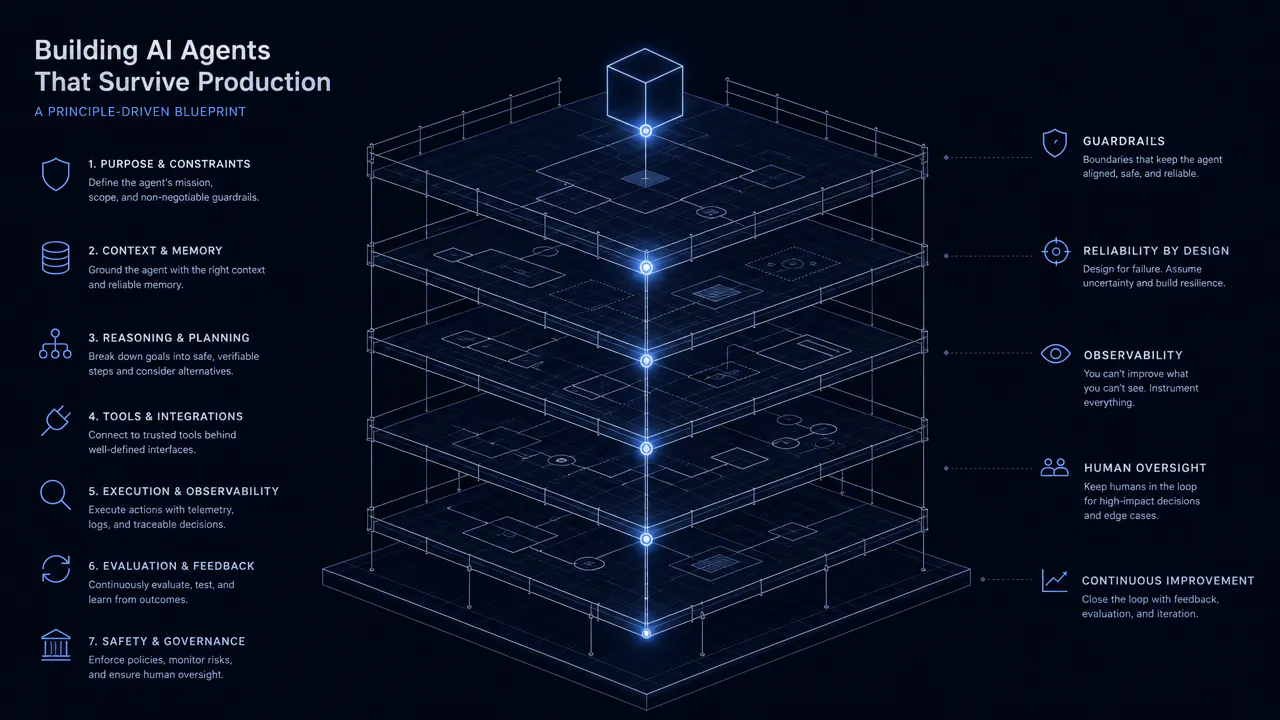
Reliable AI agents need more than a powerful model. Keep predictable steps in code, give the agent a clear job, limit its access and autonomy, bring people in before risky actions, and test and monitor the entire workflow.
Gartner predicts that more than 40% of agentic AI projects will be canceled by the end of 2027 because of rising costs, unclear business value, or weak risk controls. OpenAI's guide to building agents also recommends using agents for work involving complex decisions and unstructured data, while simpler tasks may be better handled with deterministic automation.
The principles of building AI agents in this guide come from the practical challenges CodingCrafts has seen while working on AI-powered systems for real business workflows, not just from framework tutorials. We will look at how to structure these systems, give them the right tools and context, control their autonomy, test their work, and understand what they are doing once they move into production.
What Counts as an AI Agent
Not all systems that use a language model are AI agents. Some systems use a model for a specific task like reading a document, writing a response, or classifying a request. The rest of the process still follows set rules.
The main difference is simple: who decides what happens next? If the steps are already defined in code, it is a deterministic workflow. The workflow is agentic if the model can select the next step based on what it finds. It has more autonomy if it can plan and execute several steps independently.
Deterministic Workflows
A deterministic workflow is a process that has a known sequence of steps. For instance, an invoice system can read an invoice, verify the necessary details, and send larger payments for approval. A language model can read the invoice but does not determine how the process will be executed.
This works best when the process is clear, and the rules are understood. It is also simpler to test, control, and maintain.
Agentic Workflows
When the next step in a process is not always predictable, you can use an agentic workflow. Take customer support. A simple question may only need an answer from the knowledge base. A more complex request may require checking the order, reviewing the refund policy, checking account details, and requesting approval.
The system determines the next steps based on the request and the information it finds. It can choose a tool, check the outcome, and decide how to proceed.
This provides more flexibility in the workflow. It also makes the results less predictable. Different requests can be routed through the same system, producing different results, so testing and clear boundaries become more important.
Anthropic's guide to building effective agents makes the same distinction. In a workflow, code dictates the direction of the flow. In an agentic system, the model determines what tools to use and how to move towards the goal.
Autonomous Agents
An autonomous agent has more freedom in how it plans and executes a task.
For instance, a coding system might be asked to repair a bug. It can search, locate the involved files, modify the code, run tests, review the results, resolve new issues, and test again.
The steps do not all need to be specified before the task starts. The system decides what to do next based on its progress.
This can help with work that involves an unpredictable path. More freedom also brings additional risks. It may select the wrong tool, repeat steps, make unnecessary model calls, or continue when it should stop.
More autonomy does not necessarily make the system better.
| Approach | Who decides the next step? | Best for | Main challenge |
|---|---|---|---|
| Deterministic workflow | Rules written in code | Processes with known steps | Cannot easily handle unexpected situations |
| Agentic workflow | The model makes some decisions within set limits | Tasks where the right path depends on the situation | Harder to predict and test |
| Autonomous agent | The system plans and carries out several steps | Tasks where the path cannot be known in advance | More cost, complexity, and risk |
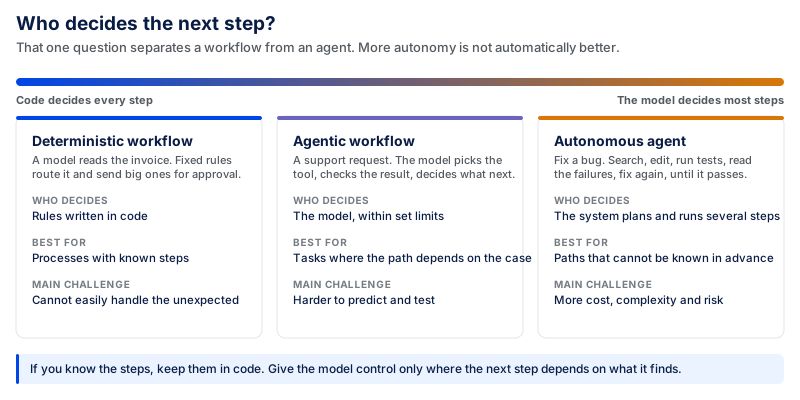
If you know the steps, keep them in code: that is the rule. There is little justification for using a model to make a decision that fixed rules can reliably make.
Only give the system control when it must make decisions during the task. Even so, begin with clear boundaries instead of granting it unrestricted freedom from the outset.
A simpler workflow is likely to be less expensive, faster, and easier to support. The goal is not to create the most self-reliant system. It is to use the right amount of autonomy for the job.
AI Agent Architecture: The Core Components
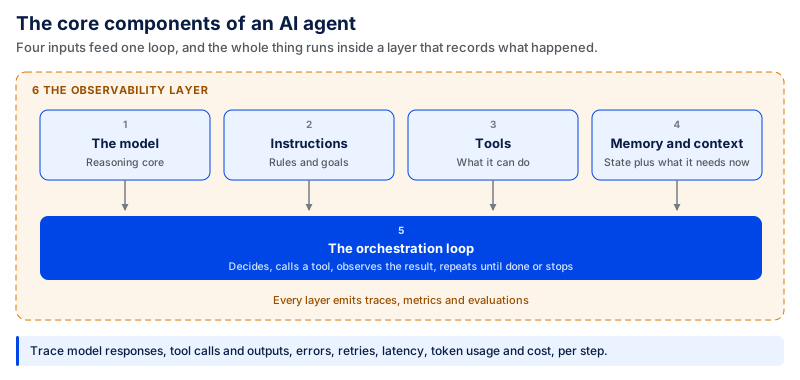
A good model is not enough for a reliable system. A production-ready agent also needs clear instructions, the right tools and context, workflow control, and visibility into what happens during each task.
These six components are interdependent. One weakness can impact the entire system.
The Model
The model is responsible for interpreting information, choosing actions, and deciding what should happen next. The strongest model isn't necessarily the best. Simple tasks such as classification or basic information extraction may not require the same model as complex planning or research.
Different models can also be used for different jobs within the same workflow. The goal is to use enough model capability for each task without adding unnecessary cost or delay.
Instructions
Instructions tell the model what to do and what rules it needs to follow. These should be simple and precise. A prompt that only says “be helpful” does not instruct the system how to handle the actual business task.
Good instructions should include the system's purpose, what it is permitted to do, what tools it can use, and what the result should be. For instance, a customer support system might be allowed to view an order and initiate the refund process but not approve it.
The system should also know when the task is complete. Otherwise, it may keep searching, calling tools, or repeating actions unnecessarily. Prompts should be versioned, tested, and monitored like other components of the system because even a small change can affect workflow behavior.
Tools
Tools enable the system to interact with data and other software. An agent might search a database, check an order, update a CRM, send an email, or create a support ticket. These tools can be connected through function calling or standards such as the Model Context Protocol (MCP).
Every tool should have a clear purpose, required inputs, expected outputs, and defined actions. Consider the tool definition an API contract between the model and the system it must use.
Clear definitions help the model choose the right tool. Similar names, vague descriptions, or too many available tools can increase the chance of a wrong tool call. Start with only the tools the workflow needs and expand when there is a clear reason.
Memory and Context
The model needs the right information to make the right decision. Working context can include the user's request and recent tool results. Conversation state keeps track of the current interaction, while retrieved knowledge can bring in relevant company documents, policies, product information, or customer data.
When the use case calls for it, long-term memory can also store useful information between conversations. These pieces of information should not be regarded as a single memory store. More context is not always better. It can increase cost and make important information harder to find. Give the model the information it needs when it needs it.
The Orchestration Loop
Many tasks can't be done in a single step. The system might need to perform an action, inspect the result, and then decide what to do next.
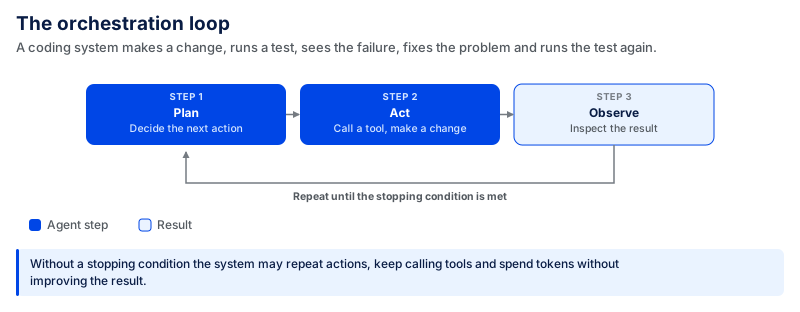
For example, a coding system may make a change, run a test, see that the test failed, fix the problem, and run the test again.
This loop lets the system adjust its next action based on what it learns. But every loop needs a stopping condition. Without one, the system may repeat actions, keep calling tools, or continue using tokens without improving the result.
Stopping conditions may include successfully completing a task, passing a test, encountering an error, or reaching a maximum number of attempts. The system should be able to detect when to keep going and when to stop.
The Observability Layer
Observability shows what happened while the agent was working. This matters because an agent can complete a task without producing a technical error and still reach the wrong business outcome.
Teams need to trace model responses, tool calls, tool outputs, errors, retries, latency, token usage, and cost.
For instance, if a task suddenly becomes more costly, the trace may show that the same tool is being called multiple times. If the final result is incorrect, the team can trace the workflow back to the first wrong decision.
Observability also helps teams evaluate changes. They can compare prompts, models, or settings against previous results instead of guessing whether a change improved the system. Without that visibility, it is difficult to diagnose failures, control costs, or know whether the system is becoming more reliable.
10 Principles for Building AI Agents
A reliable system isn't created simply by selecting a model and attaching more tools. Key decisions include what it should do, how much freedom it should have, what information it can access, and what should happen if it makes a mistake.
These principles can help you make those decisions before they become production problems.
1. Start with a Clear Goal
Start with the business problem, not the capabilities of the technology. “Automate Customer Support” is too general a goal. A clearer goal is to reduce the time needed to answer common order-status questions while sending complex cases to the support team.
When you have a clear goal, it's easier to decide what information the system needs, what it can access, how much freedom it should have, and how you will measure success.
The result should also be measurable. This could include resolution time, the number of tasks completed, or the number of cases resolved without escalation.
Without a measurable outcome, a system can work technically and still deliver little business value. For instance, if a support assistant can formulate correct responses but needs a lot of staff checking, it is not a time-saver for anyone.
2. Give Each Agent One Clear Job
A focused system is simpler to understand, test, and improve. Problems arise when a single agent is tasked with too many unrelated jobs. Suppose the same system is tasked with answering support tickets, processing refunds, generating sales leads, updating the CRM, and generating reports.
Now it requires more tools, more instructions, more permissions, and many more potential routes. If something goes wrong, finding the cause becomes harder.
A more effective strategy is to keep responsibilities narrow. A support agent handles support. A research agent collects information. A billing agent handles billing tasks.
Not every task must be handled by a different agent. More agents also add handoffs, model calls, and coordination. Split responsibilities when one system becomes too large or difficult to manage. If you don't have a clear answer to what one agent is responsible for, it's probably doing too much.
3. Design the Workflow Before the Prompt
No prompt will overcome a poorly designed process. Before writing instructions, map how the workflow should work. Determine the order of operations, the information required, when to call a tool, what happens if it fails, and which actions require approval.
Some steps may always happen in sequence, while others require branches. For instance, a password problem may go through account recovery, while a billing issue follows a different path. A refund over a set threshold may require human approval.
Rules are also required for retries. Should the system retry if the tool fails? How many times? When should it stop and request help?
Teams without this structure tend to deal with workflow issues by increasing prompt length. That puts logic into instructions that may be better handled in code. Moving predictable rules into code reduces the number of decisions the model has to make. Plan the route first. Then provide prompts for the decisions that do require reasoning.
4. Treat Every Tool Like a Production API
A model begins to impact real systems through tools. Reading a document is one thing. Updating a customer account, sending an email, issuing a refund, or changing a database record can have real consequences.
Each tool should therefore have a clearly stated purpose, inputs and outputs, input validation, restricted permissions, timeouts, and proper error handling.
Permissions should follow the same principle. A tool that only requires access to read customer information shouldn't also be able to modify or delete it.
Tools that write data must also be protected against duplicate calls. For example, if a payment request times out after the transaction is successful, the system might retry the call and create a duplicate payment. This is where idempotency comes in.
Tool descriptions also matter because the model has to choose between them. If tools such as “check account balance” and “transfer funds” are described poorly, the model may select the wrong one. That mistake can have real consequences, such as moving money instead of simply checking a balance.
Best practice is to assign a single task to each tool and provide access to that tool only for that task.
5. Give Agents the Context They Actually Need
More information does not necessarily lead to better decisions. A system can include past interactions, customer records, company documents, past tool results, and conversation history. Sending all of it to the model at every step adds noise and cost.
Different information serves different purposes. Working context includes information relevant to the current task. Conversation history tracks the current interaction. Retrieved knowledge brings in relevant information from documents or business systems, while persistent memory can retain selected information for future interactions.
The system should determine what it needs rather than treating all of this as one large memory store. Consider an assistant checking a company's refund policy. It might require the customer's order information and the current refund policy, but not months of irrelevant conversation history.
This is even more critical for long-running tasks. As messages, tool results, and documents accumulate, important information can become harder to use effectively. Summarize previous work and bring in information only when needed to keep the context focused.
The idea is not to pass on all your knowledge to the model. Pass on the right information for the decision at hand.
6. Give Agents Only as Much Autonomy as They Need
The greater the autonomy, the more opportunities for things to go wrong. A system might only require permission to choose between a few predefined options. Another may need to plan several steps and choose which tools to use. These are very different levels of control.
Start with the lowest level of autonomy that can complete the task. For example, a sales assistant may research a company and draft a follow-up email. That does not mean it also needs permission to send the email, change the CRM, book a meeting, or continue contacting the lead.
Each additional action has to be tested, secured, and monitored. Add autonomy when the workflow requires it, not simply because the model supports it. First prove that the system can make the decision reliably. Then decide whether it should also be allowed to act on that decision.
7. Bring Humans in Before the Risky Part
Human review is best before an important action occurs. There is little value in asking someone to approve a refund after the money has already been sent. Instead, put approval points in front of actions that aren't reversible or that may have major consequences. This can include big refunds, money moves, account transfers, contract approvals, or messages sent to significant customers.
Lower-risk steps can continue without approval. The agent can collect data, organize the response, and show the reviewer what it plans to do before the final action is taken.
There should also be a clear escalation path for cases the system does not manage. The model can be stopped from guessing by routing the task to the right person when information is missing, confidence is low, requests are unusual, or tools fail. Human involvement does not mean that the system failed. It is part of designing for risky work.
8. Build Guardrails into the System
Guardrails should not just tell the system what it cannot do, but also what it can do. Start with permissions. Restrict access to systems, available tools, and the actions those tools can take. Use allow-lists to limit actions or targets. Set spending limits where the workflow can create costs or transactions. Output checks can detect incorrect or improper results before they are passed to another system.
Sensitive information also needs its own controls. Personal information should not be part of the workflow unless it is required for the task and the person making the request is authorized to access it.
Another issue is untrusted content. An agent may read emails, websites, uploaded documents, or retrieved documents while performing a normal task. Those sources may contain hidden instructions that alter its behavior.
A malicious instruction hidden in an email message, for instance, could tell an agent that is supposed to summarize emails to find private information and send it elsewhere. If the same workflow has broad email permissions, the potential impact is greater than just a poor summary.
Prompt-injection protection should not rely entirely on telling the model to “ignore malicious instructions.” Access controls, input checks, limited permissions, validation, and approval for sensitive actions all decrease the potential impact of an attack.
9. Test Before You Keep Changing the Agent
If a system fails, the first step is often to modify the prompt or change the model. But without a baseline, you cannot tell whether the change improved the system or simply fixed one problem while creating another.
Start with a test set that includes normal requests, unclear inputs, missing information, tool failures, and cases that should be escalated to a person. You do not need hundreds of cases to begin. Anthropic recommends starting with around 20–50 simple evaluation tasks based on real failures, then expanding the test set as the system matures.
Next, monitor the relevant metrics for the use case. This can include task success rates, correct tool selection, escalation rates, cost per task, and response times. Do not evaluate only the final answer. An agent may produce a reasonable response while still calling the wrong or an unnecessary tool.
There is no single target success rate that works for every agent. Set the required level based on the task and its risk. Also test important tasks more than once because the same agent can behave differently across runs.
Include successful and unsuccessful examples in the test set. When the prompt, model, tool, or workflow changes, rerun the same cases to check for regressions. Add failures found in production back into the evaluation set so the tests improve with the system.
10. Make Agents Observable, Auditable, and Cost-Aware
A production system should be more than a correct final answer. Teams should be able to see how it reached that result. This means monitoring all model calls, tools used, tool outputs, errors, retries, latency, token consumption, and cost for the entire task.
This is important because failures are often not apparent. Imagine a research task that normally takes 20 seconds suddenly taking 2 minutes. The final report could still be correct. The same search tool might be called six times in a trace because the workflow's stopping condition is no longer effective.
The same visibility helps diagnose wrong results. Instead of seeing only the final failure, the team can trace the workflow back to the first incorrect decision. Audit trails are also important when the system changes business data or performs actions on behalf of users. Teams may need to know when the task started, what information was accessed, which tool was called, and what action was taken.
Monitor cost at the task level as well. A workflow may include several model calls, retries, tool calls, and evaluation steps, so the price of a single model call does not show the full operating cost. OpenAI recommends looking at cost per successful task. This means measuring the full cost of completing the work and dividing it by the number of tasks that meet the required quality level. The full cost can include model usage, retries, human review, and rework.
Observability ties these pieces together. It helps teams find failures, compare changes, control spending, and determine whether the system is improving. A good system is not one that never fails. It is one in which failures are identified, analyzed, and corrected before they become serious issues.
AI Agent Architecture Patterns: Which One Should You Use?
Not every project needs the same architecture. A single agent with a few tools may be enough for a simple task. More complex work may need routing, multiple steps, or several agents.
The right setup depends on the task, the tools involved, how much freedom the system needs, and what could happen if something goes wrong.
Start with a simple setup and add more parts only when the task needs them.
| Pattern | Best for | Main risk | Complexity |
|---|---|---|---|
| Single agent | Simple tasks with a few tools | Choosing the wrong tool | Low |
| Router + agents | Different types of requests | Wrong routing | Medium |
| Pipeline | Tasks with clear stages | Errors moving to the next step | Medium |
| Multiple agents | Large tasks that can be divided | More coordination and cost | High |
| Evaluator | Work that needs checking | Too many revision cycles | Medium–High |
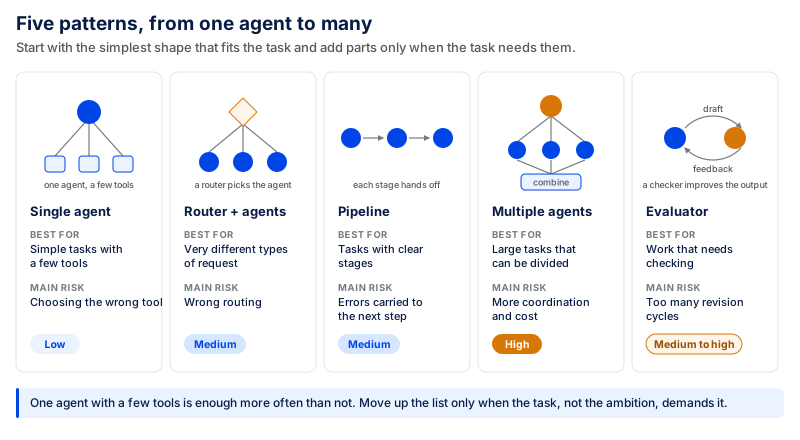
Start with a Single Agent and a Few Tools
In many cases, a single agent with a few tools is enough. For example, a customer support agent might need one tool to search the knowledge base, one to view an order, and one to create a support ticket. It can understand the request and choose the right action without passing the task to another agent.
This setup is easier to build, test, and maintain because there are fewer moving parts. Problems can appear as more tools are added. If several tools have similar purposes or unclear descriptions, the agent may choose the wrong one.
Start with the tools needed for the task. Add more only when needed.
Route Requests to the Right Agent
If a system receives very different types of requests, one agent may not be the best choice. A router can identify what the user needs and send the request to the right agent.
For example, a support platform may receive billing, technical, and sales questions. The router can send billing questions to a billing agent, product issues to a technical support agent, and sales questions to a sales agent.
Each agent then has a smaller job and only needs access to the tools and information related to that job. The main risk is wrong routing. If a billing problem reaches technical support, that agent may not have the information or permissions needed to solve it.
A fallback path is important. If the router is not sure where a request should go, it can ask for more information or send the case to a person instead of guessing.
Break the Work into a Sequential Pipeline
Some tasks have clear stages, with each stage handling a different part of the work.
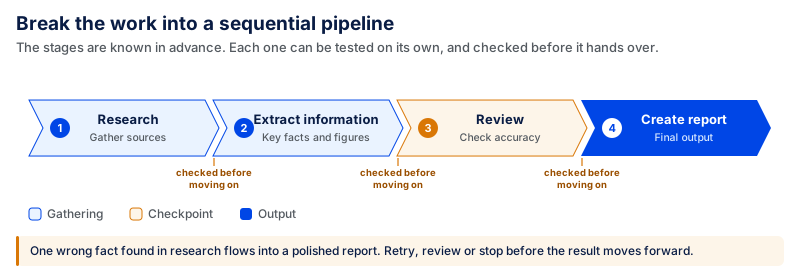
The stages are known in advance, even if some decisions within those stages may change based on the information found. This also makes testing easier because each stage can be checked separately.
The main risk is that one mistake can affect everything that follows. Suppose the research stage finds incorrect information. The extraction stage may organize that information correctly, and the final stage may turn it into a polished report. Every step can work as designed while the final result is still wrong because the original error was never caught.
Important steps should therefore be checked before the result moves forward. The workflow can retry the step, review the work, or stop if something looks wrong.
Split Complex Tasks Across Multiple Agents
Some tasks are too large or varied for one agent to handle well. In these cases, the work can be divided among several agents. One agent can coordinate the work, divide the main task into smaller parts, and assign them to other agents. The results are then combined.
For example, in a large research project, one agent can handle market research, another can study competitors, and another can do technical analysis. The coordinator can then combine their findings into a final report.
More agents are not always better. Each agent needs context and instructions, and each may add more model calls. Their results may also need to be checked and combined. This adds cost and processing time.
Use multiple agents when the work clearly needs to be divided. Do not split a simple task just to use a more complex architecture.
Use an Evaluator to Improve the Output
Some tasks need to be checked and improved before the result is accepted.
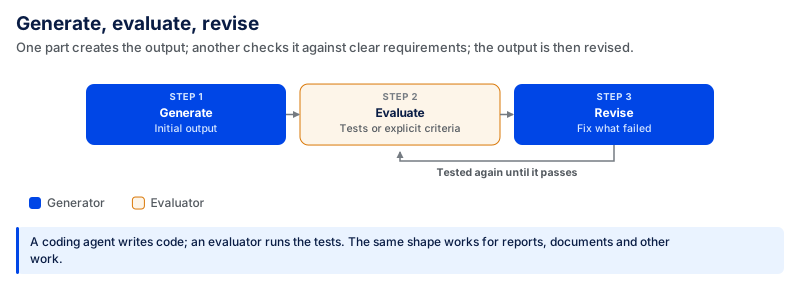
One part creates the initial output. Another checks it against clear requirements and identifies problems. The output is then revised.
For example, a coding agent can write code, and an evaluator can run the required tests and check whether the code passes them. If it fails, the code can be changed and tested again. The same approach can be used for reports, documents, and other work that can be checked against clear rules.
The main risk is that the cycle keeps going. An evaluator can almost always find something else to improve. Without a stopping rule, the workflow may continue generating, checking, and revising.
Set the stopping point before the process starts. It could be passing all required tests, reaching a required quality score, completing a set number of revisions, or sending the work to a person when the limit is reached.
The best architecture is the simplest one that can solve the problem. Start with one agent and a few tools. Add routing when different requests need different agents. Use a pipeline when the work has clear stages. Split the work across agents when a large task can be divided. Add an evaluator when the output needs a clear review step.
More parts mean more testing, monitoring, and maintenance. Add them only when the simpler setup is no longer enough.
What Changes When AI Agents Enter Production
It is easy to make it work in a demo, but it becomes difficult to manage it in production. The model is typically not the primary issue. The more difficult questions involve access, business data, existing systems, security, and accountability.
A demo can use a test database and a few sample documents. In production, it may need to access customer information, update the CRM, integrate with the ERP, leverage employee permissions, and share information with external model providers.
From then on, it's more than just an AI project. It becomes part of the company's technology and security infrastructure.
Know Who the Agent Is Acting As
The business must first be able to tell whose authority it is using before the system can take action. For instance, a staff member can request it to look for a customer record and update a sales opportunity. The system should not have access to every CRM record simply because its service account has broad permissions. It should only be able to access the information and actions allowed for that task and user.
That's where a "least privilege" approach becomes important. Do not grant more permissions than necessary. A tool that just reads records should not be permitted to edit or delete records.
In enterprise setups, you can use a separate service identity or user-delegated access. Regardless, the permissions must be made clear and controlled. Microsoft's guidance for agent identities recommends treating these systems as their own identities and defining their access, scope, and lifecycle, rather than giving them broad access by default.
This also applies to accountability. If an important record is altered, the company should be able to answer a few basic questions: Who requested the action? What did the system do? Which tool did it use? What information did it access? Which permissions allowed the action?
This requires an audit trail that links the user's request to the actions performed on their behalf. Without it, a business might notice that a CRM record has been updated but not know who allowed the update or why.
Make the Agent Work with Your Systems of Record
Connecting to a CRM, ERP, or database is typically more challenging than calling an API once. The real challenge is maintaining the accuracy of business data if something goes wrong during the process.
Now suppose that you have a sales workflow where you want to update the CRM record and then generate an order in an ERP. It can complete the CRM update, but the ERP update times out.
What comes next?
Simply running the whole task again could update the CRM twice or create a duplicate order if the ERP completed the first request but its response never came back.
These cases must be handled in production systems. Idempotent writes ensure that the same request does not result in duplicate transactions. Retries should be clearly bounded and should repeat only safe actions. Reconciliation may reconcile systems after the fact to ensure that they match.
The process should additionally track which steps have been performed. If it fails halfway, it can proceed from a safe point without starting over.
Teams also need a way to replay a missed step once the issue is fixed. These controls might not matter much when using test data in a demo. They are vital when changing real orders, payments, customer records, or inventory.
Know Where Your Data Goes
Processes usually move data through various systems before they finish. A request can be initiated in the company, pull data from an internal database, pass it to a model provider, invoke another service, and save the result elsewhere.
Teams should be aware of that fact before they go to production. Four practical questions are a good place to start:
- What information leaves our environment?
- Where is it processed?
- How long is it stored?
- What does our agreement with the provider allow them to do with it?
These questions are relevant in workflows that use customer data, employee records, financial information, health information, source code, or other sensitive data.
Data residency can also be an issue. Teams should check whether their organization, industry, contracts, or applicable regulations place requirements on where data can be processed or stored. Some have retention policies that require removing data after a predetermined time.
There's an additional layer of third-party service providers. Teams must be familiar with their security controls, data processing locations, data retention policies, subprocessors, and how they process customer data.
The same requirements should also be included in contracts. A Data Processing Agreement (DPA) may specify how a provider uses personal data, as well as security and retention obligations and other relevant matters, such as subprocessors and data deletion.
When information is retrieved, permissions should remain in effect. If a user can't open a confidential document in the first place, they shouldn't be able to do so by requesting an AI system to get it for them.
This is the actual distinction between a prototype and a production-ready system. Prototypes show that the technology can do the job. Production must prove that it can do the same job without compromising identity, data, business records, or accountability.
How CodingCrafts Approaches AI Agent Development
Building an agent is not just about connecting a model with a few tools. The real work starts when it has to use real business data, connect with existing software, follow company rules, and work reliably in production.
At CodingCrafts, we start by understanding the business problem and the current workflow. We look at what the system needs to do, what data it needs, which tools or platforms it must connect to, and where human approval is required.
This also helps us decide whether the problem really needs an agent or if a simpler automated workflow can do the job.
From Prototype to Production, Step by Step
The first step is discovery and feasibility. We understand the current process, review the available data, identify the required integrations, and discuss security and business requirements. This helps uncover technical problems early, rather than after development has already started.
Next, we build a small working version using real data and integrations. Instead of building the complete product at once, we test one important workflow from start to finish.
For example, a customer support system may eventually need to search company documents, check customer records, update a CRM, and create support tickets. The first version may focus on one complete support request and test whether the system can handle it correctly.
Once the basic workflow is working, we start testing it with different situations. These tests check whether it selects the right tools, finds the right information, handles missing data, and asks for human help when needed.
A demo may work perfectly with a few prepared examples. Real users will ask questions in many different ways, so testing with realistic cases is important before moving forward.
The next step is a controlled rollout. You can start by giving the system to a small group of users or allowing it to perform only low-risk tasks. Important actions can still require human approval until the workflow has been properly tested. Our guide on AI application security explains more about access control, data security, and other risks to consider before launch.
After launch, the work does not stop. The team needs to track tool calls, errors, retries, response time, usage, and cost. This makes it easier to find problems and understand why something went wrong.
Our AI development process moves from discovery and data readiness to a proof of concept, production, guardrails, and continuous improvement. The time needed for a proof of concept depends on the workflow, integrations, data, and project scope.
For larger companies, our AI adoption framework also considers business goals, available data, security, testing, deployment, and ownership before rolling out a solution at scale.
The main goal is to test the idea early, see if it creates real business value, and then build on what works.
What We've Built
CodingCrafts has built products where models need to use real company data and connect with existing software.
Our work includes generative AI applications that connect models with company data, APIs, search systems, and business workflows.
We have also worked with RAG and vector search to help applications find useful information from large document collections and private company data. Instead of expecting the model to know everything, the application first finds the most relevant information and uses it to prepare the response. Our guide on RAG best practices explains this process in more detail.
Our work also includes an AI agent and MCP platform built for developers working with AI workflows. The project included developer documentation, technical content workflows, OpenAI SDK integration, and production monitoring. It also required a responsive interface that could clearly show complex connections between models, tools, and other parts of the platform. This project shows how an agent platform also needs integrations, monitoring, and a clear view of how models and tools work together.
Another example is our AI-powered CRM system. It brings calls, WhatsApp, SMS, and email into one platform and helps manage leads, follow-ups, and other sales tasks. First response time dropped from 2–6 hours to under one minute, while manual workload for sales reps fell by around 50–60%.
These projects solve different problems, but they have one thing in common: the model is only one part of the product. Data, search, integrations, permissions, testing, monitoring, and error handling are just as important when the product is used in the real world.
A prototype can show that an idea works. A production system has to keep working with real users, real data, and real business rules. That is why we prefer to start with one useful workflow, test it properly, learn from the results, and then expand it when there is a clear reason to do so.
Frequently Asked Questions
What Is the Most Important Thing to Consider When Building an AI Agent?
Start with one clear goal. Decide what the system needs to do, what information it needs, which tools it can use, and when a person should step in. Keeping the job focused also makes the system easier to test, manage, and improve.
Should I Use One Agent or Multiple Agents?
Start with one agent if it can handle the task with a few tools. Use multiple agents when the work has different parts that need separate skills or can be done at the same time. Multiple agents also mean more handoffs, model calls, testing, and cost, so only add them when they are really needed.
How Do You Test an AI Agent Before Using It in Production?
Test it with situations that real users are likely to create. Include normal requests, unclear questions, missing information, tool errors, and cases that need human help. Check whether it chooses the right tools, completes the task correctly, follows permissions, handles errors, and knows when to stop. When new problems appear after launch, add them to your test cases so you can check them again after future changes.
What Makes an AI Agent Ready for Enterprise Use?
An enterprise-ready system needs more than good answers. It needs controlled access, secure handling of business data, reliable connections with company software, clear activity records, and a way to recover when something fails. Human approval should also be required for important or risky actions. Companies should know what data leaves their systems, where it is processed, how long it is stored, and how outside providers may use it.
Agents Built on These Principles
CodingCrafts keeps predictable steps in code, gives each agent one job and instruments every tool call, so the system holds up after launch.