
Most business processes don't follow one clean path. A customer problem may require an account check before the next action becomes clear. It can take multiple iterations of coding and testing to complete a software task. Sometimes, an IT incident needs further investigation before anyone knows what to do, whether it's to restart a service or escalate the problem. Fixed automation works well when the next step is known, but it becomes harder to use when the next step depends on the previous one.
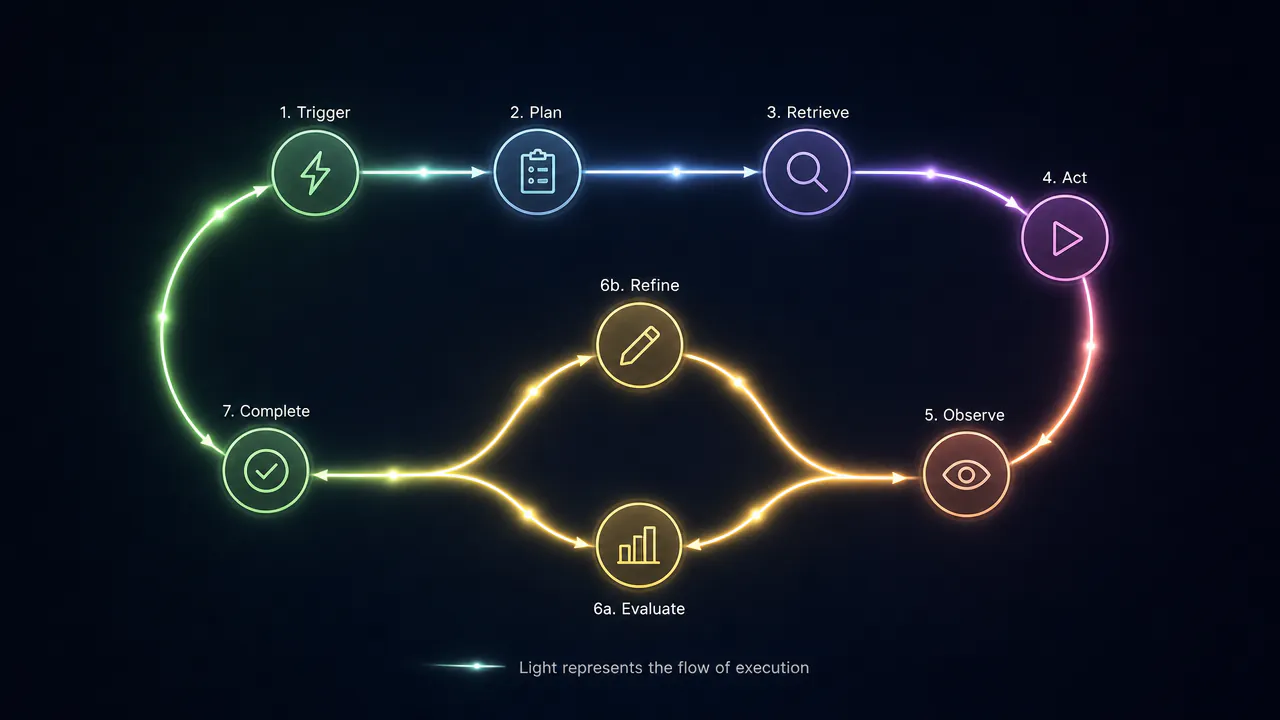
That's where agentic workflows can help. They can use AI agents, business rules, APIs, company data, validation, and human approvals to take a process to a defined outcome. The workflow can collect new information, determine the next step, take an approved action, observe what happened, and change if necessary.
It is not about adding more agents, though. One agent might be more appropriate for a small, well-defined task. Additional orchestration may be required when a process spans systems, involves multiple permissions, varies based on new information, or requires an independent check before a major action. Each extra agent or workflow step also adds cost, latency, and another place where something can go wrong.
In practice, the choice comes down to a few things:
- Use an agentic workflow when the next step depends on new information, multiple systems, different permissions, or verification.
- Use regular automation when the steps and decisions can be defined in advance.
- Keep the workflow as simple as possible because every extra agent or step adds cost, latency, and another failure point.
- Use AI where interpretation is needed, regular code for fixed rules, and human approval for high-impact actions.
What Are Agentic AI Workflows?
An agentic AI workflow is a business process where the system can use information available at runtime to choose how to reach a specific outcome. The workflow can collect context, select a relevant action, use connected tools, review the result, and adjust the next step as necessary, rather than forcing developers to preprogram every possible path.
Take a customer support request as an example. A typical workflow may use a hard-coded routing rule to send a billing problem to a particular queue. An agentic workflow can investigate the request first. It may pull the customer's records and payment history, review the relevant policy, identify the most likely problem, and then request additional details, take an approved action, or forward a refund request for human review.
This does not mean handing everything over to an automated system. A well-designed workflow combines machine-led decisions, deterministic software, and human judgment. AI can help choose the next step when that choice depends on context. Predictable operations such as calculations, validation, database updates, and fixed business rules work well with regular code. Human approval is required before actions where a bad decision could have a real financial, security, legal, or operational impact.
A simple way to determine whether a process needs this approach is to ask: Can we define all the steps and decisions in advance? If yes, conventional automation may be sufficient. When the process needs to gather new information and use it to decide what happens next, a more adaptive approach starts to make sense.
How Do Agentic AI Workflows Work?
An agentic AI workflow works as a loop. It starts with a goal, gathers the information needed to make a decision, takes an action, checks the result, and decides what should happen next. The loop can repeat until the workflow reaches its goal or a defined stopping point.
Take a customer support request as a simple example. A customer says a payment went through, but their account still shows an unpaid balance. The same case can move through all eight stages:
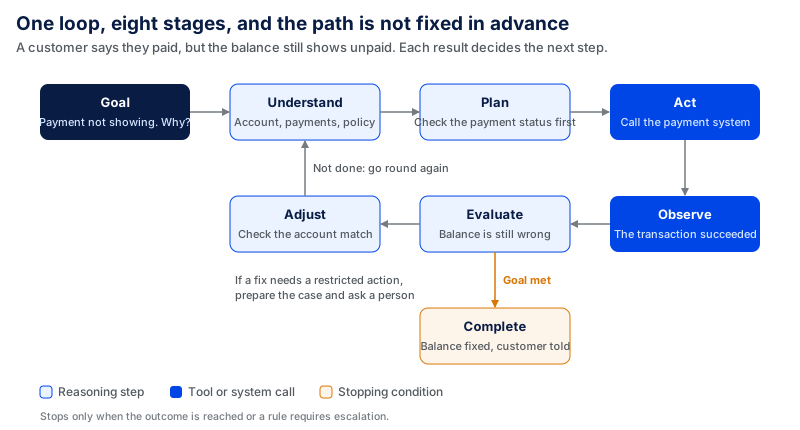
Goal: Every workflow needs a clear outcome. Without one, the system has no reliable way to know when the task is complete.
In this case, the goal is to find out why the payment has not been reflected correctly and either resolve the issue or send it to the right person.
Understand: The workflow first gathers the context needed to understand the task. This can include the user's request, account information, previous interactions, system data, policies, and other relevant information.
For the payment issue, it may retrieve the customer's account details, payment history, current balance, and the relevant billing policy.
Plan: Once the context is available, the system determines what needs to happen next. The plan does not always need to cover the entire workflow in advance. It can change as new information becomes available.
If the payment record exists but the account balance has not changed, the workflow may decide to check the payment status before choosing the next action.
Act: The workflow then uses an approved tool or API to perform the selected action.
It may call the payment system to check whether the transaction was completed, failed, reversed, or is still pending.
Observe: After an action is taken, the workflow reads the result instead of assuming the action worked.
For example, the payment system may confirm that the transaction succeeded even though the customer's account still shows an unpaid balance.
Evaluate: The workflow then checks whether the result actually moves the task toward its goal. A successful tool call does not necessarily mean the problem has been resolved.
Here, the payment check worked, but the customer's balance is still wrong. The workflow therefore knows that the original problem is not complete.
Adjust: If the result is incomplete or unexpected, the workflow changes its next step. It may gather more information, try another approved action, or pass the task to a person.
In this case, it may check whether the successful payment was correctly matched to the customer's account. If correcting the account requires a restricted action, the workflow can prepare the case and send it for human approval.
Complete: The workflow should stop only when the defined outcome has been reached or a stopping condition requires escalation.
The case is complete when the account reflects the correct payment status and the customer receives an updated response. If the workflow cannot resolve the mismatch within its allowed actions, it escalates the case with the information already collected.
The important part is that the path is not fixed from the start. Each result provides new information that can change what the workflow does next.
Key Components of an Agentic AI Workflow
Creating a production workflow takes more than an agent and a prompt. The key is how the model, tools, context, orchestration, permissions, and feedback mechanisms work together. Every component serves a specific purpose, and dividing those purposes makes the system more testable, controllable, and easier to improve.
In practice, each layer can be built with different tools. The right choice depends on how much control, durability, integration, and infrastructure the workflow needs.
| Component | Examples | When it fits |
|---|---|---|
| Agent framework | OpenAI Agents SDK, Microsoft Agent Framework, LangChain | Use a higher-level agent framework when you want built-in support for tools, state, guardrails, handoffs, or agent execution without building the full runtime yourself. |
| Models | OpenAI models, Anthropic Claude, Google Gemini | Choose the model based on the actual task. Test reasoning quality, tool use, latency, context needs, and cost rather than choosing one model for every workflow. |
| Workflow orchestration | LangGraph, Microsoft Agent Framework, Temporal, AWS Step Functions | LangGraph and Microsoft Agent Framework are built around agent and workflow orchestration. Temporal and Step Functions are useful when durable execution, retries, long-running processes, and reliable state transitions matter more than agent-specific features. |
| Memory and state | OpenAI Sessions, LangGraph persistence, application databases | Use session memory for conversational state. Use checkpoints or durable storage when a workflow must pause, recover after a failure, or continue later without starting again. |
| Retrieval and context | pgvector, Weaviate, existing databases and search systems | pgvector works well when vectors need to stay with existing PostgreSQL data. A dedicated vector database such as Weaviate can be useful when semantic or hybrid search is a larger part of the system. |
| Tools and integrations | Function tools, MCP servers, internal APIs, CRM or ticketing APIs | Expose narrow actions instead of giving the model broad system access. Each tool should have clear inputs, outputs, and permissions. |
| Observability and evaluation | OpenAI tracing, LangSmith, Microsoft Agent Framework observability | Use tracing to see model calls, tool use, handoffs, state changes, errors, and workflow outcomes. Evaluation should then check whether the workflow completed the business task correctly, not only whether the model produced a good response. |
AI Agents
The agent is the component of the workflow that performs tasks where the next step isn't consistently defined by a fixed rule. It reads the available context, selects an action, invokes an approved tool, and uses the tool's output to determine what to do next.
What matters is keeping the agent's work contained. An agent is less testable and governable if it has access to too many systems, tools, and responsibilities. Its tools, permissions, context, and responsibilities should therefore be limited to what it needs for its part of the workflow.
Large Language Models
The large language model is responsible for understanding language, interpreting a request, handling unstructured information, selecting from a set of available actions, and generating structured output for the next step.
The model, though, should not be a repository for all the business rules. Predictable rules, such as spending limits, access checks, required fields, or fixed calculations, are typically better handled in regular application code.
This separation matters because the model output is probabilistic. The workflow can then use the model for decisions that require interpretation while keeping deterministic controls over what can actually happen.
Tools and APIs
Tools can take an agent from producing an answer to changing something in the real world. They can integrate the workflow with databases, CRMs, ticketing systems, code repositories, search systems, payment systems, or internal APIs. For example, a customer support agent could have a tool that allows it to pull up an account, view an order, open a ticket, or issue a refund.
Tool design is part of the safety architecture. All tools should be clearly defined, have specific permissions, have known input parameters, and have consistent outputs. As the number of tools increases, the model can also struggle to determine which action to take when tool descriptions are too similar.
Keeping tools specific and clearly differentiated reduces the chance of the agent selecting the wrong action and makes permissions easier to control.
Memory and Context
Context tells the system what it needs to know at this moment. With memory, it can carry useful information from one step to the next or to the next interaction.
Short-term state could include the current user request, the tools that have already been called, and the results returned in the current workflow. Long-term memory can store information that needs to persist across interactions, and knowledge bases can store company or domain information as needed.
Other systems, like CRM records, application state, past cases, or user preferences, can also provide customer or business context.
Additional context, though, is not necessarily helpful. Even if a model is capable, a workflow tied to the wrong records, schema, or document is more likely to make bad decisions. It is not just about context size; context quality and source-of-truth design are also important.
For this reason, production workflows should not send all documents and records to the model just because they can. Instead, they should send only the minimum reliable context needed for the current step.
Workflow Orchestration
Orchestration determines how the pieces in the workflow are connected. As a process expands, it can require synchronizing agents, regular code, APIs, human decision-making, retries, conditional branches, and long-running tasks. The orchestration layer tracks the next step to execute, the state that needs to move with it, and what to do when something fails.
In the current Microsoft Agent Framework, this is made explicit: production workflows combine a mix of model-driven steps with deterministic executors and human-in-the-loop gates. This does not mean that all workflows must be built the same way. The framework can support sequential, concurrent, handoff, and other orchestration patterns.
Orchestration can also make failures easier to isolate. When planning, execution, and verification are represented as distinct nodes, teams can see which stage failed instead of treating the entire workflow as one agent operation.
Guardrails and Human-in-the-Loop Controls
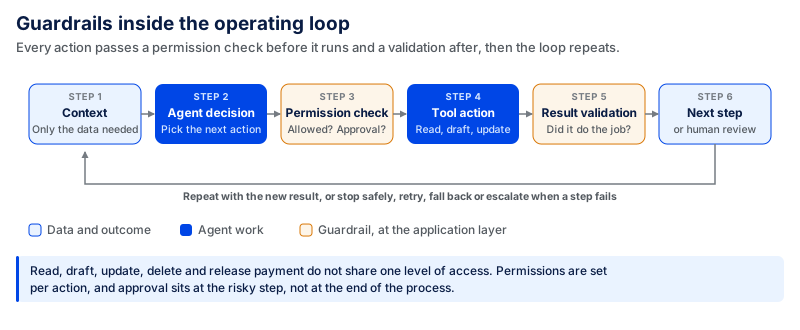
Guardrails set the workflow boundaries. They can include input validation, tool permissions, approval processes, fallback actions, error handling, output validation, and audit trails. Apply them at the application or workflow layer, not just through instructions like “do not perform unsafe actions.”
Reading data, drafting a response, updating a record, deleting information, and releasing a payment should not have the same level of access. Permissions should be set for each action based on what the workflow needs to do and what could happen if the action is wrong.
| Action | Risk level | Suggested control |
|---|---|---|
| Read | Lower | Give access only to the data needed for the task. Sensitive or unrelated records should remain restricted. |
| Draft | Lower | Allow the workflow to prepare content, but validate the output before it is used or sent where needed. |
| Update | Medium | Limit which records and fields the workflow can change. Validate the change before or after execution based on its impact. |
| Delete | High | Require explicit permission and human approval before permanent deletion. |
| Release payment | High | Require restricted tool access and human approval before the transaction is executed. |
The exact control depends on the workflow. A low-risk update may be allowed automatically, while a financial transaction or permanent deletion may require approval. The important point is to give the workflow only the permissions it needs for each action instead of giving the agent broad access to the entire system.
Human approval is best used at key points, not at the end of the process. For example, Microsoft's Agent Framework supports workflows that pause execution for human approval before continuing.
Fallbacks are also important. When a tool fails, the workflow should provide instructions on whether to retry a step, use another tool, go back to the previous step, stop safely, or escalate to a person. It might also be necessary to insert checkpoints in long-running workflows so they can restart without redoing the work.
AI Agents vs. Agentic AI Workflows: What's the Difference?
An AI agent can understand a task, decide what to do, use tools, and respond to the result. An agentic AI workflow operates at a broader process level, coordinating agents with APIs, regular code, rules, approvals, and other systems to reach a defined outcome.
A single agent can suffice for a bounded task like researching a company and creating a sales brief. An agentic workflow is more helpful when several systems are involved, along with permission levels, conditional logic, verification, or human approval.
| AI Agent | Agentic AI Workflow |
|---|---|
| Individual autonomous component | End-to-end process |
| Internal reasoning loop | Orchestrated control flow |
| Highly flexible | Flexible with defined structure |
| Can be unpredictable | Easier to govern |
| Good for bounded tasks | Good for complex processes |
| May use tools | Coordinates multiple tools/services |
| Less traceable | Greater observability |
Examples of Agentic AI Workflows
The simplest way to understand these workflows is to look at where the path can shift. In each example below, the system does more than move from one fixed step to the next. It uses the outcome of one action to determine what happens next.
Customer Support Workflow
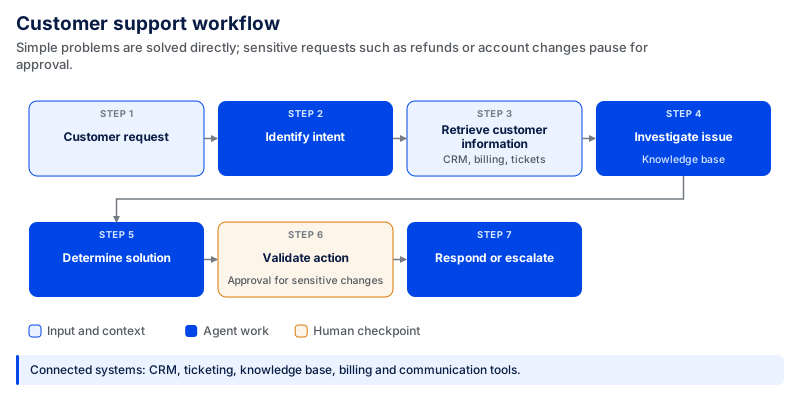
The system can integrate with a CRM, ticketing system, knowledge base, billing system, and communication system. For simple problems, it can provide a solution directly. If the request is more sensitive, like a refund or an account change, the workflow can pause for approval, then take action.
Salesforce's Agentforce examples show similar service workflows involving identity verification, order and account data, knowledge retrieval, approved actions, and escalation of more complex cases to human support.
Software Development Workflow
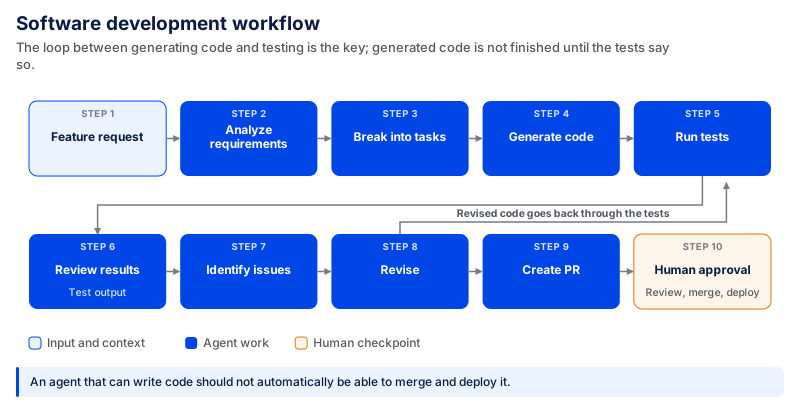
The key is the loop between code generation and testing. The first output should not be accepted as finished just because the code was generated. Test results provide an independent signal to the workflow to either continue, revise, or stop.
Other permissions may be required for other parts of the process. An agent that is able to write code should not automatically be granted the ability to merge and deploy code. By keeping review, merge, and deployment tightly controlled, the workflow can remain flexible for code generation.
Atlassian's HULA research shows why this distinction matters. Across 663 real work items tested over two months, 79% successfully generated plans, 82% of those plans were approved by engineers, and 87% moved successfully through code generation. Yet only 59% of pull requests reached merge. In a survey of 109 engineers, only 33% believed the system had solved their work item.
Sales Workflow
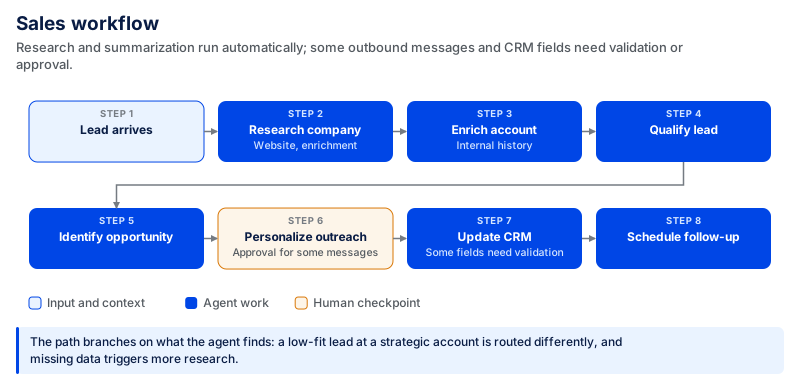
The workflow can draw context from CRM data, enrichment services, company websites, internal account history, and communication tools.
This doesn't require the same level of freedom for every step. Research and summarization can be done automatically. Some outbound messages and updates to certain CRM fields may need validation or approval.
The useful part is that the workflow can branch based on what it finds. A low-fit lead at a strategic account may be routed differently from a low-fit lead at a less important account, while missing information could trigger more research before outreach starts.
IT Operations Workflow
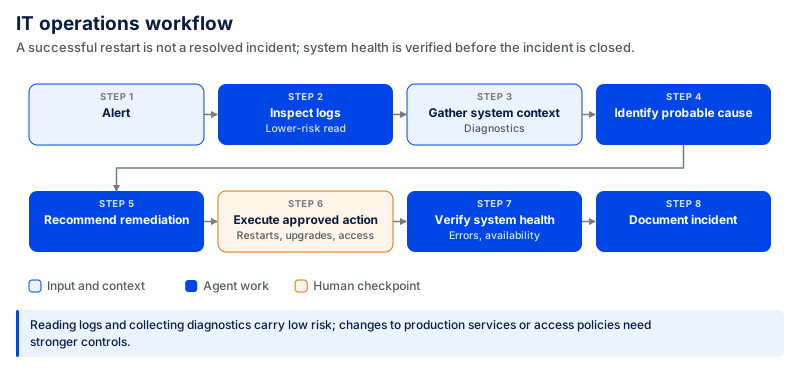
This illustrates the importance of outcome verification. A successful service restart doesn't mean the incident is solved. You still need to validate system health, errors, and service availability before closing the incident.
Permission boundaries also matter in IT workflows. Reading logs and collecting diagnostics can be lower-risk actions. Restarting production services, upgrading infrastructure, or changing access policies should be accompanied by more robust controls.
Microsoft's workflow guidance supports this clear distinction between model-driven steps, deterministic logic, and human decision points.
Research and Knowledge Workflow
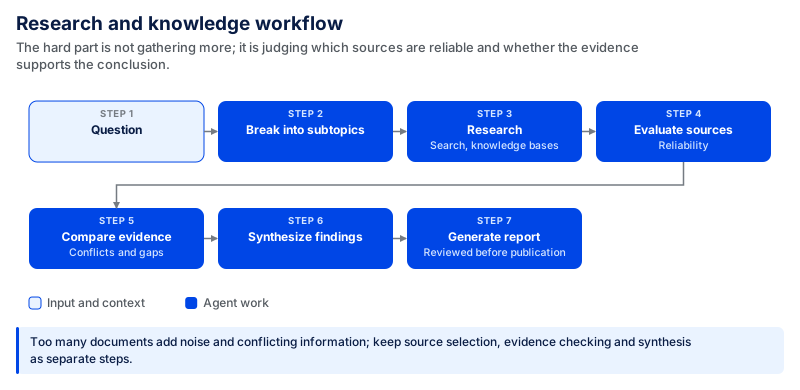
The agent may access search tools, internal knowledge bases, document stores, or structured databases. The difficulty is not gathering more information; it is determining which sources are reliable and whether the evidence supports the conclusion.
More context is not always better. Capturing too many documents can result in noise or conflicting information. A more robust workflow maintains the flow of source selection, evidence checking, and synthesis, making it easier to identify weak evidence.
Even after the draft has been reviewed, it may be worth having a person read it before publication for legal, financial, technical, or strategic reasons.
Finance and Fraud Detection
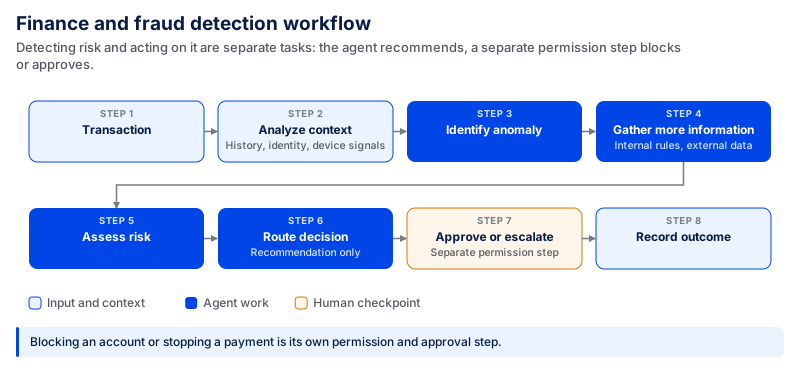
The workflow can include transaction history, customer identity, account information, device signals, internal risk rules, and external data sources.
The critical design aspect is that risk detection and risk action are separate tasks. If an agent detects any suspicious activity, it can make a recommendation, but blocking an account or stopping a payment is a separate permission/approval step.
The process should also confirm the final business outcome. A successful tool call does not mean the correct transaction was blocked or the correct account was reviewed. This is why audit trails, action-level permissions, and independent verification of consequential decisions are crucial in finance workflows.
Benefits of Agentic AI Workflows
The main benefit of these workflows is not that they automate more individual tasks. They help a process continue across decisions, systems, and handoffs without requiring someone to coordinate every step manually. They are most useful when the process has a well-defined endpoint but not a fixed sequence of steps, which may evolve as more information is obtained.
According to McKinsey's November 2025 State of AI survey, fewer than 40% of companies report measurable gains from AI, even though nearly 90% are using it. This gap does not prove that task-level automation is the cause, but it reinforces the need to measure AI by business outcomes rather than adoption alone.
The gap is even clearer with AI agents. In April 2026, McKinsey reported that nearly two-thirds of enterprises had experimented with agents, but fewer than 10% had scaled them to deliver tangible value.
Automate Complex Multi-Step Processes
Traditional automation is effective when the path is known: an event occurs, a rule is applied, and an action follows. It gets more difficult when the process involves gathering information, choosing from multiple options, using tools, reviewing the outcome, and then deciding what to do next.
An agentic workflow can handle these changing steps within defined limits. For instance, a support workflow can identify what is going on, gather account data, check the relevant policy, determine the next course of action, access a system, and confirm the issue was resolved. When evidence is incomplete, or an action requires approval, the process can take another path instead of failing.
Reduce Manual Coordination
Manual coordination often happens between the main steps of a process: copying data from one system to another, checking whether someone responded, requesting approval, updating a ticket, or reminding the next person to follow up.
The workflow can facilitate some of this coordination. It can fetch information when it is needed, initiate the next step, monitor the current step, or bring a person in when their expertise or approval is truly needed. Microsoft describes agentic workflows as a way to reduce manual handoffs and repetitive work involved in reconciling data across systems.
The key takeaway isn't just the number of automated tasks. Teams should consider cycle time, manual handoffs, waiting time, escalation rates, and the amount of manual work required to produce one outcome.
Make Workflows More Adaptive
Fixed automation follows paths and conditions defined in advance. An adaptive workflow can inspect information returned at runtime and use the result to determine what happens next.
Consider an IT incident. The first investigation may reveal a known configuration issue, an unknown error, or no error. Each result requires a different next step. Instead of processing all incidents in the same order, the workflow can branch, collect additional evidence, retry an action, or escalate.
There must be limits to the flexibility. You don't need to rely on a model for every decision, and an adaptive process still requires permissions, stopping conditions, validation, and approval points. This is helpful when the path must change; deterministic code is still preferable when the right path is known.
Improve Operational Efficiency
Judge efficiency at the workflow level, not by the speed of model output. A system may generate a customer reply in seconds, but the overall time saved will remain limited if an employee still has to find the customer record, verify the answer, update three systems, and handle the follow-up manually. The bigger gain comes when the workflow eliminates unnecessary handoffs without removing exceptions and high-impact decisions from people.
A CodingCrafts AI-powered financing platform provides one example. During trial usage, automated workflow support reduced the time to the next action from 48 hours to around 18–24 hours. The system combined role-based AI assistance with workflow state, document and call-transcript retrieval, and automated follow-ups.
McKinsey found that companies that redesigned their processes before adding automation were more than twice as likely to see productivity gains above 20%. The study surveyed 334 product and engineering leaders in May 2026, including 138 director-level and senior respondents used for this comparison.
Connect Disconnected Systems
Many business processes already span multiple software systems. The issue is that work moves across CRM, ERP, ticketing, email, databases, internal knowledge, and other applications, and people often have to connect those steps manually.
An agentic workflow can act as an execution layer across those systems. It can get information from one source, do what it's approved to do in another place, and pass the result to the next step. OpenAI's State of Enterprise AI 2025 report describes enterprise AI increasingly moving into repeatable, multi-step workflows connected to company data and tools.
This does not fix problems in the underlying data. If customer IDs conflict, records are outdated, or the same business entity is defined differently, those issues will carry into the workflow. In April 2026, McKinsey reported that eight in ten companies saw data limitations as a barrier to scaling agentic AI. This makes data quality and source-of-truth (SoT) design an important part of workflow architecture rather than a second-phase integration problem.
Understanding the Limitations of Agentic AI Workflows
These workflows offer increased flexibility, which can be beneficial because they can automate processes that wouldn't otherwise be possible with a set of rules - but it also means there are more opportunities for things to go wrong. An incorrect retrieval, a poor decision, or a bad tool call at the beginning of the process can impact all subsequent steps.
When a workflow can take actions, the risk increases. The agent may understand the request but use the wrong tool, provide incorrect parameters, or execute an action that would have needed approval. NIST notes the difference here: tools can be read-only, but if they can alter system state, the risk also depends on whether they are consequential, stateful, or reversible. That is why access should be granted based on the actions performed, not on the need for access to a system.
Security is more difficult when a workflow accesses information from e-mail, documents, a Web page, a database, or other sources. Malicious information may also be embedded in those sources, causing the agent to do something unexpected. NIST has explicitly addressed this issue as agent hijacking via indirect prompt injection, and OWASP also lists prompt injection, tool abuse, excessive autonomy, memory poisoning, and sensitive-data exposure as threats when using agents. Guardrails should therefore span the entire journey from input and context to tool execution, not just the model's final output.
Another issue with longer workflows is that errors can accumulate. If one step gets the wrong information, but the next assumes that it's correct, then further decisions are based on a faulty premise. Adding more agents does not automatically solve this problem. Additional handoffs can introduce more model calls, state management, latency, and failure points. Multi-agent architecture should be used where separation provides a benefit, such as distinct permissions, independent verification, or clearly defined duties.
Expenses and delivery time can also become difficult to predict. A simple-looking request can result in multiple model calls, searches, API calls, retries, and/or evaluation steps. Loops are particularly critical to control. If a workflow can be repeatedly researched, revised, or retried, it should have a stopping condition so that one task in the workflow may not take much more time or computing resources than expected. OWASP refers to this type of uncontrolled resource consumption as a possible “denial of wallet” threat to agent systems.
Lastly, these systems are very sensitive to the environment. An agent tied to out-of-date documents, inconsistent customer data, poorly documented APIs, or multiple sources of truth will carry those issues into its decisions.
The problem, of course, is not that an agent can make mistakes. The issue is that it can be challenging to control what occurs when something goes wrong. Production workflows require restricted access, intermediate checks for critical operations, retries, human review of high-impact operations, well-defined failure paths, and enough visibility to detect failures effectively.
How to Build an Agentic AI Workflow
In agentic artificial intelligence, the business process comes before the model. Identify what needs to occur, where decisions alter the trajectory, the systems involved, and where actions must be more tightly controlled. Then incorporate automation only where it adds value.
Step 1: Identify a Suitable Business Process
Begin with a process with a clear problem. Good candidates tend to involve repeated investigation, multiple handoffs, information spanning systems, or decisions that rely on case context.
Don't use an agent just because a workflow has many steps. Regular automation might be easier, cheaper, and more predictable where each step and decision can be clearly specified. The agent becomes useful when the system needs to interpret information or determine what to do at run-time.
Step 2: Define the Desired Outcome
To the extent possible, define what successful completion entails prior to designing a workflow. In customer support, success might mean solving the problem instead of just replying. In software development, success might mean generating code that passes the required tests rather than simply producing code.
Establish measurable metrics like task completion rate, resolution time, human escalation rate, error rate, cost per completed task, or another measure that represents the business outcome. Set the baseline and acceptable target for each metric before the pilot begins so that the team can decide whether the workflow is actually improving the process. Targets should be based on the workflow's current performance and risk rather than copied from a universal benchmark.
Step 3: Break the Process into Tasks
Draw a flow chart that shows how the process works from the first request through to the end result. Distinguish activities like getting information, making a decision, calling a tool, validating a result, requesting approval, and handling exceptions.
Be especially careful at steps where one step's outcome determines the next. These are natural places for conditional branches, feedback loops, or escalation. If you can break the process into simple steps, you can find failures more easily than if it were a long, continuous execution path.
Step 4: Decide Where an AI Agent Is Needed
Not every decision in an agentic workflow should be left to the AI. A simple way to decide is to look at how predictable the decision is and what could happen if it goes wrong.
| Decision Type | Code Decides | AI Decides | Human Decides |
|---|---|---|---|
| Best for | Fixed and predictable rules | Decisions that require interpretation or context | High-impact or sensitive decisions |
| Examples | Calculations, schema validation, access checks, required fields | Understanding requests, comparing information, choosing the next step or suitable tool | Large refunds, payments, deleting sensitive data, production changes |
| Why | The correct rule is already known | The right choice depends on the information available | A wrong decision could have serious financial, legal, security, or operational impact |
| Control needed | Validation and error handling | Defined tools, permissions, and guardrails | Explicit approval before the action is taken |
The goal is not to give the AI control over every step. Use code when the rule is known, AI when the decision requires interpretation, and human approval when the consequence of a wrong action is too high.
Step 5: Connect Tools and Data Sources
Restrict access to the workflow to only the systems necessary for the job. This can be a CRM, a database, a knowledge base, a ticketing system, a code repository, an internal API, or a communication system; it depends on the use case.
When connecting them, check the data they are based on. When records conflict, documents are outdated, IDs are inconsistent, or sources of truth are unclear, the workflow's decisions will be affected. Integration is not just about a successful API; it is also about having reliable data to act on.
Use tools for narrow purposes, ensure validated inputs and predictable outputs, and give them only the minimum permissions needed to do their job. The more similar the tools are, the greater the risk of choosing the wrong one.
Step 6: Add Guardrails
Set limits on what the workflow can read and do. These controls range from scoped permissions, input and output validation, allowed tools, retries, spending limits, transaction limits, fallback paths, and human approval.
Implement stricter restrictions for higher-impact actions. An agent can read an account record automatically, but may need authorization to delete data, change a production system, or issue a large refund. Application logic and permissions should enforce these limitations rather than relying on a prompt that specifies what the model shouldn't do.
The actual limits should be defined for the workflow rather than left as general policy. For example, teams should specify which transaction amounts require approval, how many retries are allowed, and what spending or execution threshold causes the workflow to stop or escalate.
Step 7: Add Observability
Write enough to know what occurred in the runs. Teams should be able to view the steps taken, context retrieved, the tool selected, arguments passed, the result returned, the approvals requested, the errors encountered, and the outcome.
This is especially important if the workflow branches or loops. When a task fails, it should be easy for the team to see which step failed and why, and not have to work through a long agent trace. Observability should also monitor operational metrics like latency, model and tool costs, retries, escalation rates, and task completion.
Step 8: Test Before Increasing Autonomy
Before using it for more important actions, test it against a defined evaluation set that reflects real workflow conditions. Include normal requests, incomplete information, failed APIs, conflicting data, wrong tool selections, permission issues, odd inputs, and cases that should be escalated.
Look at the entire process and not just the quality of the model's answer. Ensure it chose the appropriate tool, applied permissions, reacted appropriately to failures, achieved the intended results, and stopped when necessary. Define the required pass rate and the categories that must pass before the workflow is allowed to perform more consequential actions. Production failures should then be added back into the evaluation set.
Agentic AI Workflow Architecture
No single architecture suits all agentic workflows. A support request can require a single agent and a few tools; a software development or IT operations process can require specialized tools, branching paths, feedback, and approval points. The architecture should align with the decisions the process must make, not with a complex multi-agent design.
Single-Agent Workflows
In a single-agent workflow, one agent handles reasoning and tools for a specific workflow. It can be effective if the task is bounded, the tools are limited, and a single permission level is sufficient for most tasks.
For instance, if a question is asked of an internal knowledge agent, it can search for approved documents, compare them, and prepare an answer. If one agent can do the job successfully, there is little point in breaking it up into several agents.
The upside is simplicity: fewer model calls, handoffs, and components to debug. The problem is the design becomes hard to control when a single agent has to manage different tools, a lot of context, or permissions for very different actions. The signal to move beyond a single agent isn't just that there are many steps in the workflow, but that they require different responsibilities, controls, or independent checks.
Multi-Agent Workflows
Multi-agent workflows split the work among specialized agents. One could think about what to do, another could find out what to do, and another could do it and check it. According to OpenAI, there are two common approaches: either a manager agent calls specialized agents as tools, or a decentralized approach where agents pass work to each other.
This separation can be useful when multiple tasks require distinct contexts, tools, or permissions. For example, a software workflow may isolate code generation from verification, and the code generator won't be the only thing determining whether the result is acceptable.
But more agents doesn't necessarily mean better results. Each handoff adds another model call, more data, more latency, more cost, and more opportunity for data loss and miscommunication. Specialization isn't automatically the architecture; it's a solution to a specific problem.
Sequential vs. Parallel Workflows
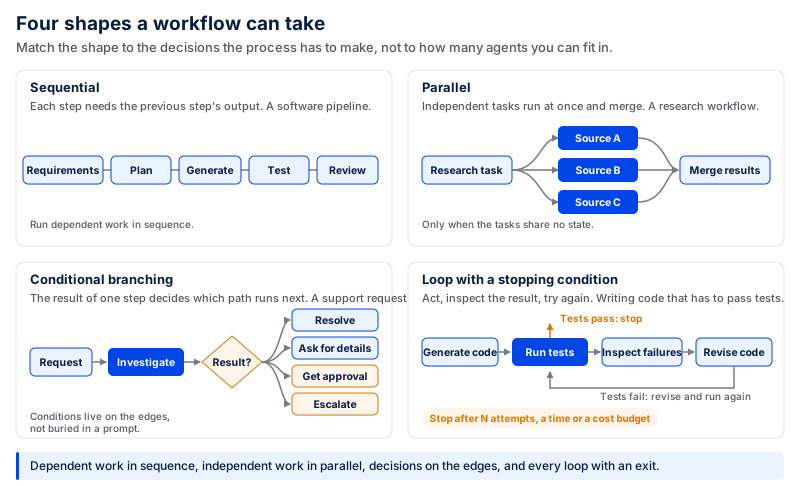
A sequential workflow is one that waits for the previous step to complete, as the output of the previous step is required as input for the current step:
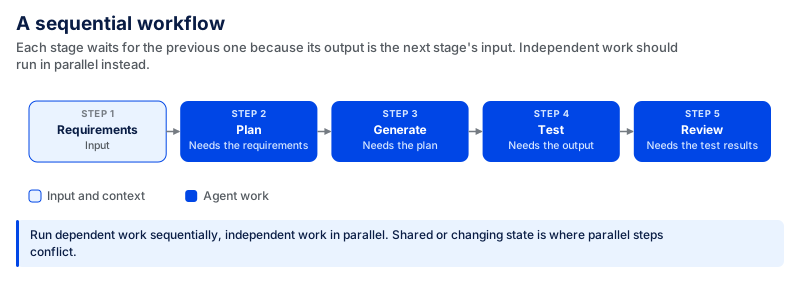
This is possible when stages are interdependent. Microsoft describes sequential orchestration as a pipeline where each agent processes its task and passes its output to the next agent in the sequence.
When tasks are independent, parallel execution is more suitable. A research workflow might study multiple independent information sources simultaneously, and then merge the results at the end. This lowers overall latency, provided the tasks are truly independent.
A simple rule to follow: Run dependent work sequentially, independent work in parallel. The benefits of parallelization can be offset by potential conflicts arising from operations involving shared or changing state.
Conditional Branching
Real business processes don't go linear, from start to finish. What happens next is often dependent on the outcome of one step.
Think about a support workflow. The system could investigate an account and determine that it can be answered immediately, or that more information is needed, or that it is an approved action, or that it is an escalated case. There should be a different path on each result.
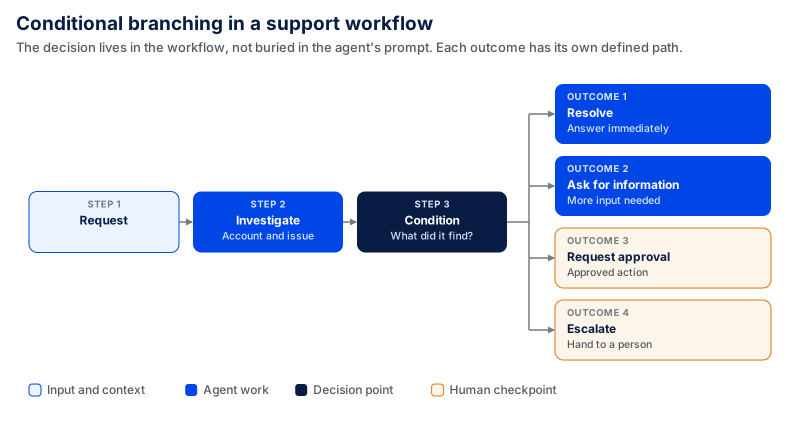
Conditional branching maintains the decision-making process, rather than burying it in an agent's prompt. Modern workflow frameworks let you specify conditions on the links between workflow components, so intermediate results decide which component runs next.
Loops and Feedback
Some tasks cannot be completed in one pass. The workflow may need to act, inspect the result, and try again. One clear example is software development:
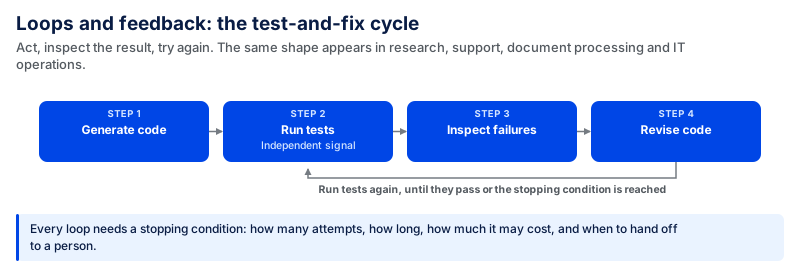
The same pattern can appear in research, support, document processing, and IT operations.
A loop must have a stopping condition. Otherwise, the workflow could go on calling models or using tools without being any closer to the goal. For each workflow, teams need to agree on how many times to attempt, how long to wait, how much will cost, how it will be successful, and what to do if it fails. The values have to reflect the real risk, cost and operational needs of the workflow, and not a "standard" value.
The workflow should also include sufficient state to be able to resume safely following interruptions. Long-running processes may be resumed without recreating completed work with the aid of checkpointing.
Human Approval Nodes
Add human approval to steps where a wrong action isn't acceptable, not to every step.
A support agent can safely extract an account and compose a response from their own. For some actions, the tool may require explicit approval before it can run, such as issuing a large refund, deleting customer information, changing production infrastructure, or releasing a payment.
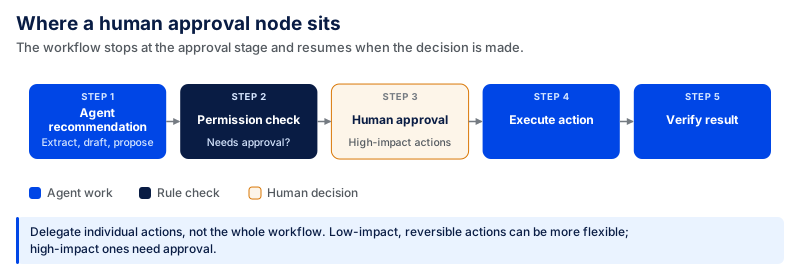
The workflow should stop at the Approval stage and resume when the decision is made. This is already possible with current agent frameworks (e.g., Microsoft supports it in its agents, which stop execution before running the tool and resume after a human response).
This also provides a better permission model. You can delegate individual actions, not the entire workflow, to an agent. Actions with less financial, security, legal, or operational impact may be more flexible and reversible, while actions with greater impact may need more robust controls.
Best Practices for Designing and Implementing Agentic AI Workflows
Building the workflow is only part of the job. These practices help teams keep it understandable and manageable as it runs in production.
Start with a Clear Outcome
Before selecting a model, framework, or agents for the workflow, outline what you want the workflow to do. “Handle customer support” is too broad. “Resolve eligible billing requests or route them to the right person with the proper account context” is specific enough to test.
Describe failure as well as success. A workflow should also know when to finish a piece of work, when to retry, and when to stop and escalate. This is particularly relevant for loops, as an agent may try different actions without making any progress toward the desired outcome.
Keep Each Agent and Tool Bounded
Give each agent only the context, tools, and permissions it needs for its role. A support agent that needs to read an account and draft a response does not automatically need permission to issue refunds, delete records, or modify unrelated customer data.
The same applies to tools. A narrowly defined tool such as `get_order_status` is easier to control than a general tool with access to the entire order system. Separate agents are useful only when a task genuinely needs different context, tools, permissions, or independent verification.
Separate Reasoning from Business Rules
Not every decision belongs inside a model. Rules such as eligibility requirements, transaction limits, required approvals, and access permissions should remain in deterministic code where possible. The model can interpret context or recommend the next step, while regular software enforces the rules.
This keeps deterministic rules deterministic while leaving flexible interpretation to the model.
Treat Permissions at the Action Level
A workflow should not be granted broad powers just because it needs access to one component of a system. These actions have vastly different implications when reading a customer record, composing a response, modifying an account, providing a refund, and deleting a record.
Set up permissions for individual tools and actions. Then, if sensitive, irreversible, or high-impact actions are required, they may need more validation or more human consent.
OpenAI's agent guidance explicitly calls out human intervention when an agent hits failure thresholds or takes a high-risk action.
This prevents a common architecture issue: giving an agent too few permissions so it can't complete something useful, or too many permissions where a single wrong choice has a big impact.
Test the Path, Not Just the Final Answer
A correct final response can hide a bad process. The agent could have gotten the wrong source, used an inappropriate tool, made unnecessary repeated model calls, or gotten the correct answer by chance.
The entire journey should therefore be evaluated: what information was found, and was it the right information? Were the appropriate tools used? Was the workflow configured properly? Were permissions followed? Did escalation happen where it was needed? Was the planned action carried out successfully?
Anthropic notes that multi-turn agents are more difficult to assess because they call tools, change state, and adjust behavior based on intermediate results. Similarly, OpenAI suggests defining the goal and key decision points before building evaluations.
Create the first test set based on realistic scenarios: API failures, missing information, conflicting data, permission failures, unusual requests, and escalation scenarios. At the production stage, incorporate real failures into this set for evaluation.
Design Failure Paths Prior to Production
The happy path is only one part of the workflow. Set up a process for what should happen if a tool times out, an API returns unexpected data, the information is not found, an approval is denied, or the agent hits the maximum number of retries.
The process will either trigger a retry, another source, backtracking, safe stop, or a transfer to a person, depending on the situation. These decisions should be part of the architecture, not made after the first production incident.
Make the Workflow Observable
In a multi-step process, do not log only the final response. Teams need to see what happened throughout the workflow, including the context used, model decisions, tool calls, approval points, errors, retries, and final outcome.
Without that information, “the agent failed,” does not explain whether the problem came from retrieval, reasoning, tool selection, permissions, execution, or result validation.
Observability also makes production evaluation more useful. Teams can find where failures occur instead of treating the entire workflow as one black box.
Increase Autonomy Only After Reliability Is Proven
Do not begin by giving a new workflow permission to perform every available action.
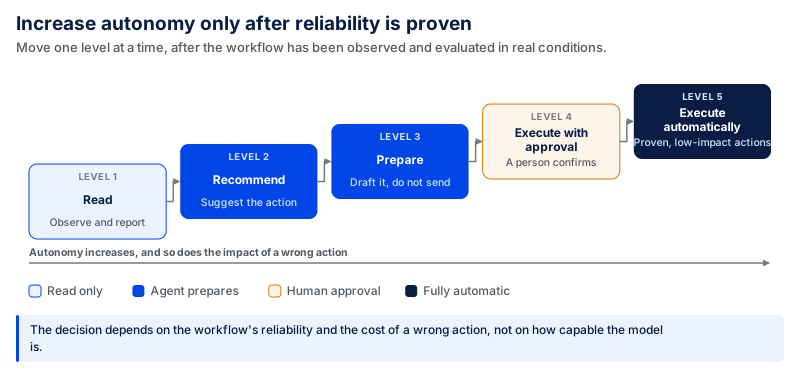
Move to the next level only after the workflow's behavior has been observed and evaluated in real workflow conditions. The decision should depend on the reliability of the workflow and the impact of a wrong action, not just because the model is more capable. Higher-risk actions may still require approval even when lower-risk actions have been automated.
Scale Your Business with Custom Agentic AI Workflows by CodingCrafts
At CodingCrafts, we create custom agentic AI workflows based on the processes your business already relies on. We design the ideal combination of AI agents, APIs, deterministic code, human approval, evaluation, and observability, and do not add agents where regular software will suffice.
The focus is on getting the workflow ready for production and scale. This includes reliable system integrations, tool access control, guardrails for high-impact actions, testing against real scenarios, failure handling, and monitoring once the workflow is in production. You can add new use cases to the existing foundation without granting agents unnecessary access or rebuilding all integrations from scratch.
For one AI-powered financing platform, we built a controlled workflow that combined role-based AI, document retrieval, negotiation logic, and automated follow-ups. In trial usage, time-to-next-action dropped from 48 hours to around 18–24 hours, while application completion improved by approximately 8–15%. See how we built the AI-powered financing platform.
Let's build a production-ready agentic AI workflow for your business → Talk to CodingCrafts.
FAQs
What is the difference between an AI agent and an agentic AI workflow?
An AI agent can receive a task, decide on a course of action, and execute the task using tools. An agentic AI workflow is the complete process that links agents to APIs, business rules, regular code, data sources, approvals, and more. A workflow can use one agent or more, depending on the process.
Do multiple AI agents require an agentic AI workflow?
No. For a bounded workflow, it may be better to have a few useful, well-defined tools and one agent. When you need context, tools, permissions, or independent verification from various parts of the process, you can use multiple agents. Adding unnecessary agents can increase costs, delays, and points of failure.
How to know when to employ an agentic workflow versus conventional automation?
When steps and decisions are preprogrammable, traditional automation typically suffices. An agentic approach is more useful when the next step is to obtain information as part of the process, such as investigating a support problem, dealing with a test failure, or determining which system to query next. An agent doesn't necessarily have to take responsibility for predictable, deterministic steps.
How to ensure agentic AI workflows are reliable in production?
Reliability is about more than picking a good model. Production workflows require scoped tool permissions, reliable data sources, validation, stopping conditions, error handling, evaluation, observability, and standard human approval for consequential actions. Teams should also use real failure cases and check the result of the tool call, rather than assuming a successful tool call means a successful task.
How much does it cost to build an agentic AI workflow?
The cost depends on the workflow, integrations, security requirements, memory, evaluation, and level of autonomy. A simple AI agent may cost around $5,000–$20,000, while a custom agent with integrations can range from $20,000–$60,000. Complex multi-agent systems may range from $60,000–$250,000+, with enterprise platforms going beyond that. See our AI agent development guide for a detailed cost breakdown.
How long does it take to build an agentic AI workflow?
The timeline depends on the complexity of the workflow, data readiness, integrations, security requirements, and testing involved. At CodingCrafts, the first proof of concept can typically be developed in around 6 weeks. Production deployment may take longer as the workflow goes through integration, evaluation, guardrails, and testing.
Workflows That Are Observable Before They Are Autonomous
CodingCrafts designs the workflow shape, guardrails and stopping conditions, then raises autonomy only as the reliability numbers earn it.