
Most enterprise artificial intelligence projects do not fail because the model cannot generate a good answer. They fail when the system has to do something with that answer.
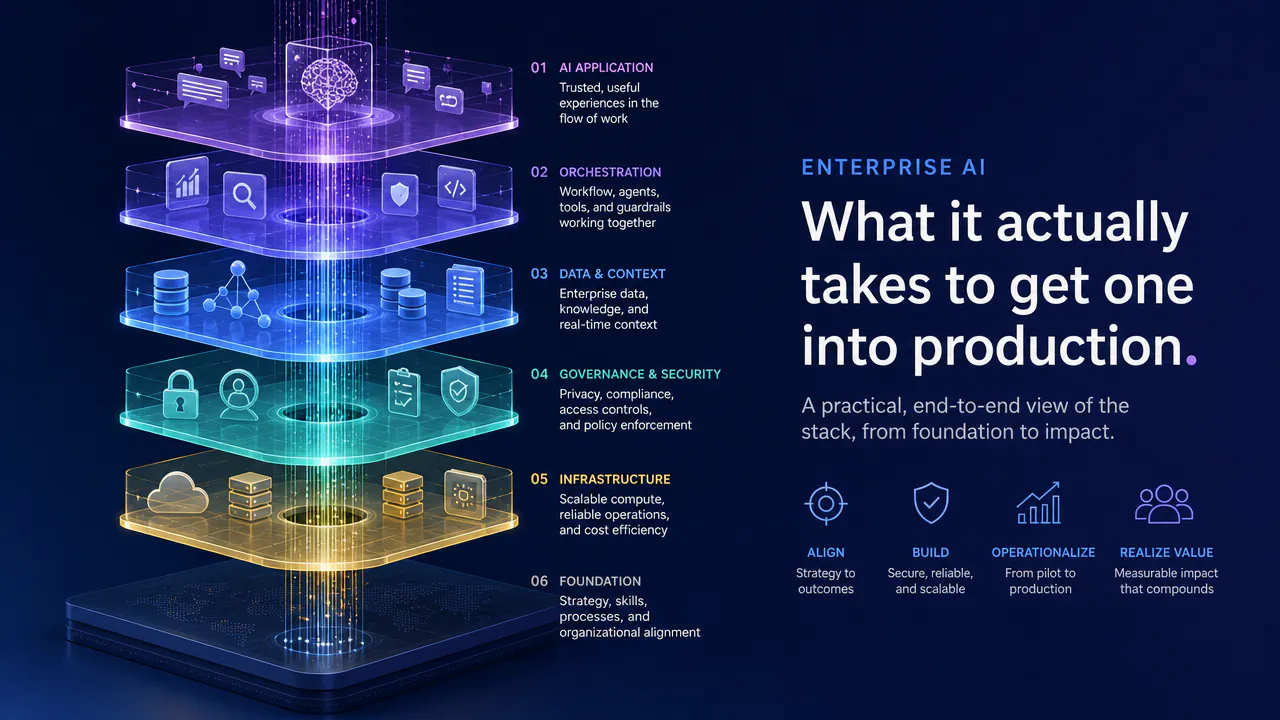
A chatbot can retrieve a policy, summarize a document, or recommend the next step. An enterprise agent goes one step higher. It can update the CRM record, approve a request, investigate an incident, reconcile data between systems, or complete a workflow, among other things. After the system becomes active, the problem shifts. Teams must consider permissions, data quality, integrations, failure handling, human oversight, evaluation, and what happens when the agent finishes all the technical steps but still can't deliver the desired business result.
That production gap is already showing up in industry forecasts. Gartner predicts that more than 40% of agentic AI projects will be canceled by the end of 2027 because of rising costs, unclear business value, or inadequate risk controls.
That's the difference between a working prototype and a production system. In reality, the model is only one part of the architecture. Reliable enterprise agents typically include artificial intelligence reasoning, deterministic software, limited data and tool access, rules about approvals, observability, and stopping and escalation criteria.
This article explains how enterprise AI agents work, where they create real value, what makes them difficult to productionize, how to design the architecture around controlled autonomy, and what teams need to evaluate before moving from a working agent to broader use across the business.
What Are Enterprise AI Agents?
Enterprise AI agents are software systems that can work toward a business goal, use company data and tools, decide the next step, and perform actions across a workflow. An enterprise agent can keep working after generating an answer, unlike a chatbot that works primarily to generate one.
For instance, a support chatbot could retrieve an account policy and explain what a customer should do. An agent could retrieve the policy, review the customer's account, decide on the next step, update a ticket, seek approval if needed, and make an authorized change in another system.
The ability to act is the key distinction. Typically, a RAG chatbot reads a piece of text, generates a possible response, and then stops. A production enterprise agent might span multiple steps and interact with various systems, including CRM, ERP, ticketing software, internal databases, and other business applications.
The architecture must consider more than model accuracy once an agent can create a ticket, modify a record, trigger an approval, or take another business action. Teams must specify what the agent can access, what it can modify, and what should happen if a step fails.
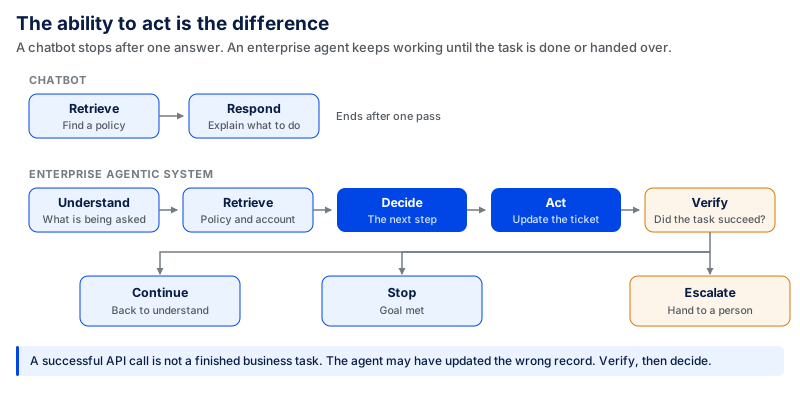
The last step is the most important one. A successful API or tool call does not always mean the business task succeeded. The agent may update the wrong record or take an action that does not produce the intended result. Production enterprise agents therefore need controls over what actions they can take and checks to verify whether those actions achieved the intended business outcome, not just whether the model responded or a tool ran successfully.
Why Enterprise AI Agents Are Becoming the Next Step in Business Automation
The traditional way of doing business automation is best suited for a known sequence: if X occurs, do Y. It works well for repetitive, rules-based processes, but becomes harder to design for unstructured information, shifting circumstances, judgment, and exceptions that can't be captured in every possible rule.
Agentic systems extend automation into that gap. An agent can understand what is happening, access the context it requires, decide what to do next, utilize other tools, and then continue based on the result.
Consider a customer issue that requires information from a CRM, an order-management system, and an internal policy. If the conditions are fixed, then traditional automation can be used for individual steps. An agent can identify what information it needs, retrieve it from these systems, decide what action to take, do what it is authorized to do, and escalate cases when it hits a boundary.
This is crucial because many business processes involve multiple steps. Decisions, handoffs, approvals, and system updates are all part of the process. You can save a few minutes by automating a single step, but the coordination around it won't change. The greater opportunity is rethinking the process to focus on the final outcome rather than merely speeding up each existing step.
The change has already started to show up in enterprise adoption. In fact, 46% of leaders reported that their organizations were fully automating workstreams or business processes with agents in 2025, according to Microsoft's 2025 Work Trend Index. The same study found that 53% of leaders said productivity must increase, while 80% of the global workforce reported lacking enough time or energy to do their work.
Not every workflow is suitable for this kind of automation. If data isn't synced, process accountability isn't established, integrations are weak, or approval rules are missing, adding an agent can simply carry those problems into the new workflow.
The transition from task-level automation to workflow redesign is more significant. Teams must determine what actions can be automated, which decisions must be deterministic, where data must be shared between systems, and where human judgment must still be in control.
In practice, the goal is controlled autonomy: let the agent handle reasoning and actions that benefit from flexibility, keep predictable logic deterministic, and require human approval when an incorrect action could have serious consequences.
How Do Enterprise AI Agents Work?
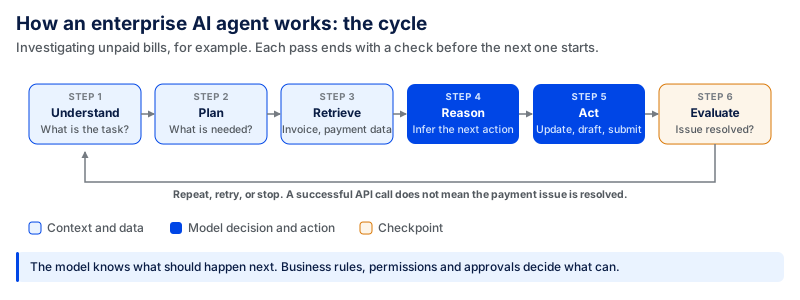
When a company sends an agent to investigate unpaid bills, it must first learn what it is supposed to do. Then it can determine what information it needs, retrieve invoice and payment information from the appropriate systems, and infer the next course of action based on that context.
If there's an action to take, the agent may update a record, draft a customer message, set up a task, or submit for approval. This does not mean the model is the final authority for all decisions. Business rules, permissions, validation checks, and approval rules may surround the model and determine what it can actually do.
The loop must also have an end. Even if an API call succeeds, the task is not always complete. An invoice record may be updated by the agent without resolving the payment issue. It therefore requires verifying the result and determining whether to continue, repeat, stop, or pass the case on to someone.
That is, even though the model knows what it should do next, the surrounding system determines what it can do.
Core Components of an Enterprise AI Agent
An enterprise AI agent needs more than a large language model. The core components below give it the context, tools, rules, and controls needed to work through the loop.
Foundation Model / LLM
The LLM handles tasks that require language understanding, interpretation, or reasoning. The model should be chosen based on the work it needs to perform rather than using the largest model for every task.
Instructions and Business Rules
The agent needs clear instructions about its job and the business rules around it. Rules that can be enforced reliably in code, such as approval limits or required fields, should not depend only on the model.
Enterprise Context and Knowledge
The agent needs access to trusted policies, documents, databases, customer information, or other internal sources relevant to the workflow. If those sources are inaccurate, incomplete, or contradictory, the agent can make the wrong decision even when its reasoning is sound.
Memory
Memory is used to carry useful information between steps and across longer interactions. It should not replace an existing system of record. For example, if customer status is already stored in the CRM, the CRM should remain the source of truth.
Tools and APIs
Tools allow the agent to act on the result of its reasoning, such as creating a ticket, reading a database, or updating a CRM record. Access to a system should not automatically mean access to every action that system supports.
Workflow Orchestration
Orchestration connects the steps of the workflow and defines what happens after success, failure, missing information, retries, or escalation.
Security and Permissions
The agent should have access only to the data, tools, and actions needed for its task. Higher-risk actions may require additional authorization or human approval.
Monitoring and Evaluation
Teams need enough visibility to understand what the agent did and whether the final result was correct.
Human-In-The-Loop Controls
Some decisions still require a person, especially when they involve money, sensitive data, privileged access, or actions that are difficult to reverse.
Together, these components create a controlled system in which AI handles tasks that need interpretation, software enforces predictable rules, and people remain involved where judgment or accountability is required.
Benefits of Enterprise AI Agents
The benefit of an AI agent isn't just finishing a task faster. The bigger opportunity is when it can integrate work across multiple steps, systems, and decisions without an individual managing each handoff.
The impact becomes clearer when the workflow is measured end to end. In a CodingCrafts contract review and document analysis platform, AI-assisted document workflows and custom search reduced the time needed to find specific contract terms and clauses by as much as 50–60% compared with manual searching.
Automate Multi-Step Workflows
Traditional automation works better with predictable sequences. That's where agents come into play when the route may vary based on the information received.
Consider an issue with an invoice. The system may be able to fetch the invoice, compare it with a purchase order, verify payment history, find the cause of the discrepancy, and determine how to proceed. Straightforward cases can continue automatically, while unusual or high-value cases are submitted for approval. As a result, there is less need for manual task coordination, which often slows work down.
Improve Employee Productivity
Much of knowledge work consists of searching for information, transferring it into and out of systems, making routine updates, and following up on incomplete work.
Agents can handle some of that coordination while workers continue to perform tasks that call for creativity, accountability, negotiation, or judgment. The aim is not to have the person do the same work in a shorter time. It is to lessen the work that goes into their primary role.
Accelerate Decision-Making
Many business decisions take a long time because the required information is spread across documents, databases, dashboards, emails, and business applications.
An agent can gather that information before a decision is made. It can also suggest or execute the next action within prescribed limits in lower-risk situations.
The benefit is not that artificial intelligence should make every decision. It is that the agent can gather and organize the information needed to make a decision faster.
Reduce Operational Costs
Cost savings may be achieved by eliminating repetitive tasks, manual handoffs, rework, and the time spent moving employees between systems.
Lower labor time does not necessarily translate to lower total cost. Production system costs include model usage, infrastructure, monitoring, maintenance, and, in some cases, human review. The cost per successfully completed task is therefore a better measure, rather than the cost of an API call. This will help teams understand whether they are actually saving money or moving the cost elsewhere.
Improve Customer Experience
Many customers don't care whether the problem was solved with artificial intelligence; what matters is that it was solved fast and right.
A system that displays just an order status could save an employee a search. One that can review the order, make an authorized change, send an email confirmation, update the customer's case, and escalate unusual situations can eliminate several delays in the customer journey.
The key metric is not the number of conversations the system can support, but rather metrics like the proportion of resolved cases, mean time to reply, cases escalated, or cases with the wrong action taken.
Scale Business Operations
More people are often added to the team as transaction or request volume grows. Agents can take over some repeatable work without expanding headcount at the same rate.
This is not an infinite autonomous scale. Permissions, rate limitations, monitoring, exception handling, and human review capability all increase with volume. If a workflow works great for 100 tasks, it doesn't necessarily work great at 100,000.
Turn Enterprise Data into Actionable Work
Businesses already have a lot of data in their CRMs, ERPs, support systems, documents, warehouses, and internal knowledge bases. The challenge is more often getting the right information into the workflow when it is needed.
Agents can close that gap by bringing back relevant context and using it to either support or execute the next step. When the system reaches "here's what the data says," it may continue on to "here's what needs to happen next."
The bigger point is that this is where information, reasoning, and controlled action are joined together to make data part of a completed business process, not another action the person has to take manually.
Enterprise AI Agent Use Cases
Typically, the best use cases aren't one-off tasks that can be accomplished with a small script. These are workflows that require someone to collect data, make a choice, navigate between systems, take an action, and handle exceptions throughout.
The level of autonomy does not have to be the same in every case. An agent may do repetitive support work on its own, create a sales proposal for consideration, or be blocked from taking a sensitive financial or HR action. The key is to match authority to the workflow's risk.
Customer Service AI Agents
Customer service is a natural fit as it often takes multiple steps to resolve a single request. An agent can understand the customer's problem, fetch account and order information, search the knowledge base, create or update a ticket, recommend the next step, and escalate if the ticket becomes an exception.
Here, the difference between responding and resolving is helpful. Retrieval is looking up an order status. A workflow is the process of changing an authorized delivery detail, updating the case, notifying the customer, and ensuring that the request was fulfilled.
Real systems are already incorporating this. For instance, an autonomous case can be automatically created from a customer conversation with Microsoft's Case Management Agent, and case fields can be populated as new information becomes available. The major production issue is what is permitted to change without authorization and what should be given to a service representative.
Sales AI Agents
Sales teams spend a lot of time filling the blanks in their CRM data, researching prospects, qualifying leads, and preparing follow-ups. Instead of switching between several tools, an agent can combine these tasks into a single, linked process.
It can search for a prospect from a trusted source, evaluate the account against the ICP, add missing customer data, and look for red flags that might impact qualification. Then it can create a summary, suggest what the salesperson needs to do next, or send a follow-up email.
The important part is keeping the workflow connected to the system of record and its existing data. Much of the coordination is still missing when the agent does research but then leaves it for someone else to manually enter into the CRM and decide what to do next.
Autonomy should have clear boundaries. While opportunity phases, discounts, commitments to prospects, and sensitive communication may need rules or human approval, research, enrichment, and follow-up preparation can be handled with more autonomy.
A real example is CodingCrafts' AI-powered CRM system, which combined AI voice agents, automated follow-ups, lead routing, and centralized communication across calls, WhatsApp, SMS, and email. First response time dropped from 2–6 hours to under one minute, while the manual workload for sales representatives fell by around 50–60%.
IT Service Management Agents
IT service management is well suited to agent-based workflows, as troubleshooting frequently involves reading information from tickets, configuration data, knowledge articles, monitoring systems, and past incidents.
An agent can categorize a request, gather relevant context, review similar incidents, identify potential causes, recommend a solution, and pass the problem to the appropriate team. For well-defined problems, it can also implement permitted remediation actions and check whether the issue has been resolved.
A study published in the Information Systems Journal examined a real-world generative AI implementation in IT service management. It found applications ranging from incident and change management to IT asset management, infrastructure triage, and network diagnostics. When problems could not be fixed automatically, the implementation also used escalation workflows. While the study focuses on generative AI in ITSM rather than enterprise AI agents specifically, it shows how AI can support multi-step IT service workflows.
This is a good example of why access level matters. An agent that can read an incident and recommend a solution risks very little, compared to one that can reset credentials, change access, modify infrastructure, or close an incident. The greater the impact of the action, the stronger the authorization and review process should be.
HR AI Agents
HR workflows also involve significant employee data and span multiple systems. Agents can respond to employee inquiries, find policies, assist with recruiting, schedule onboarding activities, and manage HR cases.
A workflow might recognize the work needed for a new employee, pull the relevant information, create access or equipment requests, monitor completed steps, and follow up on those that are missing, for instance, when an employee is onboarding.
Because HR systems contain sensitive employee data and some decisions affect employment, the boundary around autonomy is particularly crucial in this situation. Getting information about a leave policy is quite different from a hiring, compensation, or disciplinary decision. Higher-risk decisions should have clear rules and review.
Finance & Accounting Agents
Invoices, receipts, purchase orders, and contracts are just a few examples of documents that frequently accompany finance workflows. This makes them good candidates for agents to gather information and examine the exceptions at a system level.
An accounts payable workflow might, for instance, gather information from the invoice, get the corresponding purchase order, match amounts, validate supplier information, ensure that proper records are in place, and set up the transaction for processing. Simple transactions can pass through predetermined rules, and remaining transactions or mismatched cases can be assigned to an individual.
This pattern can support expense review, expense reconciliation, reporting, and discrepancy investigations. Financial procedures also demonstrate the need to keep authorization and reasoning apart. An agent can infer what it thinks should occur next, but does not necessarily have the authority to approve a payment, adjust financial records, or transfer funds.
Healthcare AI Agents
In the healthcare industry, agents might help with administrative and operational tasks but not make clinical decisions. They can help with administrative case routing, appointment scheduling, patient service requests, document preparation, information retrieval, and other repetitive operations involving information transmission between individuals or systems.
For instance, an agent might gather the details required for a booking request, review the records, route the request to the appropriate team, and follow up if information is missing. More complicated or sensitive cases may be referred to a person rather than handled automatically.
The boundaries need to be much more stringent when patient health information or decisions that potentially affect care are involved. Access restrictions, audit trails, safe data management, and human monitoring should be included in the workflow from the beginning. It is unhelpful to view clinical diagnosis and treatment as administrative automation, even if an AI system can process medical information.
Software Development Agents
Software development agents are not just about coding anymore. They can examine a repository, plan a change, update several files, run tests, investigate failures, review code, update documentation, and create a pull request for a developer to review.
For instance, GitHub's coding agents can be assigned to a task, operate asynchronously, and submit code or a pull request for review. GitHub also supports agents running project tests and validation checks when implementing changes.
Bounded responsibility is a useful pattern. It is easier to evaluate an agent when it is given a specific issue, the relevant repository context, required tests, and a defined review step than when it receives an open-ended instruction to improve an entire application.
This is not just limited to software development. The most open-ended use case is typically the weakest. The strongest is the one in which the results are known, the background information is present, the actions are under control, and the success is measurable.
Types of Enterprise AI Agents
Enterprise AI agents differ based on the tasks they perform, the tools they use, and the level of authority they are given. A research agent could support a decision, while a workflow agent could include conversational features.
Conversational Agents
Conversational agents communicate with customers using natural language. They can provide answers, gather data, guide the user through an action, and use connected tools when the conversation warrants an action.
If a policy question is asked, an internal employee assistant could respond, verify the information using an approved system, and help the employee initiate the appropriate request.
This is quite distinct from standard chatbots that draw their responses from a knowledge base. When the system can access business applications or take actions, permissions and approval rules are part of the design.
Knowledge / Research Agents
Knowledge and research agents are created to search, compare, organize, and synthesize information from several sources. They are useful for a variety of tasks including market research, competitive analysis, internal knowledge discovery, due diligence, or analyzing large collections of documents. The agent won't just return the first relevant document; it can break a research query into smaller questions, search other sources, compare and contrast, and generate structured output.
The difficulty is ensuring that the research is based on accurate sources. Important outputs should include citations or source references so a person can determine where the information originated.
Workflow Agents
Workflow agents manage work across several steps and systems. They don't respond to a question and stop; they remember where the task is, know what to do next, and use connected tools to continue the task.
An invoice exception agent might, for example, get the purchase order and invoice, find a mismatch, request missing information, record the case, and submit it for approval if necessary.
Artificial intelligence reasoning is not necessary for every stage. The agent can handle context-dependent steps, while predictable checks, calculations, permissions, and routing rules remain deterministic steps. This mix often gives teams greater control than if the model made all the decisions.
Decision-Support Agents
Decision-support agents collect and process information and then help a person make a well-informed decision. An agent examining a supplier exception, for example, would gather information about current accounts, contract terms, past transactions, and the rationale behind the exception. It might then summarize the evidence, identify risks relevant to the situation, and suggest possible action.
The key difference is that supporting a decision is not the same as having authority to make it. When the decision involves money, a job, security, compliance, or other significant risks, the agent can prepare the decision, but an authorized person still makes it.
Autonomous Task Agents
Task agents can perform specific tasks with little or no routine human intervention within defined boundaries. They can make multiple plans, choose tools, react to newly arriving information, repeat actions if they fail, and persist until they achieve their goal or reach an escalation condition.
Autonomous does not mean unrestricted. A production agent may be granted the ability to run independently within a limited subset of permissions, but still needs additional permission for higher-risk actions.
Autonomy can be viewed as a continuum:
| Level | Agent role | Human control |
|---|---|---|
| Retrieve | Gathers the information needed for the task | No business action is taken |
| Recommend | Suggests what should happen next | A person makes the decision |
| Prepare | Prepares the action or output | A person reviews or executes it |
| Execute with approval | Takes the action after approval | Approval is required before execution |
| Execute autonomously | Takes permitted actions within defined boundaries | People monitor exceptions and higher-risk cases |
The correct level is defined by the impact of failure to complete the task correctly. Actions that are reversible, low risk, and do not impact financial transactions, privileged system changes, or decisions involving people can typically be given a higher level of autonomy.
Multi-Agent Systems
Some workflows are too broad to be addressed by a single agent. With a multi-agent system, the task is split among specialized agents that work together toward the same goal.
A complex research workflow, for instance, could involve one agent collecting the information, a second agent analyzing it, and a third agent ensuring sufficient evidence and detail are included or that the information is consistent with other sources. The orchestrator can then determine which specialist gets each task and compile their outputs into the next piece of the workflow.
This distinction can be appropriate when different portions of a process need different tools, context, permissions, or areas of responsibility. Coordination can be centralized through an orchestrator, distributed among agents, or divided by defined roles, depending on the workflow.
Multiple agents should not be the default. Each extra agent creates another potential point of failure, miscommunication, or loss of context, which can ultimately affect the next step. It can also generate more calls to the model, increase response time and costs, and require teams to monitor the activity.
A single agent within a well-defined workflow may be an easier first step. Multi-agent architecture is more useful when you need to divide responsibilities, run work in parallel, restrict permissions to one agent, or have one agent check another.
Enterprise AI Agent Architecture and Technology Stack
An LLM linked to a few APIs is not the same as a production agentic system. A production architecture includes layers that provide the appropriate context, control what the model can do, link the model to business systems, and monitor what occurs after the model takes an action.
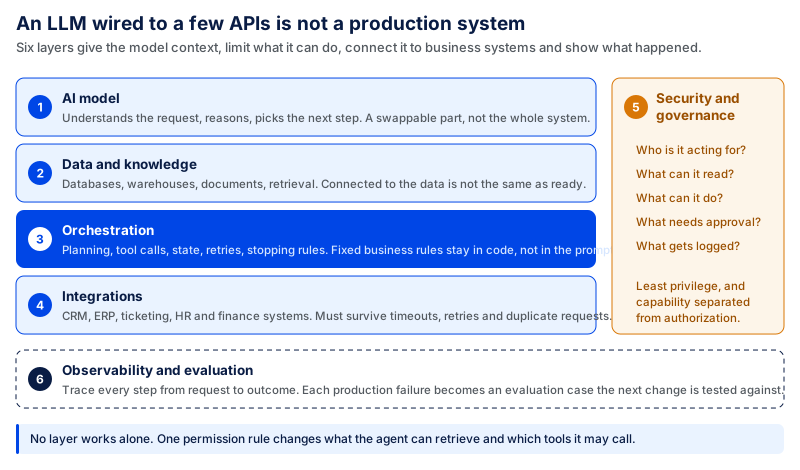
These layers are not separate from one another. A permission rule affects what data the agent can retrieve and what tools it can use. The model, retrieval system, API calls, approvals, and outcome may all need to be covered by a production trace.
AI Model Layer
The model layer is responsible for understanding the request, reasoning over the available information, figuring out what steps to take, and determining which tools might be helpful. Not every large or powerful LLM is ideal for every use case. When selecting a model, consider the complexity of the work, accuracy, latency, context, privacy, and cost.
More complex investigations might need a more powerful reasoning model, while tasks such as classification, extraction, or similar predictable ones might suit smaller, faster models. Some systems route distinct tasks to distinct models, rather than routing all requests through the same model.
Teams will have to choose where to source those models. Third-party models provide quick access to good general-purpose models. For specific requirements, proprietary or private solutions may offer greater control. In practice, the architecture must not make the whole workflow too tightly coupled to one model. Treat the model as a swappable part of the system rather than load-bearing infrastructure, because models evolve quickly and should be evaluated against the organization's specific tasks.
Data & Knowledge Layer
You need useful context to make useful decisions. This context can be sourced from enterprise databases, data warehouses, knowledge bases, documents, APIs, and other internal sources. To find relevant information within a large collection of unstructured content before the model reasons over it, you can use retrieval systems and vector databases.
More data doesn't necessarily mean a better agent. Customer IDs can differ between systems. Policies contained in documents may not be current. Duplicate records can exist in a warehouse, and more than one department may believe authoritative information is held in a different application. In such scenarios, the agent may collect the data and make the wrong decision.
That's why data connectivity is different from data readiness. Teams must determine what information they trust, how to find it across systems, how up-to-date it must be, and what to do when information conflicts.
The data should follow the access rules into the agent workflow as well. A connection to a knowledge source should not enable the system to provide information that is not available to the user or agent requesting it.
Agent Orchestration Layer
The orchestration layer governs the flow of work. It supports planning, task decomposition, tool selection, tool calling, workflow state, retries, stopping conditions, and coordination between several agents.
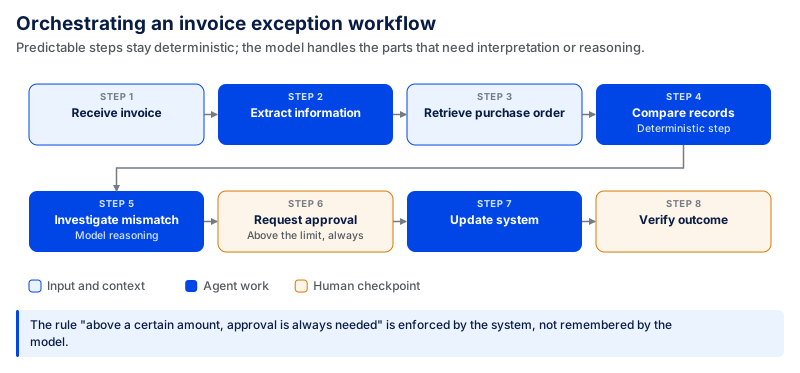
This sequence does not have to be controlled by the language model. The model can handle decision-making that requires interpretation or reasoning, while predictable steps can stay deterministic.
This distinction is crucial in production. The rule of "above a certain amount, approval is always needed" should be enforced by the system, not assumed or left to the model's memory.
The orchestration layer should also handle failures. If no tool is available, information is missing, or an action doesn't pass validation, the system should know whether to retry, select another path, go back, or seek human assistance.
Orchestration is even more crucial with multiple agents, where one agent's output can become another agent's input. Inadequate information can then be passed down the line and cause trouble with several steps.
Integration Layer
The integration layer provides the link between the agent and the systems in which the business work is performed.
These may include CRM and ERP systems, ticketing systems, HR systems, finance systems, in-house systems, databases, or other systems of record. These connections can be established via APIs, middleware, event streams, connectors, or current enterprise integration platforms.
These integrations are useful only when they give the agent reliable access to the systems needed to complete the workflow. When it can determine the right action but cannot access the system where the action needs to occur, a human must do the work in that system.
Real-world production scenarios like API failure, rate limits, timeouts, duplicate requests, schema changes, unavailable services, and upgrades must also be handled by integrations.
One of the most important questions is whether an action is idempotent: if the same operation is performed more than once, it should have the same intended effect as performing it once. After a timeout, if an agent retries, teams should know whether it will create the same order, ticket, payment request, or update twice, or proceed safely.
Security & Governance Layer
Security becomes more crucial when an agent is altering business processes rather than only reading data.
The architecture needs to answer several questions: Who is the agent acting for? What data can it access? What tools can it use? What actions can it take? Which actions require approval? And how will the actions be reviewed later?
These questions are now a key component of automation security guidance. NIST's efforts regarding the identity and authorization of smart agents raise several problems, including agent ID, authentication, authorization, least-privilege access, delegation, and auditing, when software agents act on behalf of other people or organizations.
Permissions should follow the principle of least privilege. An agent who requires customer data to pursue a support ticket shouldn't be granted access to edit all fields on the customer's record.
Action authorization may also be based on the action performed. Issuing a refund, changing employee access, approving an invoice, or modifying production infrastructure is not the same as updating an internal note.
This is the reason why capability and authorization need to be separated. The agent can access a tool, but the control layer should determine which action the agent can take in that situation.
Audit logs should include enough information to recreate what happened, such as who was involved, key decisions made, tools used, approvals received, and actions taken. Sensitive information should not be exposed simply because it is stored in a system the workflow can access.
Observability & Evaluation
Traditional application monitoring can tell teams whether a service is running. Agent systems require more visibility, as a workflow may function correctly and still be making a bad decision.
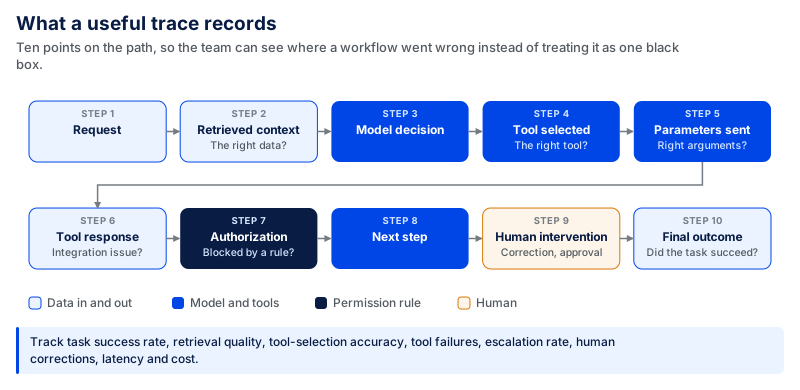
This raises several questions: Was the agent seeking the wrong information? Did it pick the wrong tool? Did the parameters need adjustment? Was there a problem with the integration? Did a permission rule block the action? Was the workflow actually completed without resolving the initial problem?
Teams should monitor more than hallucinations. Some of the best metrics are task success rate, retrieval quality, tool-selection accuracy, tool failures, escalation rate, human corrections, latency, cost, and successful business outcomes.
Human feedback is particularly useful when it pinpoints the reason for an incorrect answer. If the same types of reviews repeat, the issue may stem from the prompt or model, or it may be a symptom of a lack of context, poor data, unclear business rules, or a poorly designed workflow.
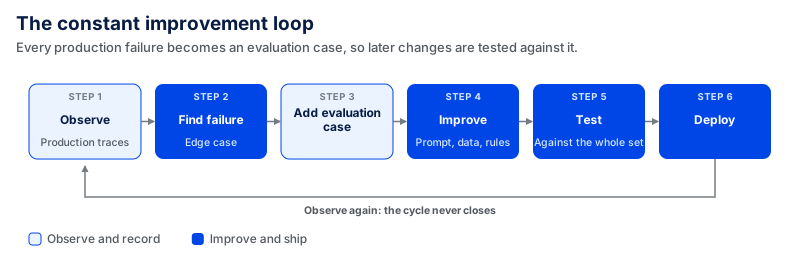
When a new production failure reveals an edge case, teams can add it to the evaluation set. Future changes to the model, prompt, data, or workflow can then be tested against that case without breaking something that already worked.
The architecture therefore needs to support two tasks. It needs to provide the artificial intelligence with enough context and capability to do something useful, and enough control, visibility, and evidence for the organization to trust what the automation does when it uses that capability.
Challenges of Implementing Enterprise AI Agents
It is easier to get an agent working in a demo than in production. When it integrates with real data and business systems, several issues become tougher to manage.
One of these is data quality. The agent can get the right information but still make the wrong decision because the records it relies on are incorrect, duplicated, incomplete, or inconsistently maintained across systems. Teams must establish what constitutes a trusted source, how to resolve significant data conflicts, and what the agent should do if data is missing or contradictory. An unreliable source of truth won't be solved just by changing the model.
Integrations can also break down in ways a demo will not. APIs expire, authentication fails, schemas update, and services go away. Workflows must be validated, retries specified, fallback workflows implemented, and escalation programmed. Retries must be protected, as repeating an uncertain action could result in a duplicate ticket, order, or transaction.
Once the agent is able to take an action, permissions become more sensitive. Reading an invoice is not the same as paying one, just as investigating an infrastructure problem is not the same as modifying production. Access should be restricted to the data, tools, and actions needed for the job, with higher-risk actions requiring stronger controls or human approval.
Another factor that harms reliability is longer workflows. A single retrieval or decision mistake can affect all subsequent steps. It is not enough to check only the model's final answer. Teams must conduct end-to-end evaluations that cover missing information, tool failures, mistakes in intermediate results, unexpected inputs, and recovery paths.
Thus, observability is crucial. Teams should be able to follow the context the agent retrieved, the decision it made, the tool it called, the parameters sent, the response received, and whether the final business outcome was achieved. A successful API call doesn't necessarily mean the task was successful.
Human oversight must be a part of the flow sooner, rather than later. Teams need to agree on who will be responsible for checking the case, what information the person will be provided, and what subsequent steps will occur after the reviewer approves, corrects, or rejects a case. If this layer is missing, a successful proof of concept can get bogged down when unusual or high-risk cases start showing up in production.
Scalability issues also become more noticeable as usage grows. Several model calls, retrieval operations, tool calls, retries, evaluations, and human reviews may be needed to complete one task. Teams should therefore look beyond token price and measure human intervention, latency, failure rate, and the total cost of completing a task successfully.
Lastly, trust is needed in production. Do not increase or reduce the agent's autonomy without evidence that the change is justified. If human reviewers keep correcting the same decision, teams should first find out why. The model may be the issue, but it may also lack context, have poor data, unclear business rules, or a poorly designed workflow.
The hard part is not giving an agent more power. It is making sure the data, integrations, permissions, evaluation, and human oversight are reliable enough to use that capability in production.
How to Implement an Enterprise AI Agent
Implementation often goes wrong when teams start by trying to automate a whole department instead of building one well-defined workflow with clear goals and controls. The idea is to show that the agent can positively affect an objective measure of a business result, and then expand the agent's role as the system gets more reliable.
1. Define the Use Case and Success Criteria
Select a particular workflow that is sufficiently complex, repetitive, or labor-intensive to warrant automation. Identify how it operates now: who's involved, what systems are used, what decisions are made, where handoffs occur, and common exceptions.
Specify precisely what the agent will do and where a person will take over. Then take baseline measures like completion time, error rate, cost per task, escalation rate, or manual effort. These become the criteria for measuring improvement.
2. Assess Data and Integration Readiness
Typical duration: 2–4 weeks, depending on data and system complexity.
Define the data and systems needed to complete the workflow. These can be CRM or ERP systems, databases, knowledge bases, documents, and internal APIs.
Verify data accuracy, currency, availability, and consistency across systems. Clarify the source of truth for conflicting records. Then list the necessary actions and permissions. Give the agent only the level of access needed for each action. Reading a record should not automatically grant permission to change it.
3. Build and Validate a Proof of Concept
Typical duration: 2–6 weeks for most focused AI proofs of concept.
Construct the POC around the workflow, not around multiple processes. Test the complete workflow using realistic scenarios. Include missing or conflicting data, wrong inputs, unavailable tools, permission failures, edge cases, and situations that require human escalation. Check whether the agent does the right thing, not just whether the model yields a satisfactory response.
4. Productionise the Agent
Typical duration: 4–12+ weeks, depending on integrations, risk, and production requirements.
A working POC is not a production-ready system. Production requires stronger authentication, scoped credentials, reliable integrations, error handling, workflow-state management, logging, versioning, and deployment processes.
Test for failures, timeouts, rate limits, concurrency, partial failures, and retries. Define who owns the system and is responsible for maintaining it as models, APIs, data sources, or business rules change.
5. Add Guardrails, Monitoring, and Human Oversight
Only grant rights to the agent that are necessary for it to perform its function. Higher-risk actions should require stronger controls.
Identify actions that require approval, when the workflow should be terminated, and who will be responsible for exceptions. Maintain audit logs for important decisions and actions.
Monitoring should cover retrieved context, model decisions, tool calls, errors, retries, approvals, human interventions, and results.
6. Measure, Learn, and Expand
Compare production results to the baseline in step one. Monitor task success rate, errors, task completion time, task escalations, human interactions, task latency, and total operating cost.
Review production failures to understand what needs to improve, then test changes before deploying them. Only add more autonomy or new workflows when production results support it.
What Enterprise AI Agents Cost
The cost of creating an AI agent cannot be fixed. The expense varies with the requirements of the system, the volume of data it must process, the number of business systems it needs to interface with, and the level of reliability and control that the production environment demands.
Based on CodingCrafts' published pricing, checked as of August 2026, a focused proof of concept typically costs $10,000-$30,000, while a production system generally falls between $50,000 and $250,000+. These are indicative ranges, not fixed packages.
The Three Things That Actually Drive the Number
Although every project is different, three factors strongly affect the budget.
Data readiness. Clean, accessible data with a clear source of truth reduces preparation work. If records are fragmented, documents are out of date, schemas are inconsistent, or data pipelines are poorly designed, the agent will need additional engineering work to use the information reliably.
Integrations. Accessing a single, well-documented API is quite different from integrating with multiple CRM and ERP systems, legacy applications, databases, and internal services. Each additional integration can require more authentication, mapping, error handling, testing, and maintenance.
Evaluation and monitoring. If the internal workflow is low risk, then the evaluation may be relatively simple. An agent that alters financial records, has access to sensitive information, or can undertake other significant actions should be tested more extensively, with stronger approval controls, auditability, and ongoing monitoring.
| Lower-complexity project | Higher-complexity project |
|---|---|
| Clean, structured data | Fragmented or inconsistent data |
| One or two stable integrations | Multiple or legacy integrations |
| Narrow workflow | Multi-step workflow with many exceptions |
| Read/recommend actions | Write or execute actions |
| Low consequence of failure | Financial, security, compliance, or operational risk |
| Basic evaluation | Continuous evaluation, audit, and human review |
Thus, the model is only a portion of the estimate. Systems and controls around the model can have a greater impact on production cost.
Running Cost, Not Just Build Cost
Development is only one part of the budget. After deployment, the system may incur recurring expenses for model/API usage, cloud infrastructure, retrieval and storage, monitoring and evaluation, maintenance, and human review.
One task can also require several model and/or tool calls within an agent-based workflow. The cost of an individual model request gives you little insight into the economics of the entire workflow.
A better metric is:
Operating cost per successful task \= Total operating cost ÷ Successfully completed tasks
This should be measured in the PoC if possible. Teams should understand this cost before scaling workflows that may need many retries, costly model calls, or human intervention.
How to Estimate Your Enterprise AI Agent Budget
Before requesting a project estimate, establish five things:
| Question | What to identify |
|---|---|
| Workflow | What task or business outcome should the agent complete? |
| Integrations | Which applications, databases, APIs, or systems of record must it use? |
| Data | What information does it need, and how much preparation is required? |
| Volume | How many tasks or workflows will it handle each day or month? |
| Risk | What happens if it makes the wrong decision or performs the wrong action? |
Using these inputs, estimate the following two numbers: build cost and operating cost. Build cost includes engineering to design and build the system. Operating cost refers to the cost needed to operate, monitor, evaluate, and maintain it at the anticipated level of service.
A small number of stable integrations with clean data can be close to the bottom end of the range. A system that spans multiple applications, involves data remediation, requires sensitive actions, or needs extensive evaluation and human oversight will move up.
There is no fixed budget just because a system is called an “agent.” The right budget depends on the workflow, data, integrations, volume, and risk.
Have an Enterprise AI Use Case in Mind? Let’s Build It
The best place to start is not with a model or agent framework. Start with a workflow that is slow, repetitive, hard to coordinate, or spread across too many systems. For a broader path from selecting a use case to production and scale, see CodingCrafts' AI Adoption Framework.
CodingCrafts can work with you to evaluate the use case, determine the integrations and data it needs, develop a focused proof of concept, and move a successful POC into production with the right authorization, evaluation, monitoring, and human oversight.
One example is CodingCrafts' AI-powered government paperwork platform, where AI assistance was combined with rule-based automation, submission workflows, payment handling, and cloud infrastructure. After implementation, average completion time dropped from about 50 minutes to under 15 minutes.
If you already have a workflow in mind, explore CodingCrafts' Custom AI Agent Development services to see what it would take to build, test, and deploy it.
Frequently Asked Questions
How Long Does an Enterprise AI Agent Take to Reach Production?
The timeline depends on workflow complexity, data, integrations, and risk level. A focused proof of concept can usually be built within a few weeks, while productionization takes longer because the system also needs testing, permissions, monitoring, guardrails, and failure handling.
What Does Data Readiness Mean for an Enterprise AI Agent?
Data readiness means the agent can access the right information in a reliable and controlled way. The data should be accurate, up to date, accessible, and consistent across systems. Teams should also know which source to trust when different systems contain conflicting information.
What Happens If the Model Provider Changes?
A well-designed enterprise automation system should not depend too heavily on one model provider. The model should be treated as a replaceable part of the architecture. If a provider changes its model, pricing, or availability, teams can evaluate another model against the same tasks and requirements before switching.
Should an Enterprise AI Agent Be Built or Bought?
Buying makes sense when an existing tool already supports the workflow and integrations you need. Building is more useful when the agent needs proprietary data, custom business rules, specific permissions, or integrations that an off-the-shelf product cannot support. Some companies use both by buying the core platform and building the custom workflows and integrations around it.
From Pilot to Production, with the Six Layers in Place
CodingCrafts builds the data, orchestration, integration, governance and observability layers around the model so the agent survives contact with real systems.