
If you're deciding whether your AI product needs images, voice, or video, the first question is whether those inputs actually help it complete the task. Multimodal AI agents can work with these different inputs, but the important question is what the system can do with that information.
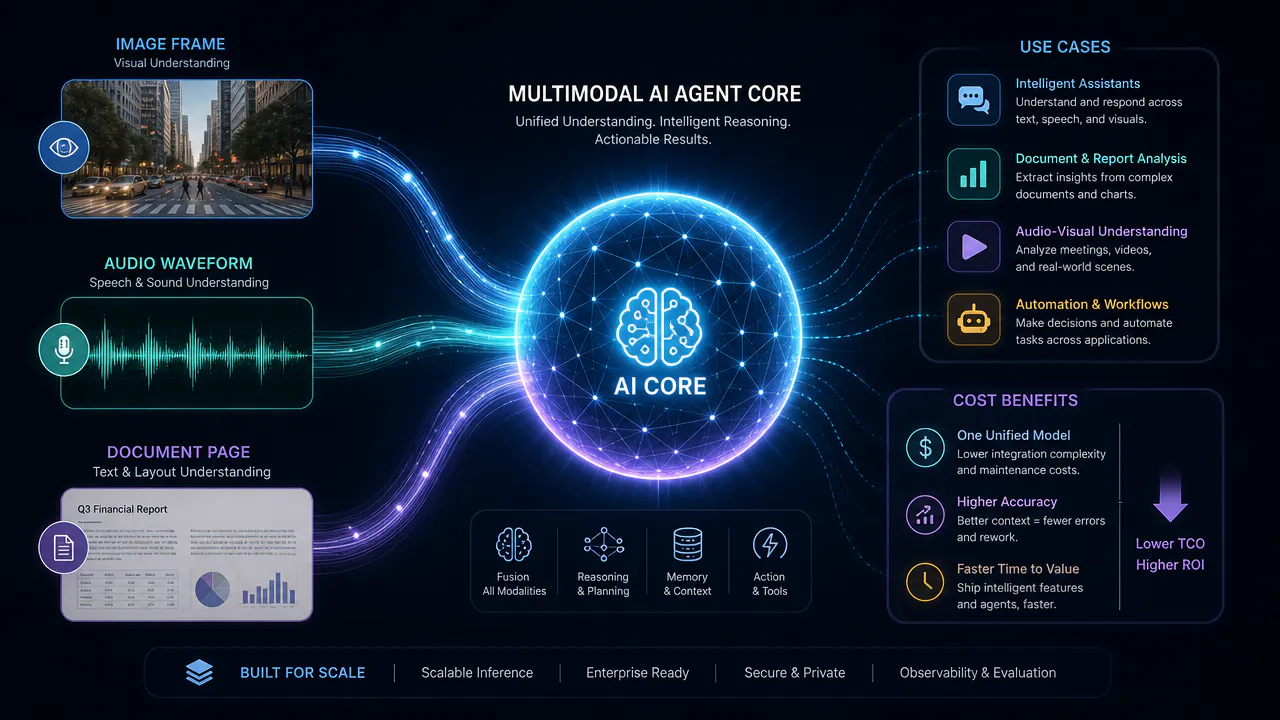
Computer-use systems are a good example. OpenAI's GPT-6 Astra can understand what is happening on a screen and take actions in software. Released on September 3, 2026, it scored 72.6% on OSWorld 2.0, a benchmark for computer-use tasks. It can interact with software, check the result of an action, and continue working toward the task.
Consider a support request where a customer sends a screenshot of an error along with a written message. A multimodal system can use information from both inputs. An agent can go further by checking product documentation, looking up account information, running an approved diagnostic tool, and deciding whether the issue needs human support.
Getting this to work in production is harder. Images can be blurry, audio can be unclear, and important details from earlier steps can get lost. Each additional input also has to be processed and kept connected to the right part of the task. Once the agent can take action, teams need to control what it can access and when a person needs to step in.
This guide looks at what it takes to build and run these systems in production, from architecture and practical use cases to testing, common problems, and cost.
What Are Multimodal AI Agents?
A multimodal AI agent is a system that can understand different types of information and use them to complete a task. It can work with text, images, audio, video, screenshots, and documents. It extracts useful information from these inputs, relates it to the user's request, and determines what to do next.
For example, a user might send a screenshot with a voice message explaining a software problem. The agent can use both inputs, check relevant product information, and decide what action should happen next.
What makes it an agent is what happens after it understands those inputs. It can use the information to decide what to do next, work with tools, and continue toward the goal.
Multimodal AI vs Multimodal AI Agent
A multimodal model can understand information in different formats. An agent can use that information to take action.
A model can describe an image, respond to queries about a document, understand audio, or combine text with images.
An agent adds a decision and action layer. It can use the input, choose the next step, call a tool, check the result, and continue until the task is complete or human help is needed.
Take a screenshot of an error message as an example. A multimodal model can read the screenshot and explain the error. An agent can go further. It can analyze the screenshot, look up product documentation, verify account information, run an approved diagnostic tool, and open a support ticket if it can't resolve the problem.
OpenAI's Computer-Using Agent is an example of this pattern. It can understand what is happening on a screen, use mouse and keyboard actions, check what happened after an action, and decide what to do next.
How a Multimodal AI Agent Works: The Architecture
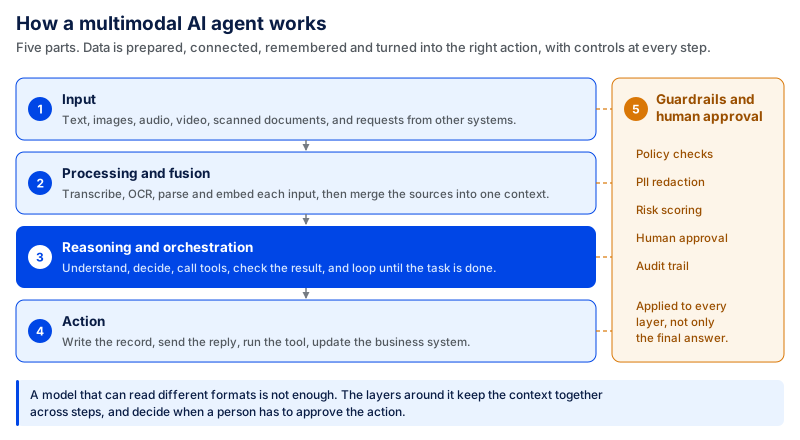
A system that works with text, images, audio, or video needs more than a model that can read different formats. The data has to be prepared, connected, remembered, and turned into the right action.
A typical setup has five main parts: input, processing and fusion, reasoning, action, and guardrails.
Input Layer
The input layer is where information first enters the system. It may come from a camera, microphone, uploaded document, screenshot, customer message, database, or another application.
Raw data is rarely ready to use. A 20-minute video, for example, may contain thousands of frames. Sending every frame for analysis would add unnecessary processing time and cost. Instead, the system can sample the frames most useful for the task.
Audio can be divided into smaller sections and converted into text. Documents or video frames that contain important text can go through OCR first, so the words are available in a cleaner format before further processing.
The right preprocessing depends on the job. A short defect that appears for a few seconds in an inspection video needs different frame sampling than a one-hour meeting recording.
Image quality matters too. Poor lighting, motion blur, unusual camera angles, background noise, and partly hidden objects can all affect what the system understands.
That's why much of the engineering happens before the primary reasoning step. The better the input, the better the rest of the workflow.
Encoding and Fusion
When the inputs are in place, the system must link the information from various sources. This is known as fusion.
It can be done in three ways.
In early fusion, information is fused early in the process. It can be useful if the inputs are well correlated. For example, a customer sends a screenshot of an error while explaining the problem in a voice message. The system connects what is visible on the screen with what the customer says before reasoning about the problem.
Late fusion processes each input independently and then combines the outputs. For example, an image of the product could be analyzed first, and then the written complaint could be analyzed separately before both are compared.
Hybrid fusion uses both methods. Some information is mixed earlier, and some is mixed later. This provides more flexibility in processing different inputs and makes it easier to verify individual parts.
No single approach works best for all projects. The choice depends on where the key information is located and how the inputs depend on each other.
Reasoning and Orchestration
Once the information is ready, the system must determine what to do with it.
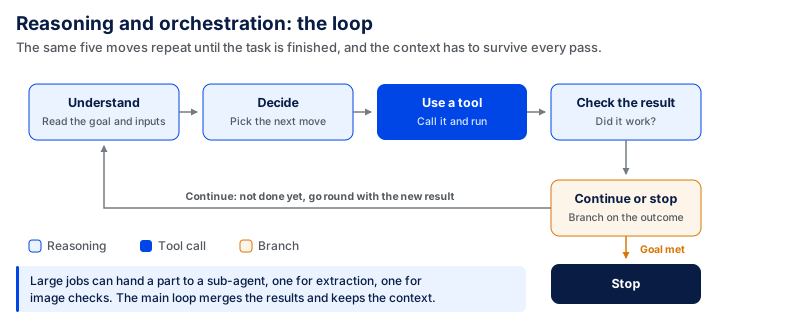
This can occur multiple times until the task is finished. In Anthropic's guidance on building agents, a system interacts with tools, observes the outcome, and repeats the process until it achieves a desired outcome or stops.
Maintaining context across these steps is particularly crucial when multiple types of input are included.
Suppose a user uploads several pages from a document and asks a question five steps later about a table on the second page. The system may make the wrong decision if that information is no longer available in the workflow.
Audio and video must also be in sync. If the spoken explanation is linked to the wrong moment or video frame, the system can draw the wrong conclusion even if it can understand the audio and video separately.
When the work is large, the main workflow can also queue a job to another model or a specialized sub-agent. For example, one part could handle document extraction, and another could handle image checking. The main workflow then consolidates the results and determines the next steps.
The point isn't to increase the number of agents. It is to give each part of the task to the right tool or model while keeping the important context available.
Action Layer
Understanding the input only matters if the system can turn it into a useful output or action. The output can be text, voice, an image, a generated document, an API call, a database update, or any action within another application.
The appropriate format depends on the product. For instance, voice could be appropriate for a driver or field technician with limited screen access. A finance team reviewing an invoice might prefer structured text with the important fields standing out. A support workflow can do more than just return a lengthy answer to the user: it can update a CRM.
The output format should therefore be a product decision, not just a model capability. Being able to reply by voice doesn't mean every workflow needs voice.
Guardrails, Approvals, and Human-in-the-Loop
The more actions a system can take, the more control it needs. A workflow that cannot approve a refund, modify a customer record, send an email, or place an order carries less risk than one that can perform those actions.
Permissions should correspond to the task. If a tool only needs to read customer information, it should not be allowed to change or delete those records.
OWASP's guidance on excessive agency states that tools and permissions should be restricted to only what's necessary for the task. It also suggests that high-impact actions should occur only with human consent.
For example, a system can review a customer's order and supporting evidence, then prepare a refund request. A support employee can still be required to approve the refund before any money is returned.
The same applies if the confidence level is low. The workflow should be able to pause when an image or audio recording is unclear, important information is missing, or different inputs conflict, rather than guessing.
The goal is not to remove people from every stage. It's about automating what can be done safely and maintaining human control when errors matter.
Multimodal AI Agent Use Cases Running in Production
The value of these systems becomes clearer when a task includes information that text alone cannot fully capture. Below are five areas where multiple forms of input can enhance actual workflows.
Document and Contract Review
What comes in: Contracts, scanned PDFs, tables, complex layouts, and embedded content.
What it does: It reads the document, identifies key clauses, searches for relevant information, and flags potential mistakes or omissions.
Why text-only falls short: Text-only extraction may neglect page layout, table structure, scanned pages, and other visual information that could alter the meaning of the document.
What gets measured: Review time, search accuracy, and the number of issues found. In CodingCrafts' Contract Review Platform, search time for specific terms and clauses was reduced by as much as 50–60% compared with manual searching.
Customer Support Across Voice, Chat, and Screenshots
What comes in: Customer messages, voice calls, screenshots, emails, and account information.
What it does: The system identifies the customer problem, reviews account information, looks for support information, and determines next steps.
Why text-only falls short: Sometimes the screenshot is the ticket. A picture can be clearer when there is an error message, a broken screen, or a payment issue.
What gets measured: First response time, resolution time, manual workload, and successful customer contacts. For a voice and messaging example, CodingCrafts' AI-Powered CRM brings calls, WhatsApp, SMS, and email into one place for lead capture and follow-up. In the project, first response time dropped from 2–6 hours to under 1 minute, manual workload fell by 50–60%, and contact and conversion performance improved by 10–20%. These results come from the CRM's voice and messaging channels, not from screenshot processing.
Field Service and Visual Inspection
What comes in: Photos or video of equipment, notes from the technician, repair manuals, sensor readings, service history.
What it does: This system analyzes the visual problem, compares it with technical data, reviews previous repair work, and recommends the next step.
Why text-only falls short: A technician might struggle to describe a crack, leak, damaged part, or unusual wear in words. A picture can convey information that is not included in a written report.
What gets measured: Inspection time, first-time fix rate, repeat visits, and specialist case referrals. Before rollout, teams can set target values for these metrics against their existing process, then test whether adding visual input actually improves them.
Healthcare Intake and Clinical Records
What comes in: Clinician dictation, patient forms, medical images, structured health records, and scanned documents.
What it does: It structures information from various sources, summarizes patient history, and helps clinical teams locate relevant information faster.
Why text-only falls short: Critical data could be embedded within a scan, image, handwritten document, or spoken audio recording, not in clean digital text.
What gets measured: Documentation time, information retrieval accuracy, and workflow efficiency. These measures need to be evaluated alongside controls for patient data, access permissions, and auditability. OpenAI's healthcare offering is designed to support HIPAA-compliant use, showing why privacy and governance need to be part of the system from the start.
Retail Visual Search and Logistics Exception Handling
What comes in: Product photos, damaged-shipment images, order records, delivery scans, and proof-of-delivery documents.
What it does: The system can identify a product, compare an item to an order, review visible damage, and send unusual cases to the appropriate team.
Why text-only falls short: A customer might not be able to describe the damage or know the product name. Sometimes the clearest information is in the image itself.
What gets measured: Search success, claim handling time, incorrect matches, and claims manually reviewed. Before launch, teams can establish baseline values from the existing process and set targets for product-match accuracy, exception-handling time, and the share of claims that still require manual review.
Models and Frameworks for Building Multimodal Agents
Choosing the right technology is an important part of building a system that works with text, images, audio, and other data types. Teams need to decide how different inputs will be processed, how information will move between different parts of the workflow, and how the system will connect with external tools and business data.
There is no need to make the setup more complex than the task requires. A simple workflow may work well with one main AI service, while a larger application may need separate services for different input types.
Natively Multimodal Models vs Stitched Pipelines
A natively multimodal system can work with different types of content within the same setup. It can accept text, images, audio, and other supported inputs without requiring a separate service for each data type.
Current models include OpenAI's GPT-6 Astra and Google's Gemini 3.1 Pro, while Anthropic's Claude models can support text-and-image workflows. GPT-6 Astra was released on September 3, 2026, with availability rolling out, while Gemini 3.1 Pro supports text, images, video, audio, and PDF inputs. The exact modalities and availability vary by model and provider, so teams should check current support before choosing one.
This makes development easier when different inputs need to be understood together. A user may upload a product image and add a written question, and the system can use both pieces of information when preparing its response.
A stitched pipeline works differently because each input type can be handled by a separate service. One service may convert speech into text, another may read information from documents, and another may analyze images before bringing the results together.
This setup requires more engineering, but it gives teams more control over each part of the workflow. They can track problems separately, use specialist technology for difficult tasks, and replace one service without changing the whole application.
Some teams use a mix of both approaches. They keep one main system for general work and add specialist services only where they need better accuracy, more control, or specific features.
A practical comparison, checked September 7, 2026, looks like this:
| Model | Useful input types | Where it can fit |
|---|---|---|
| GPT-6 Astra | Multimodal and computer-use workflows | Complex agent workflows involving software interaction, computer use, and multi-step work; availability is still rolling out |
| Gemini 3.1 Pro | Text, images, audio, video, and PDFs | Applications that need reasoning across several media types and long multimodal context |
| Claude models | Text and images | Document, image, and knowledge-heavy workflows |
Orchestration: LangGraph, LlamaIndex, MCP
When a workflow includes several steps, tools, and data sources, teams need a way to control how everything works together.
LangGraph helps developers build workflows that can keep information between steps and control what happens next. It also supports features such as human approval, memory, and recovery when a task is interrupted, which can be useful for longer processes.
LlamaIndex focuses heavily on connecting AI applications with business information. It can help a system work with documents, databases, knowledge sources, retrieval systems, and other company data needed to complete a task.
MCP has a different role. The Model Context Protocol is an open standard that gives AI applications a common way to connect with external tools and data sources.
These technologies can also be used together rather than choosing only one. A team could use LangGraph to manage workflow steps, LlamaIndex to access company knowledge, and MCP to connect the application to external tools through a standard interface.
The main goal is to choose technology that solves a clear problem rather than adding more frameworks simply because they are available.
Open vs Proprietary Models
Teams also need to decide how much control they want over the technology running their application.
Open models can give developers more control over hosting, customization, and where information is processed. This can help companies with strict data requirements, a need for deeper customization, or a desire to run the technology within their own infrastructure.
More control also means more work for the development team because they may need to manage deployment, infrastructure, scaling, security, updates, and performance themselves.
Proprietary models are usually managed by the provider, so teams can start building without setting up and maintaining all of the underlying infrastructure. They can also get access to new features and improvements as the provider releases them.
At the same time, teams have less control over the technology behind the service, so they need to consider pricing, data policies, available features, and provider changes.
A production application can also use both. Managed services can handle general tasks, while open technology can be used where the company needs more control over privacy, customization, or infrastructure.
The final choice should come back to what the product actually needs in terms of accuracy, privacy, speed, cost, and control, without creating extra technical work that does not improve the final product.
Production Challenges of Multimodal AI Agents
A system may work well during a controlled demo but still face problems when real users send large files, unclear images, long audio recordings, and unexpected requests. The main production challenges usually appear around speed, cost, visual accuracy, context, and privacy.
Latency Compounds Across the Agent Stack
Response time can increase quickly when one request has to pass through several processing steps. A user may upload an image and a voice message. The audio may need transcription, the image may need visual analysis, company information may need to be retrieved, and one or more tools may need to run before the final answer is ready. Each step adds more processing time.
The delay becomes more noticeable when the workflow includes several rounds of reasoning and tool calls. A slow tool or data source can hold up the entire process.
Teams can reduce this delay by processing independent inputs in parallel, preparing common data in advance, limiting unnecessary tool calls, and streaming useful results when possible. Test speed across the complete workflow rather than checking each service separately.
CodingCrafts follows the same approach when testing AI systems. During model selection, teams benchmark realistic requests for task completion, tool selection, latency, and cost per task rather than choosing a model from public benchmark scores alone. CodingCrafts' AI agent development guide recommends testing smaller, faster models against the same evaluation set when lower latency is important.
For a production multimodal workflow, the useful latency number is the total time from the user's input to a completed result. That includes preprocessing, model calls, retrieval, tool execution, and any verification step.
Multimodal Inference Changes the Cost Curve
Processing an image, long document, audio recording, or video can require more computing resources than handling a simple text request. Cost can increase further when the workflow analyzes several images, processes many video frames, searches a large knowledge base, or makes repeated tool calls before completing the task.
This makes input handling an important cost decision. A system may not need every frame from a video or every page from a large document. Selecting the useful parts before deeper analysis can reduce unnecessary processing.
Teams should measure the cost of the complete task, not only the price of one AI request. Storage, transcription, image processing, retrieval, external APIs, and repeated reasoning steps can all add to the final production cost.
For example, the cost of handling a support ticket with a photo and a 30-second voice note should include the cost of processing the image, transcribing or processing the audio, retrieving relevant information, running the model, and using any external tools needed to finish the task. Looking only at the model's text-token price would miss part of the actual cost.
CodingCrafts' Generative AI development process uses the proof-of-concept stage to test quality, latency, and cost on real data before moving to a production build.
Teams can also set a cost ceiling before testing. For example, CodingCrafts' AI Adoption Framework uses a pilot target of keeping cost below $0.20 per completed task as an example of a measurable success criterion. This is a sample pilot target, not a benchmark for multimodal agents. The right target will depend on the workflow, but setting it before the pilot gives the team a clear way to decide whether the system is practical to scale.
Visual Grounding Failures Are Harder to Detect
Visual errors can be difficult to notice because the final answer may still sound reasonable. A system may read a value from the wrong table cell, focus on the wrong part of a screenshot, or misunderstand the position of an object in an image. The response can look confident even when the visual detail behind it is wrong.
OpenAI's image input guidance notes challenges with precise spatial tasks, rotated content, some graphs, unclear images, and certain visual details.
This means teams should test more than the final written answer. They also need to check whether the system used the right image, object, document section, or visual detail when reaching that answer.
Multimodal Context Is Easy to Lose
Long workflows need to keep important details from earlier inputs available throughout the task. A user may upload several images, add a voice note, answer a few questions, and then ask the system to take an action. If an important detail from an earlier image is no longer available at that stage, the final decision can be wrong.
Timing also matters when audio and video are used together. A spoken comment needs to stay connected with the correct part of the video rather than being treated as separate information.
This is why teams need clear ways to store useful context, connect related inputs, and track what information was used at each step. Anthropic's guidance on agent evaluations also highlights that errors can spread across multi-step workflows as tools are called and state changes. Keeping a trace of these steps makes it easier to find where information was lost or used incorrectly.
Every Modality Introduces New Privacy Risks
Each new type of input can bring information that the user may not realize they are sharing. An image can show a face, ID card, home address, computer screen, or confidential document. Audio can contain private conversations or background speech. Uploaded files may include financial, legal, health, or business information.
There is also a security risk inside the content itself. OWASP's Prompt Injection guidance warns that harmful instructions can be hidden in external content, including images, and may influence the system after it processes that content.
Teams need clear rules for what information can be collected, where it can be stored, who can access it, and how long it should remain available. Sensitive data should be removed when it is no longer needed, and tools and connected systems should have only the access required for the task.
Adding another type of input is therefore more than a product feature. It also creates another source of data that needs to be protected, monitored, and tested for misuse.
How to Evaluate a Multimodal Agent Before You Ship
A good answer on the screen is not enough. The agent may have used the wrong image, misunderstood part of a voice note, or pulled information from the wrong page of a document. You need to see what happened during the task, not just the final result.
Before you ship, test these parts of the workflow:
✓ Test with messy real-world inputs. Don't test just with clean product images and perfect audio taken in a quiet room. Include blurred images, poor lighting, background noise, and difficult-to-read scans. These inputs can reveal issues before launch.
✓ Check whether information is connected to the right input. It gets harder when the information is distributed among multiple inputs. Imagine a customer sends three pictures of a broken laptop and follows up with a voice message saying that the screen did not turn on when the laptop arrived. The agent must relate that comment to the appropriate photographs. Using the right information but connecting it to the wrong picture can produce an incorrect result.
✓ Test whether context survives longer tasks. Initial information may be lost as more steps are added. The serial number the agent sees in the first picture might be required after the agent has gone through a warranty database or a repair guide. Add longer tasks to your evaluation to see what information remains available and what gets lost along the way.
✓ Test tool failures and approval boundaries. Practical testing is required for tool usage. Give the agent cases where an API is slow, customer information is missing, or a requested action isn't allowed. See what it does. It shouldn't go on as though nothing went wrong. Some actions, like approving a refund or changing an account, may also require a person's approval before the agent performs them.
✓ Verify the actual outcome, not just the response. If the agent states that it issued a $120 refund, check the order record to confirm that the refund actually happened. A confident success message is not a completed task. Anthropic makes a similar point in its guide to evaluating AI agents: evaluation should look at what happened in the environment during the task, not just the final response.
✓ Track performance over time. You still need metrics to see whether performance changes after launch. Task completion and response times are good starting points. At production scale, track cost, tool failures, and cases sent to humans as well. These can show where the workflow is struggling. You don't need to combine everything into a single score.
✓ Run difficult tasks again after updates. Keep a small set of difficult real-world tasks and run them again after major updates. If a new release improves image reading but starts losing details from earlier messages, you want to find that during testing rather than after customers start reporting it.
Some failures will happen after launch. The useful question is which ones you already understand and can handle safely.
What It Costs to Build a Multimodal AI Agent
Costs can vary widely from one project to another. A system that processes text and images requires less development than one that can process voice, video, company data, and actions within business tools.
CodingCrafts' AI agent development guide gives these general AI agent development estimates:
| Type of build | Estimated cost |
|---|---|
| Simple agent | $5,000-$20,000 |
| Custom agent with integrations | $20,000-$60,000 |
| Complex or multi-agent system | $60,000-$250,000+ |
| Enterprise platform | $250,000+ |
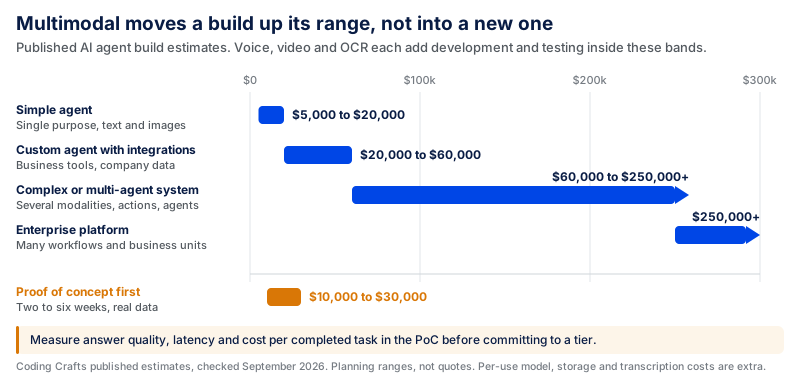
Checked as of September 2026.
These aren't fixed prices for multimodal projects, but they give companies a starting point. The lower ranges may be appropriate for a basic image-and-text setup. Adding voice, video, OCR, integrations, or sensitive business data means more development and more testing.
Video can increase the workload when the application needs to process many frames. In some cases, that workload can be reduced by selecting only the frames that are useful for the task. Voice may need transcription, while scanned contracts often need OCR. Large files also require secure storage and handling. The more parts you add, the larger the project grows.
There isn't one reliable percentage to add to a project simply because it becomes multimodal. The extra cost depends on what is being added, how much data needs to be processed, which services are involved, and how much testing the new input requires.
The spending doesn't stop after development. AI providers typically charge per use, and every interaction or workflow run adds costs. The monthly bill can also include file storage, transcription, OCR, external tools, and cloud services.
Companies that want to test the idea first can start with a smaller proof of concept. CodingCrafts' Generative AI development services estimate a focused GenAI PoC at around $10,000–$30,000, with most PoCs taking two to six weeks. During that stage, teams can test answer quality, latency, and per-request cost on real data before committing to a production build.
Should You Build Multimodal, or Start Text-Only?
More input types don't always make a smart product better. Sometimes text does the job well, and adding images, voice, or video only brings more development work and higher running costs.
Think about a customer support assistant that answers questions from a knowledge base. Most users can type what they need, so voice and video may add very little. Building those features into the first version would make the project bigger without solving a real problem.
Now take a support workflow where users often need help with errors inside an app. Describing a complex screen in writing can be difficult, while a screenshot may show the error message, settings, and surrounding context straight away. In that case, image input gives the system useful information that would be harder to capture through text alone.
That is usually the point where another type of input becomes worth adding.
| Text-only may be enough when | Add other inputs when |
|---|---|
| Users can explain the task clearly in writing | A photo or screenshot shows details that are hard to explain |
| Most information already exists as text | Useful information comes through images, audio, or video |
| You are building an early version | The text-only version is missing important information |
| Extra inputs add little to the result | Another input can help complete the task correctly |
You don't have to support everything from day one either. Start with the input that solves the main problem. Add images if users need them. Add voice or video only when the workflow gives you a clear reason to include them.
A useful question during planning is: What information would we lose if we only used text?
If nothing important is lost, text may be all you need. When the task becomes harder without a photo, screenshot, voice note, or video, adding that input starts to make sense.
Getting a Multimodal Agent into Production with CodingCrafts
A demo may work well with a few clean files and simple requests. Real users make things harder. They upload poor scans, send long conversations, leave out details, and sometimes ask for something that needs human approval. CodingCrafts helps turn these early builds into products that can work with real business data and existing tools.
Not every production AI system needs to start with image, audio, or video input. Sometimes the harder problem is getting context, memory, permissions, and escalation right first.
The AI-Powered Financing Platform is a good example of that text-first approach. CodingCrafts built an AI assistant that used PDFs and previous call transcripts to support small business financing. Merchants, funders, and sales teams needed different information, so the assistant had to understand the user's role and keep track of earlier conversations. Difficult cases could also be passed to a human rep.
Memory became an issue during longer conversations. At first, repeated responses appeared in around 20–30% of cases. After adding memory controls and checks for repeated answers, this dropped to around 5–10%. During trial usage, the application completion rate also improved by approximately 8–15%. CodingCrafts does not publish the trial duration or number of applications behind that figure, so it should be treated as a project result rather than a general benchmark.
The project also shows why multimodal input should be added when it solves a specific problem, not simply because the technology supports it. The same production work around memory, permissions, context, and human escalation still matters when you add image, voice, or video inputs.
The bottom line is simple: start with text if text gives the system enough information to complete the task correctly. Add images, voice, or video when those inputs provide information the text-only workflow would otherwise lose.
If you're planning an AI product, CodingCrafts can test the difficult parts with your real data first and take the build further once it's ready for production.
Start with a Measured Proof of Concept
CodingCrafts tests answer quality, latency and cost per task on your images, audio and documents in a $10,000 to $30,000 proof of concept before a full build.