Top 10 Software Development Trends in 2026: What Teams Should Act On

Your team might already use automation to help with code but still spend days waiting for a release. Scaling could be more manageable with a cloud migration, but you may end up paying more. The hard part of keeping up with changes in software development is deciding which changes will improve how your team works.

Research reflects that, too. According to a Gartner report released in May 2026, only 35% of software engineering leaders reported high returns from AI in software development.
In this guide, we examine ten trends in that pragmatic way, identifying what each trend changes, where, and what you should look for before buying in. Some of these are worth trying at a small scale now. Some suggest you make better use of the tools you already have, or prepare for a longer-term transformation.
Software Development Trends 2026 at a Glance
The table below offers a quick overview. These are editorial recommendations based on the studies and examples referenced throughout the article, not a ranking of importance for every team.
Recommendations reviewed: September 11, 2026.
| Software Development Trend | 2026 Status | What to Measure |
|---|---|---|
| Agentic AI | Act now | Developer time, review time, defect rate |
| AI-Native Software Development | Act now | Task completion time, review effort, defect rate |
| Platform Engineering | Act now | Environment setup time, deployment lead time, developer wait time |
| Cloud-Native Development | Act now | Infrastructure cost, deployment time, reliability |
| DevSecOps | Act now | Security issues found before release, remediation time |
| Observability | Act now | Incident resolution time, error rate, service latency |
| Low-Code and No-Code | Use selectively | Development time, maintenance effort, number of unmanaged apps |
| Edge Computing | Depends on the use case | Latency, processing time, infrastructure cost |
| Sustainable Software Engineering | Build into decisions | Compute usage, idle resources, infrastructure cost |
| Quantum Computing | Watch and prepare | Quantum-vulnerable algorithms and systems identified |
Several entries are established practices. Their place here reflects how useful they remain for today's engineering decisions, rather than a claim that they first appeared in 2026. The examples also include earlier projects where the lessons still apply.
Top 10 Software Development Trends in 2026
These trends were chosen for their significance to software delivery, the level of existing research and adoption, and for their need for action by engineering teams, selective action, or preparation.
1. Agentic AI
A coding agent can take a task through multiple stages. It can inspect the repository, create a change plan, modify files, run tests, and correct its changes. There is still a need to define success criteria and examine the outcome.
The important distinction is the amount of work that the tool can do between instructions. Product labels are different, so make sure you know what a specific tool can do. For instance, GitHub's April 2026 Copilot cloud agent update explains codebase research, implementation planning, and code changes that developers can access before they submit their pull requests.
A reasonable first trial is a task that you can perform independently, like a bug repair with a regression test that is easily repeatable. Provide the agent with a clear description of what is required, any important limits, and a means for conducting the tests. Then review both how it is implemented and whether those tests prove the fix.
Consider the entire picture when determining the outcome of the work. A fast first result can create a false sense of security if the implementation requires extensive review and correction. Monitor time to acceptance (including rework) and make approval requirements clear for sensitive changes.
2. AI-Native Software Development
An agent that performs a single action is only part of the solution. Teams can also leverage automation for planning, testing, documentation, code review, and maintenance. This broader application is called AI-native development, and in this context it involves integrating artificial intelligence into the daily software development process.
These AI uses are related but focus on different things. The first is a tool's autonomy. This one is about how a team structures the workflow around those tools.
For example, a team can use AI to detect impacted modules before making a change, suggest missing tests during coding, and produce documentation after the change. These are potential uses, and not proof that the process will become quicker. There's still someone to review assumptions, tests, and documentation.
According to DORA's 2025 research, automation amplifies a team's existing strengths and weaknesses. That makes it worth reviewing the delivery process before using these tools more widely. If the process is unclear or unreliable, the work AI produces will be harder to assess.
Select one point at which work slows down periodically. Compare similar work with support and without support, including time taken to provide context and time to review output. Expand only if the improvement holds beyond the initial trial.
3. Platform Engineering
Every time developers need to create a ticket for a test environment, part of your delivery time is spent waiting.
Platform engineering targets repetitive friction. An internal platform gives developers trusted ways to build environments, run services, and share infrastructure. CNCF's description explains such self-service development, testing, and deployment capabilities.
Toyota Motor North America's Chofer platform shows how this works across many teams. It is built using Backstage and AWS; it supports more than 100 application teams and more than 1,600 cloud applications through a common developer interface.
The first step can be much smaller. Pick a task where developers keep having to ask another team, and simplify it so they can do it themselves. Before deciding what to put on the platform, ask the people doing the work where they get stuck.
A portal is only a part of the answer to a bottleneck. If someone still has to complete the setup on the back end, time that too. The platform succeeds when the task itself gets easier.
4. Cloud-Native Development
Cloud native development is a well-accepted practice. In January 2026, CNCF's annual survey found that 82% of surveyed container users run Kubernetes in production. That figure describes container users in the survey; it isn't a recommendation that every application should use Kubernetes.
The best architecture still depends on what you are trying to do. Managed infrastructure that scales automatically may suit a service with variable load requirements. A small product that has fairly simple requirements might be simpler to run as a single, organized application.
Moving existing software to the cloud doesn't fix its design problems. When parts of a system are tightly coupled, moving an application does not eliminate the coupling.
Examine the problem area in the system: a service that is often slow or overloaded during peak periods, a deployment that fails often, or an infrastructure setting that is difficult to maintain. Analyze the impact of a change on that problem. Include the cost of operating, securing, and monitoring the proposed architecture before making the change.
5. DevSecOps
A security problem discovered just before launch can delay a release. By this time, the impacted code could be attached to a number of features, and the team will have little time to work out a safe fix.
DevSecOps integrates security into the normal development and operations process. Dependency checks, secret scanning, and other security checks can run with the build and tests, giving developers feedback while they work on a change.
In an updated GitLab customer story, Hilti describes bringing code management, deployment workflows, and security scanning together. According to GitLab, deployment time has dropped from approximately three hours to 15 minutes. That's not just the result of security scanning; it's part of a larger shift in Hilti's delivery process.
Each check also needs an owner. Decide which findings should block a release, who investigates them, and what happens when an exception is needed. Otherwise, you may end up with a longer alert queue and unresolved risks.
Check whether critical problems are detected and resolved earlier. An increasing number of alerts does not necessarily indicate that the software is getting safer.
6. Observability
A slow checkout may be caused by a long database query or a slow payment service. Knowing that the page is slow doesn't tell you where to look.
Observability supports investigation by consolidating logs, metrics, and traces. A trace follows a request through the system, showing where time is spent. OpenTelemetry's observability primer explains how this information helps teams understand application behavior.
Large production deployments back the approach. A 2026 OpenTelemetry account of Adobe's pipeline describes thousands of collectors per signal type across its infrastructure.
Collecting data has a cost, though. In Grafana Labs' 2025 survey, average observability spending equaled 17% of compute infrastructure spending, with wide variation between respondents.
Start with a significant user flow, like checkout or sign-in. Examine if data is available to determine the failure and its impact on users. Establish retention and collection policies for those needs, and monitor if investigations become quicker.
7. Low-Code and No-Code
An internal approval tool could be as simple as a form, a couple of rules, and a link to an existing database. Visual app-building tools can help make that kind of thing easier to provide.
Low-code platforms integrate visual elements and provide custom code choices. No-code tools let users build within defined capabilities. Both still need someone to know the process, how to do it, and what information is required.
T-Mobile's Orbit application is a useful example. Employees use it to manage and approve initiatives such as device promotions and service offers. It integrates Power Apps with Power Automate, Power BI, and Dataverse.
It's very easy to underestimate the ongoing work. When business rules change, an integration breaks, or the original creator walks out the door, someone must maintain the app. Forrester's June 2026 analysis points to this gap between faster app creation and proper management as more people use it.
When selecting a platform, find out who owns the platform, who can access it, the limits of integration, and how costs could change as it becomes more popular. If the app has custom or performance requirements, test them early enough to switch platforms if needed.
8. Edge Computing
A factory inspection system may need to process images quickly, even without a stable cloud connection. Processing the information close to the equipment can avoid a round trip to a distant service.
That's the idea behind edge computing. It can help when response time matters, when the connection is unreliable, or when rules must be based on data that stays on site.
Emirates Global Aluminium reported that its hybrid setup delivered 10-13 times faster AI responses and 86% cost savings for image and video AI use cases in a Microsoft case study published in December 2024. Those results are from that deployment and workload.
The trade-off is managing software across more locations. Devices must be updated, monitored, and have recovery procedures in place, with a way to handle lost connections.
Test the real load in the actual environment it will run in. If there is an existing cloud service that can provide the required response time and availability, then moving processing to the edge requires another compelling reason.
9. Sustainable Software Engineering
An oversized server, an unused environment, or a job that repeatedly processes the same information will consume resources without adding value. Waste is a good starting point for software sustainability.
Infrastructure changes can drive measurable results. In an AWS case study, Zendesk reported a reduction of more than 50% in relevant monthly carbon emissions after moving workloads onto Graviton-based instances and right-sizing capacity. The case highlights a migration completed in 2023, and the emissions figure covers that scope, not Zendesk's full footprint.
A lower cloud bill does not always mean lower energy use or emissions, since discounts and pricing don't track resource usage. Measure sustainability separately from cost savings, and state what each measure covers.
First, consider your application's usage at normal and peak demand. Eliminate unused resources, rethink unnecessary processing, and determine if smaller capacity is sufficient to achieve the desired performance. Keep reliability targets in place so efficiency improvements don't compromise the service.
10. Quantum Computing and Post-Quantum Readiness
For most software teams, no quantum software application is on the immediate roadmap. Preparing for encryption changes is more relevant, especially for systems that handle information that must stay confidential for years.
On August 13, 2024, NIST finalized its first three post-quantum cryptography standards: FIPS 203, 204, and 205. These cover key establishment and digital signatures built to protect against attacks by future quantum computers.
NIST's separate transition roadmap, IR 8547, is an initial public draft. Its proposed transition dates depend on the algorithms and systems involved; they aren't a single confirmed deadline for every organization.
The first priority is an inventory. Identify public-key cryptography usage, software libraries and external services that support it, and who is responsible for software upgrades. Include vendor dependencies, since your migration plan may depend on them.
That inventory shapes what a future transition may look like. Your security team can then set priorities based on applicable standards, data risks, and supplier plans.
How to Choose What to Work on First
Use a recent delivery problem to narrow down the list. When developers wait for environments, consider platform engineering. If incidents take hours to diagnose, consider improving observability. A limited AI trial could be helpful if repetitive development work is taking up time.
Before starting, write a short pilot brief:
- The problem: Describe the delay, failure, or unnecessary work with a recent real example.
- The baseline: Record how long it takes, what it costs, or how often it fails today.
- The change: Define a limited trial and name the person responsible for it.
- The success criteria: Set the improvement you need and the quality or reliability measures that must hold steady.
- The review date: Decide when you'll review the results and decide whether to expand, change, or stop the trial.
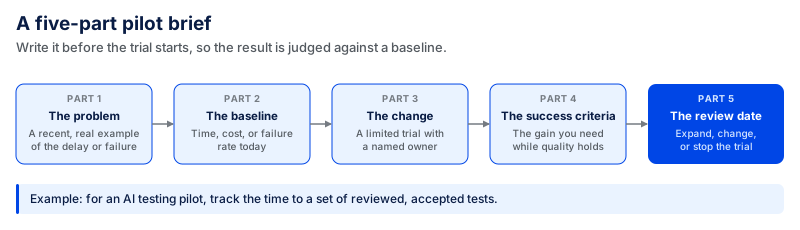
If you're running an AI testing pilot, for instance, track how long it takes to produce a set of acceptable tests that have been reviewed and corrected. Check that the tests cover the intended behavior. A higher number of AI-created tests won't tell you that on its own.
How Coding Crafts Applies This Thinking
Two published Coding Crafts projects show how technical decisions connect to product requirements.
For an AI-powered financing platform, the team built assistants for merchants, funders, and sales representatives. Business rules limited negotiations; document retrieval provided context, and conversations could escalate to a human when needed. In trial use, time to next action dropped from 48 h to about 18-24 h, and application completion increased by 8-15%.
On an on-chain perpetual DEX platform, the work included wallet integration and access-control rules. The case study shows that wallet connection inconsistencies were reduced by 20-30% across browsers and tests on mobile devices, with the response time for most trading flows reduced to less than 2 seconds from 4-5 seconds.
Neither case study reports the sample size or the measurement period. These are results from individual projects, useful for understanding the work involved rather than predicting another project's results.
To assess a similar build, explore our custom software development services.
Frequently Asked Questions
How Much Does It Cost to Adopt a New Development Technology?
The cost depends on what you are actually changing. Adding one new tool is very different from rebuilding a whole platform. You may need to pay for setup, integration, training, review, and ongoing use.
For example, Coding Crafts' published estimates for custom AI projects put a focused proof of concept at $10,000–$30,000 and a production system at $50,000–$250,000 or more.
These numbers are for custom AI projects, checked on September 11, 2026. They are not a general price range for coding tools or every new technology.
Should Startups Follow the Same Trends as Enterprises?
Startups and large companies may use the same tools in very different ways. A startup might test one tool or use a managed service. A large company may need shared rules, stronger controls, and support across many teams and systems.
The better choice is the one your team can manage properly. Company size matters, but so do your product needs, security requirements, budget, and team skills.
Will AI Take the Place of Software Developers?
AI can already handle some development tasks, but developers are still needed. They still have to understand requirements, make technical decisions, review code, test the work, and take responsibility for what goes into production.
For developers, learning how to check and test AI-assisted work is becoming more important. Writing code faster is useful, but it is only one part of building reliable software.
Is Low-Code Replacing Custom Development?
Low-code works well for some types of projects, especially simple internal tools and standard workflows. But it does not fit every product.
Before choosing it, check the harder parts first. Look at custom features, integrations, performance, data access, and long-term costs. A tool may help you build the first screen quickly, but that does not mean it will handle the full product well.
What Should Teams Prepare for in 2027?
In May 2026, Gartner forecast that more than 65% of engineering teams using agentic coding would treat IDEs as optional by 2027.
This forecast only applies to teams already using agentic coding. It does not mean most developers will stop using IDEs by 2027.
Teams should focus on how automated work will be checked, approved, and linked back to the original task. These steps are useful now and will also help as coding tools become more capable.
Your Next Step
Think about one problem from your last release or incident. Use the table above to find the trend that may help. Then test it on a small task and decide what result you want before spending more time or money.
If it works, expand it. If it does not, move on.
Test one trend on a real bottleneck
Bring the delay, failure, or manual work slowing your releases. Coding Crafts will help you scope a small trial with a baseline and a clear success measure before you commit to more.
More from the blog.
View all postsRelated reading from the Coding Crafts team.