MVP Development for SaaS Startups: From Idea to Production

Before spending months building a SaaS product, you need to know if people actually need it. Start by talking to your target users. Find out what problems they face and whether your idea can solve them. Their feedback can help you focus on what matters and avoid spending time and money on features they may never use.

Product-market fit is a common problem for startups. CB Insights found that 43% of companies with identified failure reasons had issues with product-market fit. This shows how important it is to understand what customers need before committing more time and money to development.
An MVP is the first working version you put in front of those customers. It focuses on the main product idea you want to test. People should be able to use the core feature, see whether it solves their problem, and give you feedback based on actual use.
For planning, you can divide the first 90 days into four parts: validate the idea, work on UX and technical architecture, build the MVP, and test it before a beta launch.
Ninety days is a planning framework, not a fixed delivery promise. A product with several integrations, complex features, regulated data, or more security requirements may take longer. The size and availability of the team can change the schedule too.
The sections below explain what belongs in a SaaS MVP, what can wait, and how to take the first release from an idea to production.
What Makes an MVP Different From a Full SaaS Product?
An MVP has a smaller scope than a full SaaS product. It focuses on the main problem users need to solve and includes enough features for them to use the product from start to finish.
A full SaaS product covers more needs. It may support different user roles, more integrations, advanced reports, extra settings, and features requested by a wider customer base.
A smaller scope does not mean releasing an unfinished product. The main feature still needs to work properly. Users should be able to sign up, use it, and see whether the product solves the problem they came with.
Here is a simple comparison:
| Area | SaaS MVP | Full SaaS Product |
|---|---|---|
| Main purpose | Test the main product idea with early users | Serve a wider range of customer needs |
| Features | Features needed for the main use case | A larger set of features and options |
| Users | A smaller, clearly defined group | A broader customer base |
| User roles | Limited to what the first release needs | May include several roles and access levels |
| Integrations | Only those needed for early use | More integrations based on customer needs |
| Design | Clear and usable, with fewer screens and options | More screens, settings, and product areas |
| Feedback | Helps decide what is worth building next | Helps improve and expand the existing product |
A founder may have many features planned for the product. The first release may need only five. Early users can show which of the remaining ideas are worth spending time and money on.
What Should a SaaS MVP Include?
A SaaS MVP needs enough functionality for a customer to sign up, use the main feature, and manage their account. The exact feature list will change with the product. A project management tool and a finance platform will not need the same first release.
Still, several parts are common across many SaaS products. Here are the main areas to plan for when deciding what goes into the first release.
Core User Workflow
Start with the main task people are coming to the product to complete. For an invoicing SaaS product, that could be creating and sending an invoice. For a booking product, it could be choosing a service, selecting a time, and making a booking.
Build that path first. Extra reports, customization, and secondary features can wait if the customer can use the main feature without them.
The first release should cover the whole path. A feature that looks complete on one screen but requires the team to finish the task manually behind the scenes may give misleading feedback about how customers will use the actual product.
User Authentication and Account Management
Users need a secure way to create an account, sign in, recover access, and manage basic account details.
B2B products may also need company accounts and user invitations. AWS describes the link between a user and their tenant as a basic part of SaaS architecture. The tenant information can then carry through authentication and be used elsewhere in the application.
Keep the first version focused on what your customers need. Add advanced role settings, custom access rules, and enterprise SSO when the target customer or product requires them.
Multi-Tenant Architecture
Most SaaS products serve more than one customer or company from the same application. Each customer is treated as a tenant, and their data must remain separate.
Authentication alone does not provide that separation. AWS explains that a user can be correctly authenticated and still access another tenant's resources if tenant isolation isn't handled separately.
The first release needs a clear tenant model from the start. The exact setup can vary. Some products share infrastructure between customers, while others keep certain resources separate.
AWS outlines three basic models of SaaS architectures: silo, pool, and bridge. A silo model provides tenants with specific resources. The bridge model combines both, while the pool model is based on infrastructure sharing. The choice can affect costs, deployment, tenant isolation, and how resources are managed as the product scales.
If you use PostgreSQL, Row-Level Security is one option for controlling which rows a user can read or change. PostgreSQL policies can restrict access based on the rules set for a table.
Dashboard and Core Product Interface
The main interface should make the next step clear. After signing in, users should not have to search through several screens to find the feature they came to use.
Keep the dashboard focused on information that helps them move forward. This could be a pending task, recent activity, account status, or a button to directly take them to the main action, depending on the product. Extra charts and reports can be created when they are needed.
Make a plan for the empty state too. A new account may have no projects, transactions, documents, or other data to display. Instead of leaving users with an empty screen, show them what to do first. This may be creating a project, uploading a file, linking an account, or another setup procedure.
Billing and Subscription Management
If the MVP is testing a paid SaaS idea, customers need a way to subscribe and pay. The first version may only need one or two plans. Customers should be able to see their subscription, update payment details, and cancel when needed. You can add more complicated pricing once you have enough customer usage to support those decisions.
Subscription billing also continues after checkout. Payments can fail, subscriptions can change, and customers can cancel. Stripe, for instance, sends events for subscription creation, updates, cancellations, successful invoice payments, and failed payments. Plan for these cases during development instead of treating payment as a single checkout screen.
If payment is included in the concept you're testing, it also gives you a stronger signal than free usage alone, since customers are paying from the start. If someone uses a free version, they may like it. If they pay, the problem matters enough to them to spend money on it.
Admin and Operational Controls
A SaaS MVP may need controls for both the team running the product and the customers using it. The access given to each person should match their role.
Provider controls are used by the SaaS team to manage the product across all customer accounts. These may include checking account status, reviewing subscriptions, handling support issues, monitoring activity, and managing customer accounts.
Tenant admin controls stay within one customer's account. A company admin may need to invite or remove users, assign roles, manage access, and update company settings without being able to see or change another tenant's data.
Keep the user hierarchy simple in the first release. A basic B2B SaaS product may only need a provider admin, tenant admin, and regular user. Add more roles and detailed permission settings when the product or customers require them.
What Should You Leave Out of a SaaS MVP?
You will probably have more feature ideas than you can fit into the first release. Many of them may be useful later. They do not all need to be in the MVP.
Keep the first version focused on what people need to use the product. Things such as custom themes, detailed dashboards, extra reports, and many account settings can wait.
The same goes for user roles. If the product only needs an admin and a member at first, there is little reason to build several other roles before customers ask for them.
Be careful with integrations too. You may have a long list of tools you want the product to connect with. Start with the ones your first customers actually need. Each new integration takes more time to build, test, and maintain.
Pricing can stay simple as well. One or two plans may be enough for an early release. You can add more plans, add-ons, and pricing options once you know what customers are willing to pay for.
A mobile app is another feature that may be able to wait. If people can use the product properly through the web, building separate iOS and Android apps at the same time may add work without telling you much more about the idea.
There are exceptions. A company selling to large businesses may need SSO before a customer will buy. A healthcare product may have requirements that must be handled before launch. Some SaaS products also depend on a specific integration to work at all.
There are also cases where building an MVP is not the right next step. If you can't find a small group of actual people with the problem, take more time at the start doing customer research. The same goes for a product that depends on a network or dataset that doesn't exist yet, a regulatory requirement that must be met before the product can legally be sold, or an idea you would pursue whatever the MVP showed. In such situations, development isn't necessarily the next expense to cover.
How to Scope an MVP for a SaaS Startup
A clear scope tells the team what needs to be built now and what can wait. Without it, small feature requests can keep adding weeks to the project.
Start with the customer and the problem. Once those are clear, it becomes much easier to decide what belongs in the first release.
Start With the Target Customer
Be specific about who will use the product first.
“Small businesses” is too broad. A SaaS product for small accounting firms has different needs from one built for small ecommerce stores.
Write down who the first users are, what problem they have, and how they deal with it today. Talk to people who match that description before deciding what to build.
You do not need to design the first release for every customer you may serve in the future. Focus on the group you want to test the product with first.
Define the Core Job to Be Done
Next, describe what that customer comes to the product to do.
Keep it simple. A user may want to send an invoice, schedule a team, review an application, or collect documents from a client.
This gives you something concrete to build around. If a feature has little connection to that job, it may not belong in the first release.
Try to describe the job in the customer's language rather than as a software feature. “Get an invoice paid” is more useful for planning than “invoice management module.”
Map the Critical User Journey
Think about the main path a customer will take when they first use your product. Start with sign-up and follow the journey until they get something useful from it.
A simple journey may look like this:
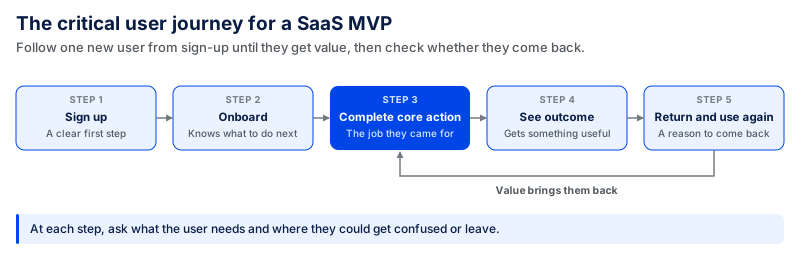
Go through the journey step by step. Ask what the user needs at each point. Is it clear what they should do next? Is there anything that could confuse them or make them leave?
Also think about what happens after their first successful use. Do they have a reason to come back? Your MVP should help you see whether users get value from the product and whether that value is enough to bring them back.
Separate Must-Have Features From Future Features
Once the journey is clear, go over the feature list again. A feature is essential if the customer needs it to complete the primary task, your first customers require it, or adding it later would mean changing a key part of the product. Everything else can be considered for a later release.
These decisions can be made easier with a simple table:
| Ask About the Feature | What to Do |
|---|---|
| Is it needed to complete the main task? | Keep it |
| Is it required by the first target customers? | Keep it |
| Is it needed for security, legal, or compliance reasons? | Keep it |
| Can the team handle it manually for the first few customers? | Consider later |
| Is it mainly for a rare case? | Consider later |
| Are we adding it because it may be useful someday? | Leave it for later |
Keep a list of the features you set aside. They are not lost. You're waiting for real usage to show which ones deserve development time.
Define Success Metrics Before Development
Before development begins, determine the criteria for judging the MVP.
The numbers will depend on the product. You might track:
- How many people complete onboarding
- How many complete the main action
- How many return and use the product again
- How many start a paid subscription
- How often people use the product
Choose realistic goals for the metrics that are important to the product. For instance, a team could aim for 50% of new users to complete the primary action within one week.
Also, define a failure condition: the result that would make you stop, change the product, or do more customer research. If every possible outcome leads to building more features, the MVP isn't really testing the idea.
Write those targets down before launch. Once users arrive, you can compare what actually happened with what you expected, then decide what to do differently in the next release.
SaaS MVP Development Process: Building a SaaS MVP From Idea to Launch
Once you know what your MVP needs to include, you can start planning how to build it. Before development begins, the team needs a clear idea of who the product is for, what the first version needs to do, and how users will move through it.
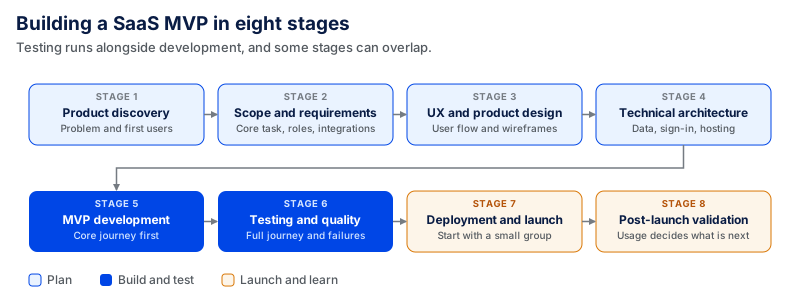
The process can be broken into eight stages.
1. Product Discovery
Start by understanding the problem you want to solve. Talk to potential customers and learn how they deal with that problem today. Ask what takes too much time, what causes problems, and what they wish worked better.
By the end of this stage, you should have a clear idea of who you are building for and what problem the MVP needs to solve. If you are still unsure, talk to more potential users before moving forward.
2. MVP Scope and Product Requirements
Next, decide what you need to build for the first release. Focus on the main features users need to complete the core task. Also note the user roles, integrations, and any security requirements the product needs.
Then, map out how a user will move through the MVP, from signing up to completing the main task. Keep everything else for later. This keeps the MVP small and gives the team a clear scope to follow during development.
3. UX and Product Design
Once the scope is clear, the next phase is to plan how the product will work for the user. The team maps the main user flow and creates simple wireframes to show how people will move through the product.
These early designs are reviewed before development starts. This gives the team time to find confusing steps, improve the flow, and make changes without having to rebuild working screens later.
By the end of this phase, the team should have a clear design that developers can use to start building the MVP.
4. Technical Architecture
Before development starts, the team decides how the MVP will work behind the scenes. This includes where data will be stored, how users will sign in, how customer data will be separated, where the product will be hosted, and which outside services it needs to connect with.
Some of these decisions are difficult to change later, especially when more users and data are added. They need more attention at this stage.
You also don't need to build for thousands of users from day one. The setup should work well for the first release while leaving room to grow as more people start using the product.
5. MVP Development
Once the design and technical plan are ready, development can begin. The team starts with the main user journey and gets the core product working before moving on to the rest of the agreed scope.
The product should be reviewed regularly while it is being built. This gives the founder or product team a chance to test the progress, share feedback, and catch problems early.
New ideas will often come up during development. Keep them for later unless they are necessary for the first release. This keeps the MVP focused and prevents the scope from growing while the team is still building it.
6. Testing and Quality Engineering
Testing should happen while the MVP is being built, not only at the end. This makes it easier to find and fix problems before launch.
Before the MVP goes live, test the full journey as a real user. Create an account, complete the main task, try the payment process if there is one, and check the important account settings.
Also check what happens when something goes wrong. Test failed payments, broken integrations, error messages, and other issues that could stop someone from using the product.
For a SaaS product, customer data needs special attention. One customer should never be able to see another customer's information. Test the MVP on the browsers and devices your first users are likely to use as well. Fix any problem that stops users from completing the main journey before you launch.
7. Deployment and Launch
Once testing is complete, the MVP is ready to go live. The team moves it to the live environment and sets up backups, logs, and error tracking so problems can be found after launch.
Test the main user journey again once the product is live. Something that worked during development may behave differently after deployment.
If possible, start with a small group of users. Let them use the product and see where they face problems. Fix any major issues before inviting more people.
8. Post-Launch Validation
After launch, the focus shifts to how people actually use the MVP. Check whether users complete onboarding, reach the main feature, come back to use the product again, and subscribe if it is a paid product.
Pay attention to where users leave as well. If many people stop at the same point, talk to them and find out why. Maybe something is confusing, an important part is missing, or they are not getting enough value from the product.
Use this feedback to decide what to work on next. You may need a few small changes, or you may find that the product needs a bigger change before you continue building.
How Long Does It Take to Build a SaaS MVP?
There is no fixed time for building a SaaS MVP. A simple product may move quickly, while one with more features, integrations, or security requirements will need more time.
The scope gives you a better idea of the timeline. Once the team knows what has to be designed, built, and tested, it can estimate the work more accurately. At Coding Crafts, a focused first SaaS release usually takes around 4 to 6 months.
Factors That Affect SaaS MVP Development Time
A few things can make the development longer.
Product scope: More features mean more design, development, and testing. Changes made after development starts can also extend the timeline.
User roles: If customers, admins, managers, and other users all need different access, each role has to be planned and tested.
Integrations: Some products need payment, CRM, accounting, or other third-party integrations. The time required will depend on the API and what needs to be connected.
Security and compliance: Products that handle sensitive information may need additional security work, documentation, and testing.
Data migration: Some customers may need their existing records moved into the new product. Preparing and importing that data takes time, especially when the old data is incomplete or stored in different formats.
The team also needs timely decisions during the project. Waiting several days for approval on a screen or feature can hold up the work that comes after it.
Example SaaS MVP Development Timeline
A SaaS MVP usually moves through the following stages. Some of them can happen at the same time.
| Phase | Work |
|---|---|
| Discovery | Learn about the customer, the problem, and what needs to go into the first release. |
| Design | Plan the user journey and design the main screens. |
| Architecture | Decide how data, accounts, hosting, and integrations will be handled. |
| Development | Build the main feature and the other parts included in the scope. |
| QA | Test the product, fix bugs, and check payments, integrations, access, and important user actions. |
| Production launch | Put the MVP live and start giving early users access. |
These stages do not have to wait for one another to finish completely. Developers may start on an approved part while other screens are still being designed. Testing can also start while development is still going on.
The timeline can change if the scope changes. If a new integration or user role is added during development, the team has more work to design, build, and test.
For that reason, estimate the timeline after deciding what will be included in the first release.
How Much Does SaaS MVP Development Cost?
The cost of a SaaS MVP depends on what you need in the first version. A simple product with one type of user and a few main features will usually cost less than a product with several user roles, integrations, or compliance requirements.
Coding Crafts estimates the typical cost of MVP development at $10,000 to $100,000. The final cost depends on the product, features, industry, and development work involved.
Your feature list has a direct impact on the budget. Every new screen, user role, integration, or pricing rule adds more work for design, development, and testing.
Integrations can add to the cost as well. Connecting a common payment or email service may be fairly simple. Connecting an older business system or moving data from another product can require more work.
Security is another cost to consider. If your SaaS product handles health, financial, or other sensitive data, you may need additional security and compliance work before launch.
You also need to plan for costs after the MVP goes live. Hosting, databases, authentication, payments, email, and monitoring services may all come with monthly or usage-based charges.
These costs may be small when you only have a few users. As the product grows, they can increase with traffic, storage, active users, payments, and other usage.
Here are a few services a SaaS MVP may use:
| Service | Example starting point | What can increase the bill |
|---|---|---|
| Vercel | Free plan available; paid plans available for commercial teams | Seats, requests, bandwidth, and other usage |
| Supabase | Free plan available; Pro starts at $25/month | Database size, egress, active users and additional resources |
| Clerk | Free tier available; paid plans start above it | Active users, B2B features and enterprise SSO |
| Stripe | No standard monthly fee for basic payments; transaction fees apply | Payment volume, international cards, currency conversion, Billing and Tax |
Not every MVP needs all of these services. The $10,000 to $100,000 development estimate covers the build, but you should also budget for the costs that continue after launch.
A clear MVP scope can help you keep the budget under control. If you keep adding features during development, the cost and timeline can quickly move beyond the original estimate.
Choosing the Right Tech Stack for a SaaS MVP
You do not need a complicated tech stack to build a SaaS MVP. Choose the tools based on what the first version actually needs.
Look at the features, the type of data you will store, and the services your product needs to connect with. Also consider what your development team already knows. Using familiar tools can make development easier and make it faster to fix or change things as you learn from users.
Frontend
The frontend is the part of the product your users see and interact with. React and Next.js are common choices for SaaS applications, while Vue is another option.
Your MVP screens may change as you get feedback from users. Choose a framework your team knows well so these changes are easier to make. You do not need to choose a new technology just because it is popular.
Backend
The backend handles what happens behind the product. It manages user accounts, data, payments, business rules, APIs, and connections with other services.
Node.js, Django, Ruby on Rails, Spring Boot, and Go are all options. The right choice depends on what you are building and what your team is comfortable working with.
Keep the first version simple. If one backend can handle the MVP, you do not need to split it into several services. You can change the setup later if the product grows and needs it.
Database
Your SaaS MVP needs a database to store information such as user accounts, subscriptions, settings, and customer records. PostgreSQL is a common choice when much of this data is connected.
For a SaaS product with multiple customers, you also need to decide how each customer's data will stay separate. Make this decision early because changing the setup later can require more work.
If you use PostgreSQL Row-Level Security (RLS), make sure the rules work for the database role your application actually uses. Turning on RLS alone does not mean customer data is properly separated.
Other databases, such as MongoDB or Redis, can be added when there is a clear need for them. A small MVP usually does not need several databases from the start.
Authentication and Authorization
Your MVP needs a secure way for users to sign in and control what each user can access. The first version may only need email login, password recovery, and a few user roles.
For a B2B SaaS product, you may also need company accounts and team invitations.
You can build authentication yourself or use a service such as Auth0 or Clerk. Features such as SSO can be added later if your customers need them.
Cloud and Infrastructure
Your SaaS MVP needs a place to run. AWS, Google Cloud, and Vercel are some common options.
You do not need a large setup for the first release. If you only have a small number of users, start with what the MVP needs and increase resources as the product grows.
Even with a small setup, plan for backups, logs, deployments, and error tracking. These make it easier to find problems and keep the product running after launch.
Third-Party Services
You do not need to build everything from scratch. Third-party services can handle common needs such as payments, authentication, email, file storage, analytics, and notifications.
For example, Stripe can handle payments, while Auth0 or Clerk can manage user authentication.
Before choosing a service, check its pricing, usage limits, and how easily it can be replaced later. Costs can increase as your number of users grows. For an MVP, only add services you actually need. Anything that does not solve a current problem can wait until a later release.
When Should You Invest in SaaS Scalability, Security, and Compliance?
Your MVP does not need to be ready for millions of users from day one. Start with what the product needs now and plan to grow as more people start using it.
Security should be considered from the beginning. If your product handles regulated data, check the compliance requirements before development starts. Infrastructure can grow later as your traffic and number of users increase.
Scaling Infrastructure
Start with the number of users you expect in the first few months. If you are launching the MVP to a small group, you do not need infrastructure built for thousands of customers.
You still need the basics, such as backups, monitoring, and a clear deployment process. Coding Crafts includes these areas in its SaaS development process.
After launch, watch how the product performs as more people use it. You may notice slower pages, longer database queries, higher storage use, or increasing cloud costs.
These are signs that it may be time to improve the infrastructure. Until then, keep the setup simple and avoid adding complexity before you actually need it.
SaaS Security
Even an MVP can store sensitive information such as customer names, passwords, company data, and payment details. You need to protect this data from the first release.
Start with the basics: secure login, clear user permissions, encryption, backups, and activity logs. If several customers use the same SaaS product, make sure each customer can only access their own data.
Coding Crafts includes authentication or SSO, role-based access, encryption, audit logs, and limited cloud access in its SaaS security controls.
For the first release, focus on a few important checks:
- Keep each customer's data separate.
- Keep passwords and API keys out of the source code.
- Use TLS to protect data while it moves between systems.
- Give users and systems only the access they need.
- Check user permissions on the backend.
- Keep logs of important account and admin actions.
- Check dependencies for known security issues.
Security also needs attention after launch. As you add new features and integrations, review the product for new risks and fix security issues as they appear.
Compliance
Check compliance requirements before building if your product will handle regulated data or sell to customers with strict security requirements.
For healthcare products in the U.S., the HIPAA Security Rule applies to covered entities and their business associates and requires safeguards for electronic protected health information.
Some business customers may also ask for SOC 2 reports or other security evidence before buying. Find out early what your target customers expect, because those requirements can affect access controls, logging, data handling, and documentation.
SOC 2 is typically not mandatory for all SaaS startups, but customers or procurement often require it. If enterprise customers are in the target market, ask about their security requirements early rather than late, after a deal has been put out for procurement.
GDPR may also apply to a SaaS product that uses personal data governed by EU law. Under Article 33, companies must notify the supervisory authority within 72 hours of certain personal-data breaches. Article 83 imposes higher-level administrative penalties of up to €20 million or 4% of a company's global annual turnover for some violations. For an MVP, it's worth tackling some basic data mapping, deletion/export processes, access controls, and knowing which providers control customer data.
You may not need every certification for the first release. But requirements that affect how the product stores or protects customer data should be part of the plan from the start.
Where SaaS Startups Go Wrong
A SaaS MVP can go off track before development even starts. Sometimes too many features are added. Sometimes the product is built without enough customer feedback. Small decisions like these can make the MVP take longer and cost more.
Building too many features: You do not need every idea in the first version. Start with the features people need to use the main part of the product. Other ideas can wait.
Not talking to customers: A good idea does not always mean people need the product. Talk to your target customers before building too much. Ask how they deal with the problem now and what they want to do differently.
Adding features during development: New ideas will come up while the MVP is being built. Adding all of them can delay the launch. Keep the important ones for the current version and move the rest to a later release.
Making onboarding difficult: People should know what to do after they sign up. If they get confused in the first few steps, they may leave without trying the main feature. Test onboarding with people who are new to the product.
Waiting too long for feedback: You do not have to finish every planned feature before showing the MVP to users. Let a small group try it early. Their feedback can show you what is confusing, missing, or unnecessary.
Forgetting about costs after launch: You will still have expenses after the MVP is live. Hosting, databases, payment fees, outside services, maintenance, and new features all cost money. Include these when planning the budget.
Leaving security for later: Basic security should be part of the MVP from the start. Think about login, user access, customer data, and any compliance requirements while building the product.
The first release does not have to do everything. It needs to give people enough to use the product and tell you what should come next.
Should You Build a SaaS MVP In-House or Hire an MVP Development Company?
Both options can work. The better fit depends on the people you already have, your budget, and how much technical experience is available inside the company.
Before deciding, look at who will handle product design, development, testing, deployment, and technical decisions. Writing the code is only one part of getting an MVP ready for users.
Building In-House
An in-house team stays close to the product every day. Developers can work directly with founders, hear customer feedback, and make changes as the product develops.
It can make sense when you already have experienced developers or plan to build a permanent technical team.
The harder part is hiring. A SaaS MVP may need frontend and backend development, UX design, QA, and cloud experience. Finding all of these skills can take time, especially if you are starting with a small team.
You also have to consider salaries, hiring costs, software, and other ongoing expenses. If the MVP is still testing whether the idea has demand, building a full team this early may be more than you need.
An in-house team may also be more suitable if the product will shift direction often during development, or if the same engineers will work on the product day to day for many years. In those situations, retaining product knowledge within the company may matter more than having a guaranteed first release from another team.
Working With an MVP Development Company
A development company can provide the people needed for different parts of the project without hiring each role separately.
This can work well when you have a clear product idea but do not have a complete technical team. It can also help when your current team does not have enough time to build the MVP alongside other work.
Before choosing a company, look at the products it has already built. Ask who will work on your project, how scope changes are handled, how often you will see the product during development, and what happens after launch.
Code ownership should also be clear before the project starts. The same applies to access to cloud accounts, repositories, documentation, and other parts of the product.
Whichever option you choose, make sure someone on your side stays involved. Product decisions still need input from the people who understand the customers and the problem you are trying to solve.
How Coding Crafts Approaches SaaS MVP Development
At Coding Crafts, we first look at the product idea and who will use it. We decide what needs to go into the first release before moving to design and development.
The first version focuses on what customers actually need to use the product.
Discovery and Product Scoping
We start by learning about the product, the people who will use it, and the problem it needs to solve. During SaaS product discovery, we go through the main user roles, features, integrations, security needs, and other requirements. We also look at what customers need to do from sign-up to the main action in the product.
From there, we decide what needs to be built first. Features that are not needed for the MVP are kept for later.
By the end of this stage, the team has a clearer scope for the first release and knows what needs to move into design and development.
UX and Technical Architecture
Once the scope is clear, product design and technical planning start to come together. Designers map the main user journey and create the screens users will need. Engineers plan the data, access rules, integrations, and other technical parts needed to make those screens work.
For example, an admin and a regular user may see different information on the same SaaS dashboard. The design needs to show the right view, while the technical setup makes sure each user can only access the right data.
Planning both sides together helps the team find problems early, before development begins.
Agile MVP Development
The MVP is built in smaller stages instead of all at once. The team builds a set of features, tests the work, and reviews the progress before moving to the next stage. The client stays involved throughout development. Regular updates and demos give them a chance to see the working product, share feedback, and raise questions early.
Testing also happens during development. The team checks new features, user journeys, integrations, and account access as they are built. If new ideas come up, the team reviews whether they are needed for the MVP or can wait for a later release. This keeps the first version focused on the agreed scope.
Launch and Post-Launch Support
Before launch, the team checks the MVP again to make sure the main features, user flows, integrations, and access are working as expected.
After launch, the focus moves to real users. The team watches for bugs, fixes issues, and looks at where users may be having problems.
User feedback and product usage can also show what needs to change or improve. These insights help the team decide what to work on in the next release. As the product grows, support can continue with fixes, updates, and new features.
SaaS MVP Case Studies
We worked on SaaS and digital products across finance, travel, marketing, healthcare, and other industries.
The Centralized Credentialing Platform was built for healthcare organizations to manage provider onboarding and verification. It includes separate portals for providers and admins, plus document submission, invitations, and status tracking. After launch, onboarding time went from 2–4 weeks to around 1–2 weeks. Manual follow-ups also dropped by around 30–45%, while incomplete submissions fell by about 25–35%.
For the Centralized Travel Management Platform, Coding Crafts built a multi-tenant product for travel agencies and their customers. It included mobile apps, travel documents, trip planning, notifications, and agency management. Document-related support requests dropped by an estimated 25–35%, while document retrieval went from several minutes to under 30 seconds during testing.
The AI-Powered Financing Platform was built for merchants, funders, and sales representatives. It included document retrieval, negotiation rules, and automated follow-ups. During trial usage, time to the next action went from 48 hours to around 18–24 hours. Application completion also increased by approximately 8–15%.
From validated idea to a production SaaS release
Coding Crafts scopes the core workflow, user roles, and data separation your first release needs, then designs, builds, and launches it with regular demos along the way.
More from the blog.
View all postsRelated reading from the Coding Crafts team.