
A chatbot can answer a question. An AI agent can take the next step and get work done. For example, a chatbot can tell a customer about a refund policy. An AI agent can check the customer’s order, review the refund rules, see if the customer can get a refund, update the support ticket, and ask a person for approval when needed.
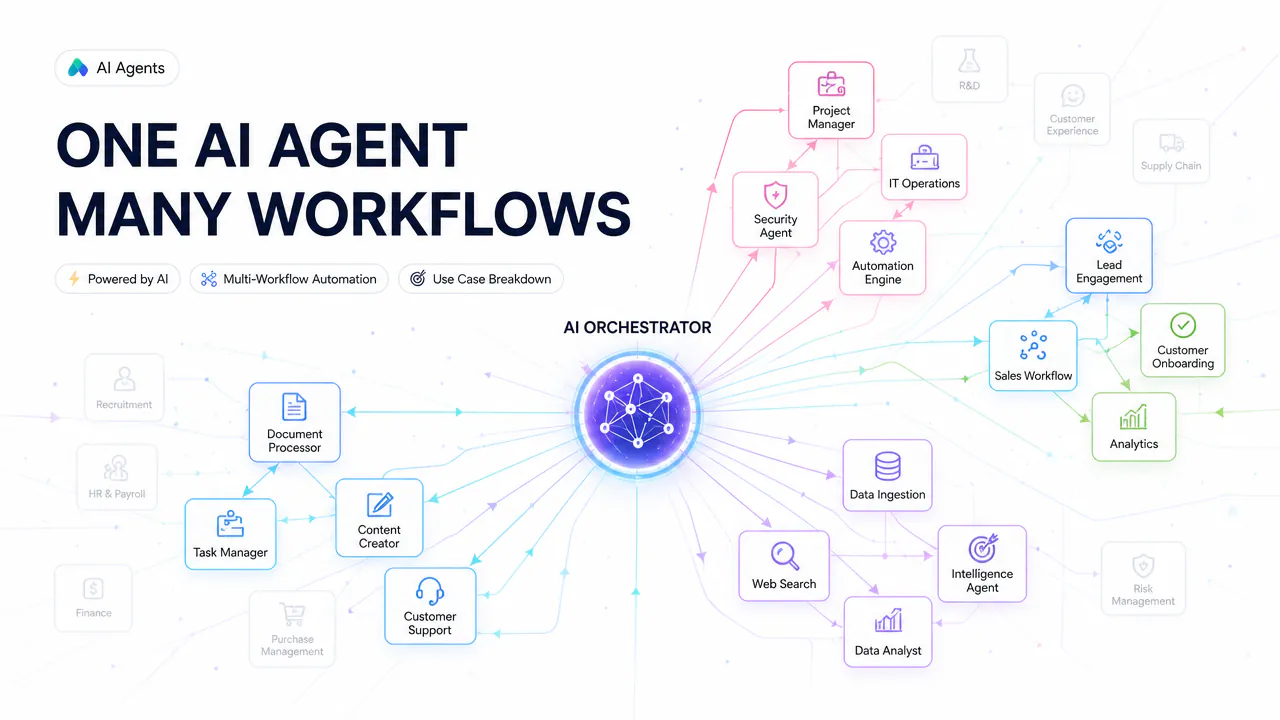
This is what makes these agents useful for businesses. They do more than write text or answer questions. They can handle several steps of a task, use information from different systems, and take actions to complete the work.
Businesses can use artificial intelligence agents in customer service, sales, marketing, finance, HR, IT, software development, operations, research, and many other areas. These AI agent use cases show how businesses can use them to handle real work across different teams. Below, we cover 21 practical use cases and examples, how they work, and when people still need to step in.
What Are AI Agents?
These agents are software systems that can work toward a goal and take action to complete a task. They can understand what a user wants, find the information they need, decide what to do next, and use connected tools to get the work done.
For instance, an employee may want to know why a customer’s order is late. Instead of checking different systems one by one, an agent can do this work. It can check the order, review the shipping details, look at past customer messages, find the reason for the delay, and suggest the next step. If it has permission, it may also take that next step.
But businesses should not give an agent the same level of control for every task. Checking an order or sorting a support ticket is lower risk than sending a payment, changing a contract, or deleting a customer record. Higher-risk actions may need human review and approval before they happen.
Clear rules help keep this under control. Fixed rules can govern predictable steps, while the agent handles parts of the task that require interpretation or reasoning. The system can also control what information the agent can see, which tools it can use, and what actions it can take.
The goal is not to let an artificial intelligence agent do everything on its own. The goal is to give it enough access to complete useful work while keeping important decisions and high-risk actions under human control.
21 AI Agent Use Cases for Businesses
These agents can be used in many areas of a business, but the best use cases share a few common features. They have a clear role in the job, access to the right information, permission to perform certain activities, and a clear point where a person must intervene. NIST has also highlighted identity and authorization as important issues for AI agents that access data, tools, and applications. Its 2026 concept paper discusses identification, authorization, auditing, and controls for agentic AI systems.
Here are 21 practical ways businesses can use them.
AI Agent Use Cases at a Glance
Here is a quick look at the 21 use cases, what the agent can help with, and where human control is most important.
| Use Case | Main Task | Human Control Needed For |
|---|---|---|
| 1. Customer Support and Ticket Resolution | Resolve and route customer requests | Exceptions, sensitive cases, and higher-impact actions |
| 2. Lead Generation and Qualification | Research and score potential leads | Qualification criteria and outreach limits |
| 3. Sales Outreach and Follow-Ups | Prepare follow-ups and update sales records | Discounts, promises, and contract terms |
| 4. Marketing Content Creation | Research, draft, and prepare content | Facts, brand voice, and publication approval |
| 5. Market and Competitor Research | Monitor sources and summarize relevant changes | Trusted sources and important findings |
| 6. Personalized Product Recommendations | Compare products and recommend suitable options | Sensitive or higher-impact customer actions |
| 7. Finance and Accounts Payable | Match invoices and validate payment details | High-value payments and exceptions |
| 8. Accounts Receivable and Collections | Track overdue invoices and support collections | High-risk cases and escalation |
| 9. HR and Recruitment | Support recruiting and employee workflows | Hiring, pay, promotion, discipline, and termination |
| 10. Employee Onboarding | Coordinate onboarding tasks across systems | Sensitive employee data and account access |
| 11. IT Help Desk and IT Operations | Troubleshoot issues and perform approved actions | High-impact system changes |
| 12. Software Development | Plan, code, test, and prepare changes | Major changes and production deployment |
| 13. Data Analysis and Reporting | Analyze data and investigate changes | Important business decisions |
| 14. Document Processing | Extract, validate, and route information | Important documents and exceptions |
| 15. Legal and Contract Analysis | Review contracts and flag risky clauses | Legal obligations and high-risk decisions |
| 16. Supply Chain and Procurement | Monitor operations and prepare purchasing actions | Large purchases and supplier changes |
| 17. Customer Success and Churn Prevention | Identify account risks and suggest next steps | Sensitive conversations and commercial offers |
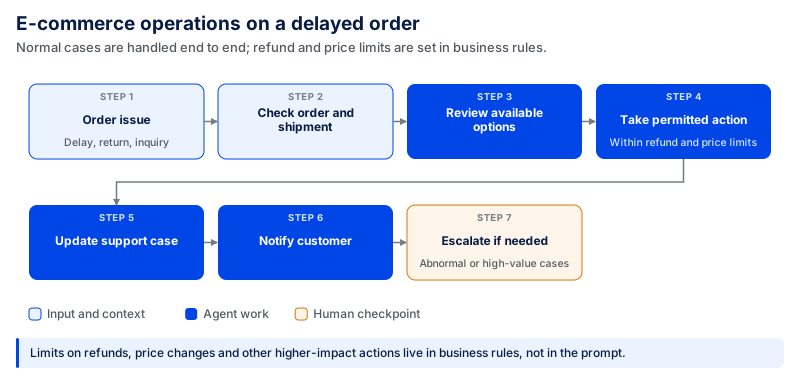
| 18. E-commerce Operations | Manage routine order, return, and fulfillment workflows | High-value or unusual cases |
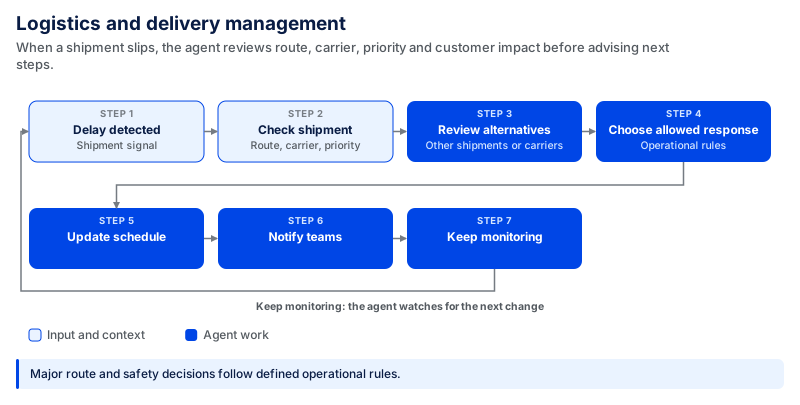
| 19. Logistics and Delivery Management | Monitor delays and coordinate responses | Major route and safety decisions |
| 20. Research and Knowledge Management | Search, compare, and summarize information | Verification of important findings |
| 21. Industry-Specific AI Agent Applications | Apply agent workflows to industry-specific work | Regulated, financial, legal, safety, and other high-risk decisions |
The level of human control should depend on the action, not simply on the use case. An agent may handle low-risk steps independently while pausing for approval before actions with financial, legal, employment, security, or safety consequences.
1. Customer Support and Ticket Resolution
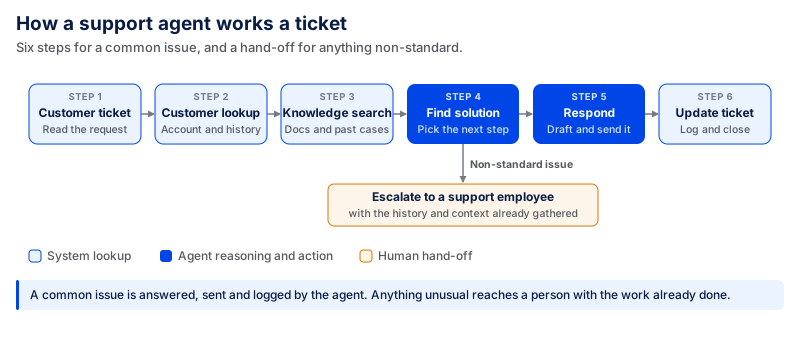
Customer support agents can do more than answer basic questions. They can read a new ticket, understand the problem, check the customer's history, search the knowledge base, and find the right next step.
For a common issue, the agent can provide a reply, send it, and update the support system. If the issue is non-standard or requires a special intervention, it can notify a support employee with helpful information already gathered.
In 2024, Klarna reported that its AI assistant handled 2.3 million customer conversations in its first month and reduced average resolution time from 11 minutes to under two minutes. But the story did not end there. In May 2025, Bloomberg reported that Klarna CEO Sebastian Siemiatkowski said the company's cost-focused use of AI in customer service had gone too far. Klarna began recruiting people again so customers could have the option of human support.
2. Lead Generation and Qualification
Sales teams can spend hours identifying prospects and determining whether they qualify. An agent can review approved sources, gather company and contact information, look at signals such as company size, industry, funding, hiring activity, or other criteria relevant to the ICP, and score prospects by criteria. It can then integrate valuable data into the sales system and push stronger leads higher up the list.
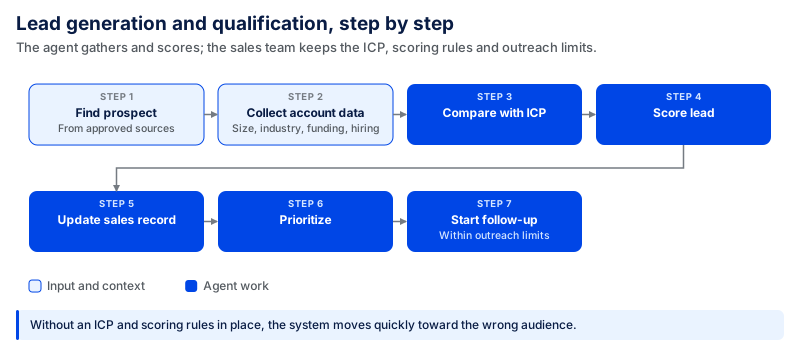
ICP (Ideal Customer Profile), scoring rules, and outreach limits should still be in place. Otherwise, the system may move quickly while targeting the wrong audience.
3. Sales Outreach and Follow-Ups
Much of the selling occurs after a call. Someone has to take notes, keep the record updated, research unanswered questions, follow up, and remember the next steps.
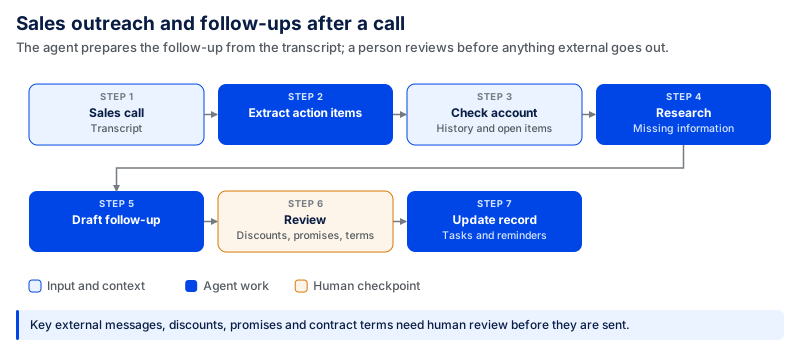
The agent can then process the transcript, retrieve action items, review the account history, research missing information, and write the follow-up based on what was discussed. It can also set up upcoming tasks or meeting notifications.
A similar use case appears in CodingCrafts' AI-powered CRM system, which brings calls, WhatsApp, SMS, and email into one platform while automatically capturing leads and triggering follow-ups.
Before sending key external messages, discounts, promises, or contract terms, human review is required. The agent can handle the preparation and routine follow-up without taking control of every part of the sales process.
4. Marketing Content Creation
A content agent should do more than write a blog post from a prompt. It can assist the broader content process. For example, it can start with a topic, search for relevant information, scan and compare other pages, find reliable sources, create an outline, write a preliminary draft, recommend internal links, verify key arguments, and draft the document for review.
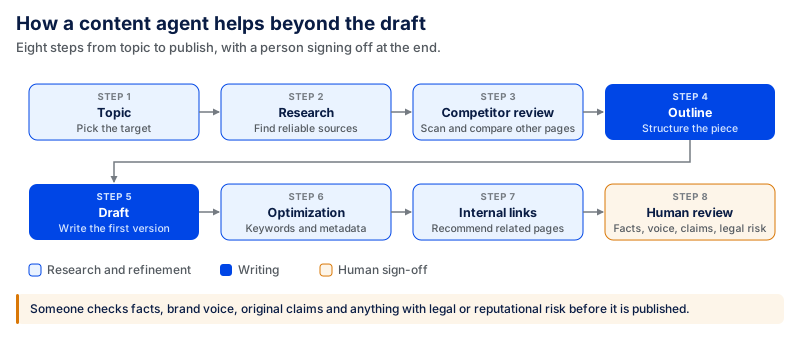
This saves time throughout the content process, not just when writing. But someone should check facts, brand voice, original claims, and anything that could lead to legal or reputational trouble before it is published.
5. Market and Competitor Research
Market research often becomes outdated soon after someone finishes the report. The agent can continue to monitor updates of specific sources. It can track product releases, pricing changes, company announcements, new functionality, market activity, or anything else significant to the business.
It doesn't have to send all changes to the team; it can compare new information with what is already known and flag only relevant updates.
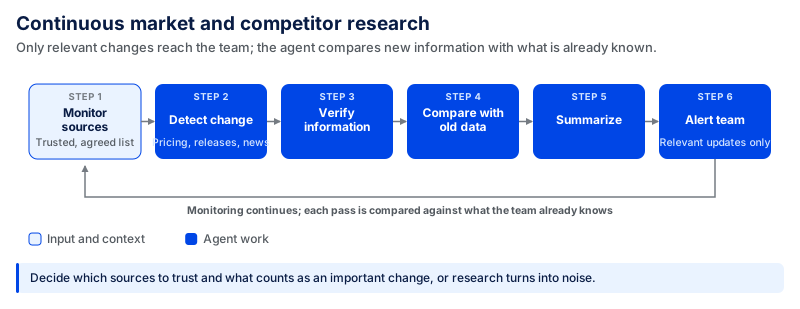
The business needs to identify its sources of trust and what constitutes an important change. Otherwise, the team might end up with more noise than useful research.
6. Personalized Product Recommendations
A conventional recommendation system can recommend products primarily from previous usage. Agents can use more context.
It could consider the customer's current preference, past shopping history, inventory, product information, reviews, budget, location, and more before recommending a choice.
For instance, a customer looking for a laptop could explain their work and budget. The agent can compare appropriate products, verify availability, follow up on questions, and assist with the next steps.
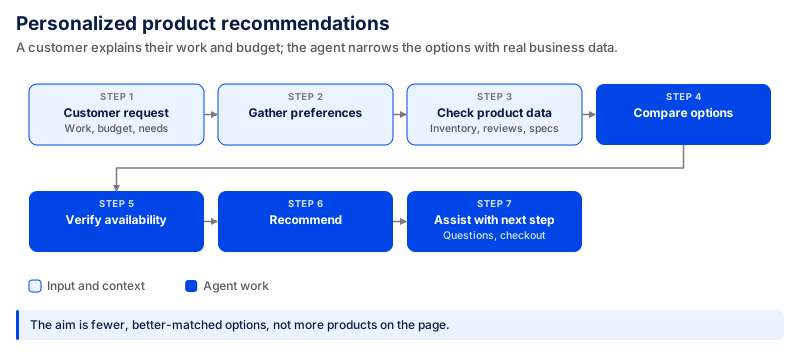
The objective is not to just display more products. It is to refine options based on the customer's actual requirements and existing business information.
7. Finance and Accounts Payable
A considerable amount of checking is required between purchase orders, supplier records, accounting systems, and accounts payable.
An agent can read an invoice, extract key information, locate the matching purchase order, compare amounts, review payment terms, and flag anything that doesn't match. Exceptions can be taken to the finance team, and clean cases can proceed.
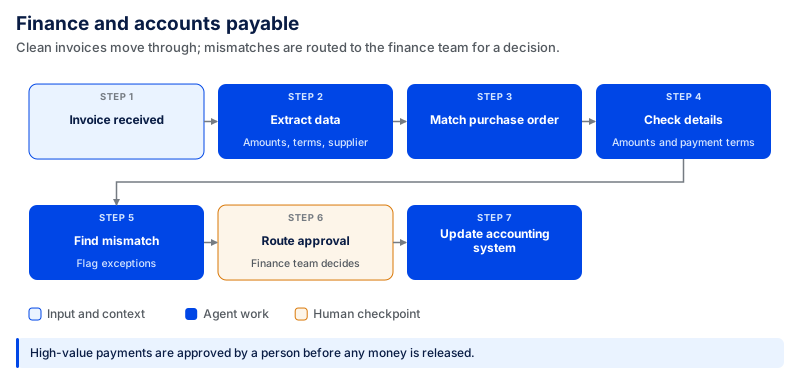
The agent can do most of the preparation, but humans should still clearly approve high-value payments before money is released.
8. Accounts Receivable and Collections
Financial teams can also track money owed by customers through agents. The system can monitor unpaid invoices, determine overdue accounts, review payment history, and prioritize cases for action. It can send or prepare routine reminders and highlight high-risk cases to the finance team.
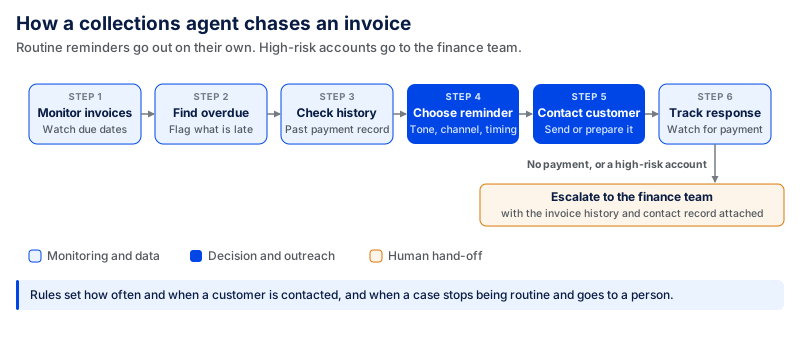
A real-world example comes from Access Intell, which reports that an AI collections agent recovered $417,600.77 across 1,590 invoices for a fresh-food wholesaler within two and a half weeks. The system used human escalation workflows for cases that needed intervention.
This lets teams focus on accounts that need attention rather than manually reviewing each invoice. The rules should govern the frequency and timing of customer contact as well as when a case should go to a person.
9. HR and Recruitment
HR teams have a lot of repetitive work, including communicating with candidates, answering employee questions, and more. An agent can help review resumes against job requirements, identify potential matches, arrange interviews, draft job descriptions, answer approved HR questions, and provide recruiting teams with resume information.
It can also gather data from applicant tracking, HR information, payroll, and employee-support systems and create a summary before a human makes a decision.
IBM AskHR is another example of AI-assisted HR workflows. IBM reports that AskHR supports around 80 automated HR tasks, including employee letters, vacation requests, payroll access, and manager workflows, with a 94% containment rate for common questions and a 75% reduction in support tickets since 2016.
This boundary is important. The agent can structure information and suggest actions, but people may be impacted by hiring, pay, promotion, disciplinary actions, and termination. These decisions require clarity of human ownership. Regulatory requirements can also apply to automated employment tools. For example, New York City's Local Law 144 requires certain automated employment decision tools to undergo a bias audit and requires specified notices before they are used.
10. Employee Onboarding
Onboarding demonstrates the value of agents over a single automation.
Hiring a new employee can require HR, IT, payroll, managers, facilities, training systems, and multiple forms and/or approvals. An agent can help coordinate these steps, rather than having one person chase each team.
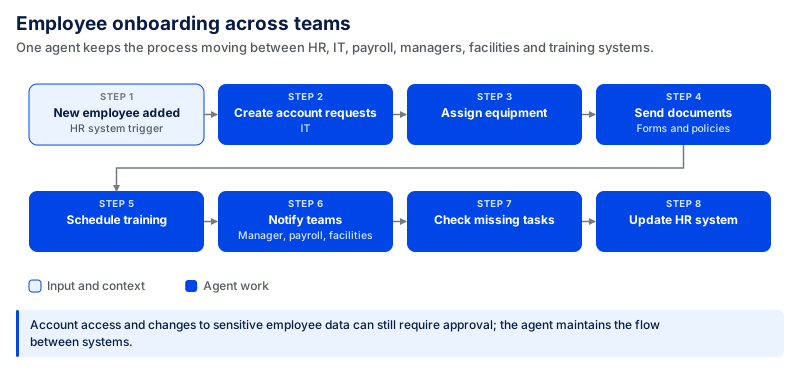
The agent does not need full control of every system. Access to accounts, sensitive employee information, and other key changes can still be approved. The primary advantage is maintaining the entire process flow between systems.
11. IT Help Desk and IT Operations
There are a lot of repeat requests coming in for IT teams, but sometimes it takes more than a help article to answer them.
An agent can categorize an incident, verify device details, search for past incidents, reference technical documentation, and recommend a solution. It can also reset access or perform other common actions for approved, low-risk tasks.
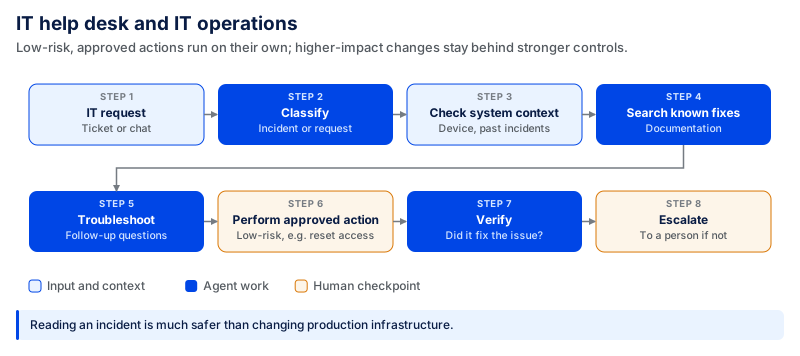
A real example comes from Mobilezone, which built an internal IT service desk agent called Supporto using Microsoft Copilot Studio. Employees can describe an issue in conversation, while the agent asks follow-up questions, distinguishes incidents from service requests, and creates structured tickets in the service desk system. Microsoft reports that the agent now handles all first-level IT service requests across the organization.
Access is important. Reading an incident is much safer than changing production infrastructure. High-impact changes should stay behind stronger approval controls.
12. Software Development
Software agents can now help with more of the development process than code completion.
A developer can assign a well-defined task to the agent. It can view the codebase, identify affected files, schedule the change, add code, run tests, analyze failures, update documentation, and prepare it for review.
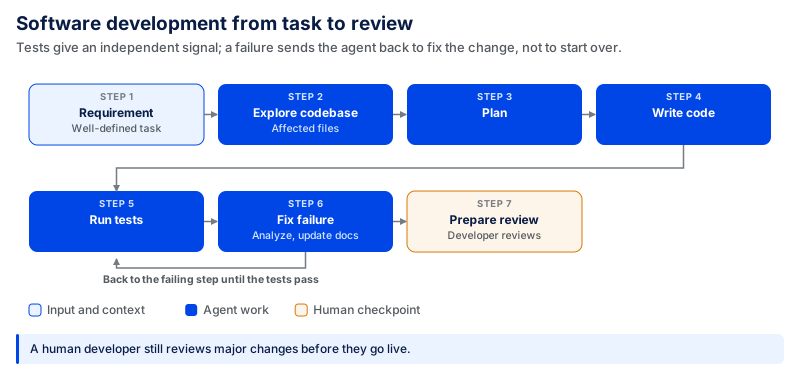
GitHub Copilot coding agent is one example of this approach. Developers can assign it tasks such as fixing bugs, adding features, improving tests, or updating documentation. It works in its own development environment, opens a draft pull request, and then asks a developer to review the work.
Tests provide an independent signal that the change is successful. When a test fails, it can return to the corresponding step without repeating the entire process. It is still important to have a human developer review major changes before they go to production.
13. Data Analysis and Reporting
Many teams already use dashboards. The difficult part is to know why an important number changed.
An agent can gather information from a trusted source, perform an analysis, compare relevant time periods, find unusual patterns, and create a summary. It can also monitor important metrics and initiate an investigation if they move outside a defined range.
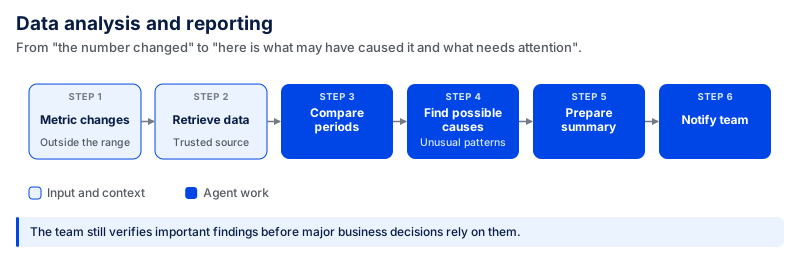
The true value is in shifting from “the number changed” to “here is what may have caused it and what needs attention.”
The team should still verify important findings before using them for major business decisions.
14. Document Processing
Document processing can be agentic if the system performs a useful action with the information it extracts.
An agent can categorize the document, extract key fields, validate information from another system, identify missing content, use known rules to validate, and forward the document to the next appropriate action.
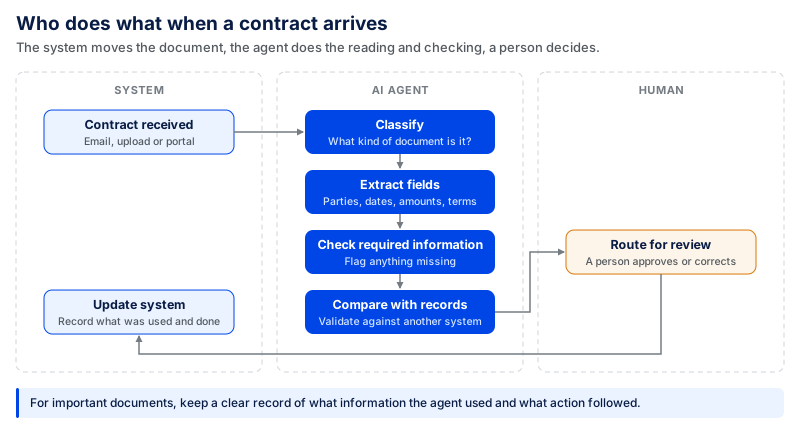
This can work for contracts, invoices, forms, claims, applications, and other document-heavy processes.
For important documents, teams should keep a clear record of what information the agent used and what action followed.
15. Legal and Contract Analysis
Legal teams can use agents to reduce the time spent on first-pass review and research.
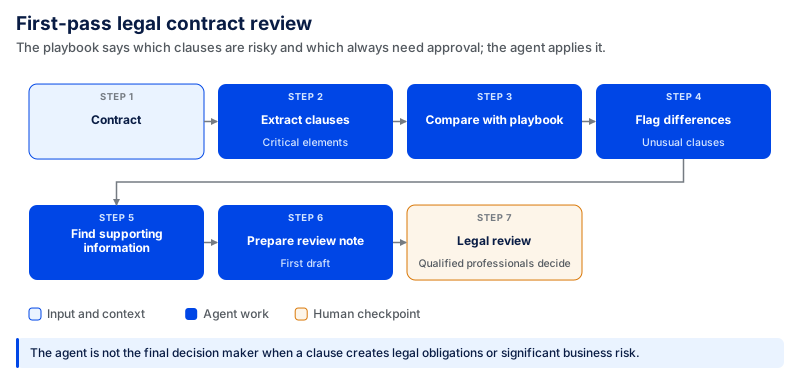
An agent can identify critical elements, compare a contract to an approved playbook, mark up unusual clauses, summarize the differences, search for supporting documents, and create a first draft or review note.
It is most effective when the organization has already established what's important. For instance, the legal department can establish guidelines on which clauses are risky and which are always subject to approval.
NEXT Insurance reports using Ironclad's AI assistant, Jurist, as part of its legal operations. The legal team uses it to review contracts against company policies, support legal research, and draft documents. According to the case study, drafting a termination letter with Jurist cut the legal operations manager's time in half. The company still follows a “trust but verify” approach, with its legal team reviewing the work.
An agent should not be the final decision maker on high-risk legal issues. When a decision creates legal obligations or significant business risk, qualified legal professionals should review it.
16. Supply Chain and Procurement
Supply chains change constantly. Stocks change, suppliers fall behind, prices fluctuate, and unforeseen circumstances can impact delivery.
An agent can monitor inventory, supplier performance, purchase orders, delivery data, and other useful operational signals. If it identifies a problem, it can explore possibilities and plan the next step.
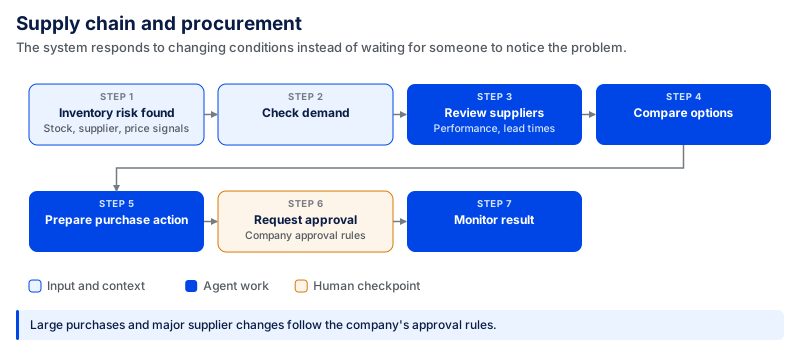
This is useful because the system responds to changing conditions instead of waiting for someone to notice the issue manually. Large purchases or major supplier changes should still follow company approval rules.
17. Customer Success and Churn Prevention
Customer success teams may have the information they need, but it's in different places. An agent can monitor CRM data, product usage, support tickets, billing history, and customer conversations. It can combine these signals and flag the account when usage slows, complaints rise, or renewal is near.
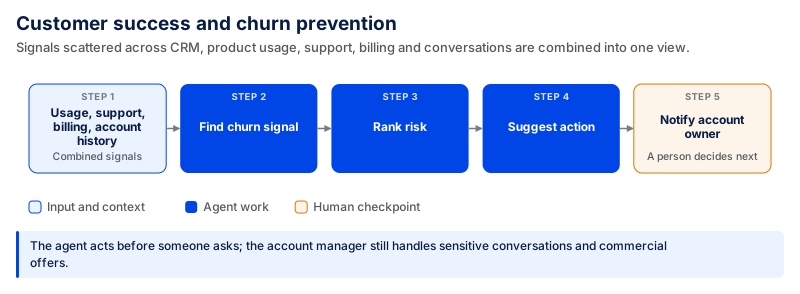
This is different from a normal dashboard because the agent can act before someone asks a question. The account manager still decides how to handle sensitive customer conversations or commercial offers.
18. E-Commerce Operations
E-commerce websites have numerous interdependent workflows for customers, orders, inventory, payments, shipping, and returns.
An agent can review inventory status, respond to product inquiries, manage returns, create approved refunds, monitor fulfillment issues, and monitor price or inventory signals.
For instance, when an order is delayed, the system can access shipment information, review available options, update the support case, and notify customers without requiring an employee to search each system.
SharkNinja uses Salesforce Agentforce to support customers across shopping and post-purchase workflows, including product recommendations, order support, and warranties. Salesforce reports that its agentic service now handles around 20,000 chats per week, while Agentforce Commerce has been associated with a 14% year-over-year increase in items added to cart.
Limits on refunds, price changes, and other higher-impact actions should be defined in business rules. The agent can handle normal cases, and abnormal or high-value cases are transferred to a person.
19. Logistics and Delivery Management
Logistics teams deal with variable routes, delivery schedules, vehicle availability, shipment information, and unforeseen delays.
An agent can monitor these signals and be alerted when they change. When a shipment is delayed, it can review the route, carrier, order priority, alternate shipment or carrier options, and the impact on customers before advising next steps.
Agents can also support fleet monitoring and maintenance by bringing together sensor data, service history, and current operating conditions.
Major route or safety decisions should still follow defined operational rules.
20. Research and Knowledge Management
Employees can spend significant time searching across documents and systems before they can use the information they find. A research agent can search internal documents, compare sources, organize findings, summarize evidence, and monitor approved external sources for new information.
It can also produce weekly research briefings for teams rather than assigning the same team member to search the same information each week.
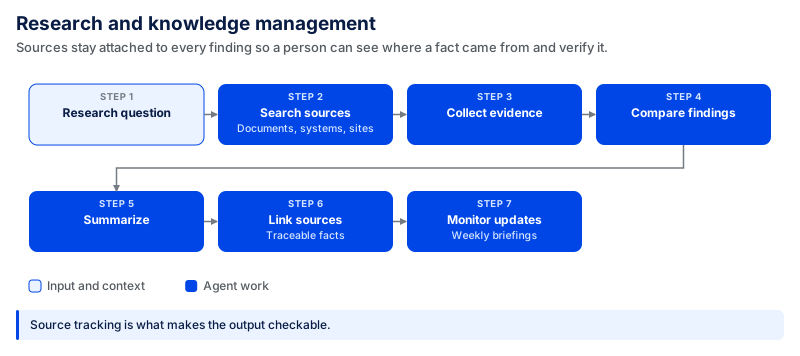
Source tracking matters here. It helps a person see where important facts came from and verify them when necessary.
21. Industry-Specific AI Agent Applications
The same basic idea can work across industries, but the data, actions, and risks change. An agent used to schedule an appointment does not need the same controls as one that reviews a loan or works with factory equipment.
Healthcare
Agents can assist with patient appointments, paperwork management, administrative tasks, research and support, and more.
For instance, an agent could gather data for an appointment, review scheduling availability, pass documents to the appropriate team, and follow up if they are missing.
Healthcare organizations also need to limit access to protected health information where applicable. According to the U.S. Department of Health and Human Services, the HIPAA Privacy Rule generally requires covered entities to make reasonable efforts to limit uses, disclosures, and requests for protected health information to the minimum necessary for the intended purpose, subject to specific exceptions. Diagnosis and treatment decisions should not be treated like normal administrative tasks.
Banking and Finance
Agents can handle fraud review, compliance, customer service, document collection, and loan processing tasks for banks and their financial teams. An agent may compile application history, determine if documents are missing, identify missing information, and submit the application for review.
A similar example is CodingCrafts' AI-powered financing platform, which guides merchants, funders, and sales representatives through loan applications using role-based assistants, document retrieval, automated follow-ups, and controlled negotiation rules.
Rules and qualified human oversight are needed for actions like approving credit, moving funds, or making other important compliance decisions.
Manufacturing
Manufacturers can rely on agents to monitor equipment information, quality data, production plans, maintenance history, and supplier data.
When a machine shows changes in signals such as vibration, temperature, or cycle time, an agent can gather the recent readings, review previous maintenance, determine the likely source of the trouble, and inform the appropriate personnel before the issue escalates.
The agent can assist with decisions, but safety-critical changes should be handled through controlled procedures.
Retail
Retail agents can help with inventory management, merchandising, customer questions, product recommendations, and store operations.
For instance, an agent could identify a popular product performing above expectations, pull the inventory from various stores, forecast future demand, and notify the team or take action to restock.
The value is linking demand, stock, customer behavior, and operations, rather than examining each source individually.
Real Estate
AI agents can support real estate teams with lead qualification, research, customer communication, listing preparation, and follow-up.
An agent can take the buyer's requirements, find matching properties, review listing data, put together a shortlist, and arrange the next meeting.
It can save time on research and coordination, but real estate professionals still have to negotiate, make legal commitments, and make other decisions.
In all of these use cases, the same principle is true; the agent should be granted sufficient access to perform meaningful work, but not more authority than is necessary. Low-risk and reversible actions may be able to run with less review. Money, legal rights, employment, security, safety, and other serious consequences require more human control.
What Makes a Good AI Agent Use Case?
Not every task needs an AI agent. Some tasks are simple and follow the same steps every time. Normal automation may work better for them. AI agents are more useful when a task has several steps, uses information from different places, and needs some thinking before taking action.
A good use case should also have a clear purpose, reliable data, measurable results, and defined limits on what the agent can do without human approval.
Look for Repetitive, Multi-Step Workflows
Start with work that happens often and includes several steps. For instance, solving a support ticket may involve checking the customer account, looking at past cases, finding the right policy, choosing a solution, updating the ticket, and sending a response. An agent can handle these steps as part of one workflow.
But a simple task may not need an agent. If the job only involves moving data from one field to another, normal automation can often handle it faster and at a lower cost.
Choose Tasks Involving Multiple Tools or Systems
Agentic systems are useful when employees need to move between different systems to complete one task. A sales employee, for example, may check the CRM, emails, call notes, and product information before deciding what to do next. An agent can collect this information and bring it together, so the employee does not have to check every system by hand.
The stronger fit is a workflow where access to those systems helps the agent complete useful work, rather than simply gathering information.
Prioritize High-Volume Processes
Workflows that happen many times can be good use cases. Even a small time saving can make a difference when the same work is repeated hundreds or thousands of times.
For example, saving five minutes on a task that happens 1,000 times saves about 83 hours of work, while automating a two-hour task that happens once a month saves much less time.
But volume alone doesn't make a workflow suitable for an agent. The process should also have a clear purpose and be stable enough for the agent to follow.
Choose Workflows with Measurable Outcomes
Businesses should know how they will measure the results before they build an agent. The right measure depends on the work. A support team may look at resolution time or the number of cases solved. A sales team may track qualified leads or meetings booked. A finance team may measure processing time, errors, or the number of cases that still need manual work.
The number of people using the agent does not tell the full story. What matters is whether the agent improves the result of the work.
Make Sure the Agent Has Access to Reliable Data
An agent needs reliable information to make good decisions. If the data is missing, old, or incorrect, the agent may also produce the wrong result.
For example, a support agent may follow every step correctly but still give the wrong answer if it uses an old customer record or an outdated policy.
Businesses should know where the data comes from, how often it is updated, and which source the agent should trust if two systems show different information. Good data is just as important as the model behind the agent.
Keep Humans Involved in High-Risk Decisions
Businesses should also decide how much control an agent needs for each task. Finding information, sorting a ticket, or preparing a draft carries less risk. Releasing a payment, hiring an employee, changing a contract, or changing a production system is different. A wrong action in these areas can have serious results.
Low-risk actions may run without approval. High-risk actions should stop and wait for a person to review them. These limits should be clear before the agent starts working.
A simple rule to follow is:
The best AI agent use case is usually a repetitive, multi-step process where the agent can take useful actions and the result can be measured.
Quick Check: Is Your Workflow a Good Fit?
| What to Check | Good Fit for an AI Agent | May Not Need an AI Agent |
|---|---|---|
| Workflow | Has several connected steps | Has one simple step |
| Frequency | Happens often | Happens rarely |
| Systems | Uses data from different tools or systems | Works within one system |
| Decisions | Needs some thinking before the next step | Always follows the same fixed rule |
| Data | Reliable and updated data is available | Data is missing, old, or unreliable |
| Results | Success can be clearly measured | No clear result to measure |
| Risk | Important actions can be sent for human approval | High-risk actions cannot be separated from unattended execution |
Benefits of Using AI Agents
These agentic systems can help businesses save time and handle work faster, but the value depends on how they are used. The biggest benefits usually come from workflows where employees spend a lot of time moving between systems, checking information, and repeating the same steps.
Reduce Repetitive Manual Work
Many business processes include small tasks that employees repeat every day. They may copy information between systems, check records, sort requests, prepare reports, or follow up on unfinished work.
An agent can take over some of these steps. For instance, instead of asking an employee to review every new support ticket, an agent can read the request, check the customer record, find useful information, and prepare the case for the next step.
In CodingCrafts' AI-powered CRM project, automating lead capture, follow-ups, and communication workflows reduced manual workload by around 50–60%.
This gives employees more time for work that needs experience, judgment, or direct communication with customers.
Improve Operational Efficiency
Business processes can slow down when work moves between several people and systems.
For example, handling a customer request may require one person to check the account, another team to confirm information, and someone else to complete the next action. An agent can connect these steps and keep the process moving.
The benefit does not come from making one step slightly faster. It comes from reducing the waiting and manual handoffs between steps.
Speed Up Response Times
An agent can check information and start working as soon as a request arrives. For example, a customer service agent can review a new ticket, check the customer's history, search for a solution, and prepare a response without waiting for an employee to open the case.
The same CodingCrafts' CRM project reduced first-response time from 2–6 hours to under one minute by automating lead capture and follow-up workflows.
The same idea can work in IT support, sales, finance, and other teams. Faster responses can be useful when delays affect customers or stop employees from completing their work.
Scale Workflows Without Proportional Headcount
As a business grows, the number of support tickets, invoices, leads, documents, and internal requests may also increase.
An agent can help process some of this additional volume by handling routine work before it reaches an employee.
This does not mean an agent replaces the whole team. People are still needed for exceptions, approvals, customer relationships, and decisions that require judgment.
Reduce Errors in Repetitive Processes
Manual work can lead to mistakes, especially when employees repeat the same task many times. Automation can follow the same checks each time. In practice, an agent can compare invoice details with a purchase order, check whether required information is missing, and flag a mismatch before the invoice moves forward.
But automated tools can also make mistakes. Businesses still need validation rules, good data, and human review for important actions. The benefit comes from reducing avoidable manual errors, not assuming the agent will always be correct.
Improve Access to Business Information
Important business information often sits across different systems, documents, emails, and databases. Employees may spend a lot of time searching for it.
These agents can collect information from approved sources and bring the useful parts together. For example, a sales rep could get account history, recent customer conversations, product usage, and open support issues without checking each system separately.
In CodingCrafts' contract review and document analysis project, the system reduced the time spent searching for contract terms and clauses by around 50–60% compared with manual review.
This makes information easier to use, but the agent should only have access to the data it needs for its job.
Enable 24/7 Workflow Execution
Some automated tools can continue handling approved tasks outside normal working hours. They may sort incoming requests, monitor systems, process documents, check for changes, or prepare work for employees to review when they return.
This can be useful for businesses that serve customers in different time zones or run operations around the clock. High-risk actions can still wait for human approval even if the agent continues working on other parts of the process.
Improve Employee Productivity
The main productivity gain comes from reducing the time employees spend on routine coordination. Instead of searching across systems, copying information, preparing basic summaries, and checking the status of every task, employees can use that time for work that needs more attention.
The goal is not simply to make employees complete more tasks. A useful agent should remove unnecessary work and help people spend more time on decisions, problem-solving, and customer or team needs.
Understanding the Limitations and Challenges of AI Agents
These agents can perform complex processes, but they are not always correct. A system may find the wrong information, choose the wrong tool, or take an action that looks correct but does not solve the actual problem. The risk increases with more steps in the workflow because a mistake in one step could impact the following steps.
The table below shows some of the main failure points businesses should plan for before an agent is deployed.
| Failure mode | What it looks like | What reduces the risk |
|---|---|---|
| Wrong information or action | The agent finds the wrong information, chooses the wrong tool, or completes an action that does not solve the actual problem. | Validation checks, clear action limits, testing, and human review for important decisions. |
| Poor or conflicting data | Customer records are outdated, documents are missing, or two systems provide different information. | Trusted data sources, clear rules for conflicting records, and regular data updates. |
| Policy or rule violation | The agent recommends or takes an action that conflicts with a business policy or required process. | Build important business rules into the workflow instead of relying on the model to remember them. |
| Integration or tool failure | An API becomes unavailable, a login expires, or a connected tool returns incomplete information. | Define what the agent should do when a tool fails: retry an approved step, use an approved alternative, stop the workflow, or escalate to a person. |
| Too much access | The agent can modify sensitive records, payment information, or other data that it does not need to complete its task. | Give the agent only the permissions required for its role and require approval for actions that are difficult to reverse or have serious consequences. |
| Successful action, wrong outcome | A tool call completes successfully, but the business problem is not actually solved. | Monitor the data used, decisions made, actions taken, and final business outcome rather than checking technical completion alone. |
| Insufficient human oversight | The agent makes sensitive decisions involving money, employment, legal obligations, security, or other high-impact areas without appropriate review. | Define which actions can run independently and which must stop for human judgment or approval. |
| Higher workflow cost | One task requires multiple model calls, searches, tool actions, retries, or human reviews, making the full workflow more expensive than a single AI request suggests. | Measure cost at the workflow level and include model usage, tools, integrations, infrastructure, retries, and human review where applicable. |
These permission and security risks become more important when agents can call APIs, modify records, or trigger business workflows. We cover these risks in more detail in our guide to AI application security.
Monitoring after deployment is especially important. A completed tool call doesn't necessarily imply a correct business outcome. Teams must observe what data was employed, what choices were made, what steps were taken, and whether the final outcome was correct. This makes it easier to find problems and improve the workflow over time.
Human oversight is still needed, particularly in finance, HR, legal, security, and other sensitive areas. The purpose is not to exclude people from all processes. Businesses need to determine what work the system can execute independently and where human judgment is still required.
Workflows can also become more complex, which increases cost. A useful cost estimate should therefore consider the whole workflow rather than only the price of one model request. This can include model usage, searches, connected tools, infrastructure, retries, and human review.
Businesses should not give up on AI agents because of these challenges. They show that a good model alone is not enough for a successful use case. These systems work more reliably in real business processes when good data, clear rules, limited access, reliable integrations, monitoring, and human review are in place.
How to Choose the Right AI Agent Use Case
Businesses should not start by asking where they can use a smart agent. They should first look at the work their teams are already doing. The goal is to take a possible use case and understand how it works today, what the agent would need to do, what could go wrong, and how success would be measured.
The following steps can help businesses decide which use case makes sense. For a deeper look at moving from a use case to architecture and production, see our guide on how to create AI agents.
Step 1: Identify Repetitive Workflows
Start with tasks that happen often. A support team may answer similar customer questions every day. A finance team may check hundreds of invoices each month. A sales team may spend hours checking leads and sending follow-up messages.
Use this first step to create a shortlist rather than deciding immediately what to automate. Focus on workflows where repeated manual work takes meaningful time or slows down the process.
But not every repetitive task needs an automated system. If a task is simple and always follows the same rule, normal automation may be enough.
Step 2: Map the Current Process
Start by mapping how employees complete the workflow today. Write down each step from the beginning to the end. Check what information employees need, where they get it, which tools they use, and when another person becomes involved.
Take invoice processing as an example. An employee may receive an invoice, find the purchase order, compare the details, check for missing information, send it for approval, and update the accounting system.
Once the process is clear, it becomes easier to see which steps the system can handle and which should stay with a person.
Step 3: Identify Decisions and Actions
Now look at what happens at each step. Some steps only involve finding information. Others require a decision or an action.
In customer support, the system may check an order and read the refund policy. It may then need to decide whether the customer meets the refund rules. After that, it could prepare a response or send the case to a manager.
Separate these steps into three groups: what the agent can read, what it can decide, and what it can change or trigger. Businesses should know which decisions the system can make and which still need a person.
Step 4: Determine Which Systems the Agent Needs to Access
The system needs access to the right information to complete the task. For customer support, this may include order details, customer records, support tickets, and company policies. For sales, it may include account details, emails, call notes, and product information.
But it should not have access to everything. If the job only requires checking an order, there may be no reason to allow changes to payment information. Access should match the work the system needs to do.
Step 5: Assess Risk
Businesses should also think about what could go wrong. Some mistakes are easy to correct. If the system prepares a poor summary, an employee can change it. Other mistakes can cause bigger problems.
Sending money to the wrong account, changing a contract, deleting customer information, or making the wrong change to a live system can be much harder to fix. Assess both the impact of a wrong action and how easy that action would be to reverse. The more serious the possible result, the less control the system should have on its own.
Step 6: Define Human Approval Points
Next, decide when a person needs to check the work. The system may be able to search for information, sort requests, check records, or prepare drafts without asking for approval each time.
But some actions should stop before they happen. A payment may need approval from the finance team. A contract change may need legal review. A hiring decision should stay with the people responsible for hiring.
A person does not have to check every step. Use the risks identified in the previous step to decide exactly where the workflow should pause for review or approval. Add human review where a wrong decision could cause a serious problem.
Step 7: Choose KPIs
Businesses also need a simple way to check whether the new process is actually helping. The measure should match the problem they wanted to solve.
A support team may check how long it takes to solve a ticket. A finance team may look at invoice processing time or the number of errors. A sales team may track qualified leads, meetings booked, or time spent on follow-ups.
Record the same KPIs for the current process before introducing the agent. This creates a baseline for comparing the results later. If the work takes less time, needs less manual effort, or produces better results, the business can clearly see what has improved.
The right use case should solve a real problem. If the team cannot explain what should improve and how they will measure it, the use case may need more thought before development starts.
Have an AI Agent Use Case in Mind? Let’s Build It
A good AI agent starts with a real business problem. Start with a repetitive, multi-step workflow, map the systems and data involved, define what should improve, and decide where human approval is needed. These steps make it easier to see whether an agent is the right solution before development begins.
We can help you implement that idea at CodingCrafts. We start by learning about your existing process, systems, and what you want to automate. We then design and develop a solution that integrates with how your business operates.
For example, we built a contract review and document analysis platform with AI-assisted analysis and anomaly detection. The platform reduced the time spent searching for specific contract terms and clauses by 50–60% compared with manual searching.
Frequently Asked Questions
What Are the Most Common AI Agent Use Cases?
Common AI agent use cases include customer support, sales follow-ups, lead qualification, finance, HR, IT support, software development, document processing, research, supply chain management, and e-commerce operations. The best use case depends on the workflow, available data, required actions, and level of risk.
How Do I Know If a Workflow Needs an AI Agent?
A workflow may be a good fit when it happens frequently, includes several connected steps, uses information from multiple systems, and requires some reasoning before an action is taken. If the task always follows the same fixed rule, normal automation may be simpler and less expensive.
What Is the Difference Between an AI Agent and a Chatbot?
A chatbot mainly responds to questions or prompts. An AI agent can go further by using tools, retrieving information, making decisions within defined limits, and taking actions across a workflow. For example, instead of only explaining a refund policy, an agent could check the order, verify the policy, prepare the refund, update the support ticket, and send the case for approval if needed.
How Long Does It Take to Build an AI Agent?
The timeline depends on the workflow, integrations, data quality, security requirements, and level of autonomy. A focused proof of concept can often be tested within a few weeks, while a production system involving several tools and approval rules usually takes longer. CodingCrafts typically targets around six weeks to the first AI proof of concept, depending on scope.
How Much Does It Cost to Build an AI Agent?
The cost depends on what the agent needs to do, how many systems it connects to, the models it uses, security requirements, and how much testing and monitoring are required. Businesses should consider the full cost of the workflow, not just the price of individual model calls. For a detailed breakdown, see our guide on how to create AI agents, which also covers AI agent development costs.
Pick the Use Case, Then Prove It
CodingCrafts maps your workflow, builds a proof of concept on your real data in two to six weeks, and only then commits to a production build.