
HR teams spend a significant share of their time on administrative work. A Deloitte and ServiceNow paper reported in 2020 that HR staff spent a median of 57% of their time on administrative tasks. SHRM's 2025 Talent Trends research also found that 43% of organizations were using AI for HR tasks in 2025, up from 26% in 2024.
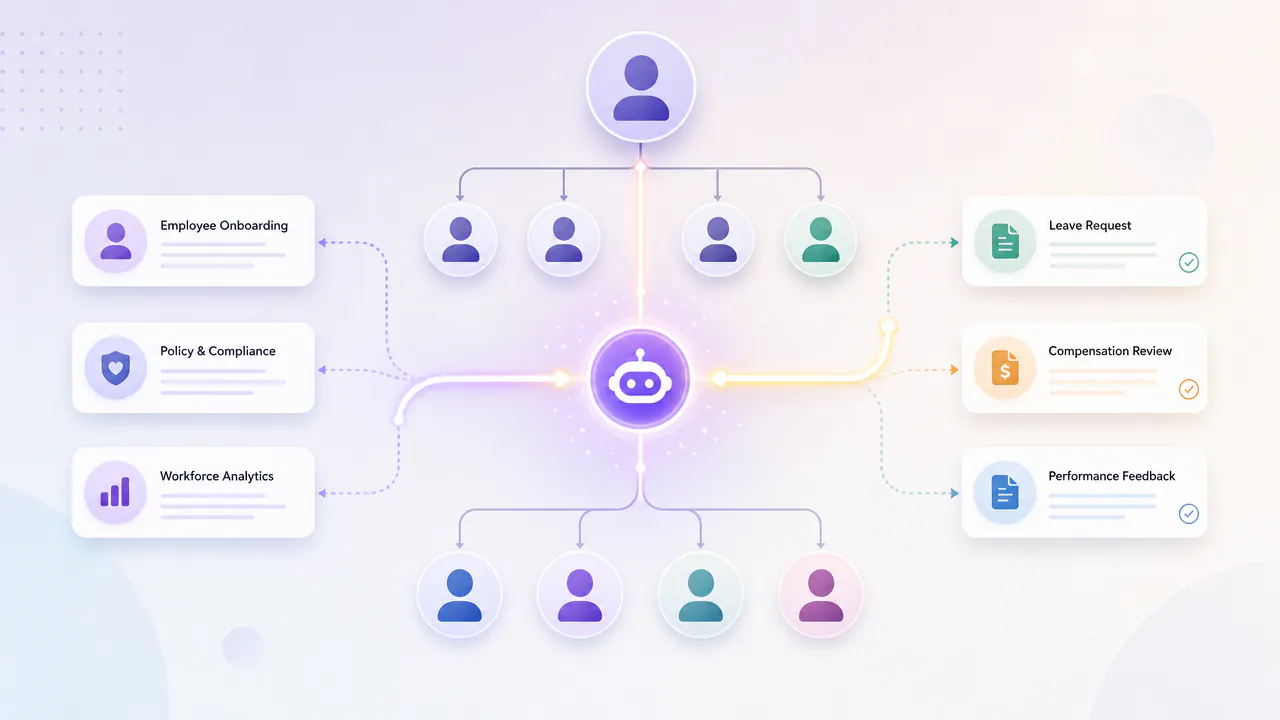
Traditional automation works well for predictable tasks, but it becomes less useful when the next step depends on context or requires coordination across systems. AI agents can go further by finding relevant information, choosing the next step, using connected HR tools, and carrying out approved actions.
Speed alone is not enough. Employees and candidates need to trust how these systems use data and support decisions. Privacy, fairness, permissions, transparency, and human oversight must therefore be part of the design from the start.
This guide explains where AI agents can help HR, when to build or buy them, and how to deploy them in real workflows without losing the human element.
What Are AI Agents for HR?
Artificial intelligence agents for HR are software programs that can understand a goal, research the information they require, decide what to do next, and use connected HR tools to move a task forward. They can answer questions and take actions, unlike basic chatbots.
For example, an employee might ask, “Can I take leave next Friday?” A chatbot can provide information on the leave policy. An agent can review the appropriate policy, check the employee's available leave, draft the request, send it for approval, and update the HR system once it is approved.
This is one aspect that sets agents apart from conventional HR automation. Traditional automation is based on a set of rules: If this occurs, then do that. Agents can deal with workflows that require them to take a certain action based on the information that they gather. For example, an agent may see that a person needs to upload a document during the onboarding process but fails to do so; it asks the new employee, continues working on the other documents, and informs HR if it still isn't done.
For this, the agent is able to integrate with systems like HRIS (Human Resource Information System), ATS (Applicant Tracking System), payroll systems, benefits portals, company knowledge bases, email, or ticketing. Access should still depend on the user and task. If an employee asks about benefits, they shouldn't suddenly gain access to another employee's compensation or performance data through the agent.
HR agents are particularly useful for repetitive questions, required input, system transitions, approvals, and regular follow-up, for instance, in recruitment, onboarding, employee support and benefits, compliance, and offboarding.
The key point to remember is that the agent does not make the final decision by default. It can retrieve information, organize actions, and coordinate workflows; sensitive decisions about hiring, pay, performance, promotion, or termination should remain with authorized people. The aim is to reduce administrative burden while preserving the human element in decisions involving employees.
Why HR Teams Are Adopting AI Agents
The key value of HR agents goes beyond automating more tasks. They can manage typical tasks in multiple systems while involving HR personnel when judgment, privacy requirements, or employee impact are involved.
Scaling HR Operations Without Scaling Headcount
As the company expands, HR workload increases. More employees mean more onboarding tasks, policy questions, benefits requests, leave requests, system updates, and support tickets.
SHRM's 2025 CHRO Benchmarking data found a median HR-to-employee ratio of 1.98 HR professionals for every 100 employees, up from 1.11 in 2022. That helps explain why reducing repetitive administrative work matters as organizations grow: increasing employee volume can otherwise create pressure to expand HR capacity alongside it.
Some of these repetitive workflows can be handled by agents, so HR teams don't have to manually process each request. For instance, an onboarding agent can gather necessary data, assign tasks, respond to frequent questions, monitor missing tasks, and raise exceptions. This enables HR departments to handle more personnel without allocating additional administrative resources.
Reducing Response Times and Ticket Backlogs
Routine HR requests can often be handled without specialist HR support. Employees may need to complete a routine task, check a status, find a document, or understand a policy. An agent can retrieve the relevant information immediately. If action is needed, it can escalate to the next step rather than just instructing the employee on what to do.
That distinction matters. A helpful HR agent shouldn't just provide information for simple requests; it should resolve them when it can. Sensitive or complex cases can then be referred to the appropriate HR professional with the necessary information gathered.
IBM offers a useful example. Its internal AskHR agent automates more than 80 HR tasks and handles more than 2.1 million employee conversations each year. IBM reports that AskHR contains 94% of common questions within the platform, while only 6% of interactions in 2024 needed to be routed to a specialized HR partner. It has also contributed to a 75% reduction in support tickets since 2016.
Moving HR from Administrative to Strategic
HR professionals can dedicate more time to work that requires human judgment when they're not spending time searching for information, updating systems, or following up on routine requests. Reducing this administrative workload creates more room for work that depends on judgment, context, and direct support for employees and managers.
This encompasses workforce planning, employee development, manager support, employee retention, organizational design, and complex employee issues. Agents can also prepare information for this work, such as collecting relevant context before a manager's 1:1 meeting or finding trends in employee requests.
The purpose is not to get people out of HR. It is to shift repetitive coordination to the agent without removing people from decisions and conversations where human judgment matters more.
Ensuring Consistency and Compliance
Policies that are dispersed across documents, systems, locations, and teams create inconsistency in HR processes. Employees may get different answers depending on who responds to their questions.
The operational impact of better standardization can be measurable. PwC's 2026 research on payroll and HR administration found that two-thirds of organizations reported improved efficiency and reduced payroll errors and compliance risk after consolidating payroll operations.
The policy information and necessary policy workflow steps can be applied more consistently by an agent that is linked to approved and current sources. It can also capture actions, approvals, and escalations as the process progresses.
Consistency is of little value if the information itself is inaccurate. When policies are out of date, or employees have conflicting records, incorrect answers will appear more consistently. HR teams must take the time to review information agents use and ensure controlled knowledge sources and clear data ownership.
Use Cases for AI Agents in HR
The most compelling use cases are workflows that require multiple questions, data collection, system updates, approvals, and follow-ups. The agent takes over the duties, and recruiters, managers, and HR professionals remain engaged in decisions and judgment.
Recruitment and Candidate Screening
An agent may take an application, organize the candidate's information, review the candidate against the approved job requirements, identify any missing information or data, arrange interviews, and prepare a summary for the recruiter.
Track screening time, recruiter overrides, completion rate, candidate progression, and hiring outcomes. Set the pilot target against the organization's existing screening time rather than using a universal percentage reduction. As an external reference point, SHRM's 2025 recruiting benchmarking found that screening and interviewing each take roughly 8–9 days in the recruiting process. The goal should be a measurable reduction from the company's own baseline without lowering the quality or consistency of hiring decisions.
Success should be considered not only through time saved for recruiters but also in other ways. Teams should also track applications completed, human overrides, screening results, and whether different groups of candidates are handled the same way.
Employee Onboarding Orchestration
Coordinating HR, IT, payroll, managers, facilities, and the new employee during onboarding can be challenging. An agent can gather necessary information, set up onboarding tasks, initiate account requests and equipment requests, share policies, check for missing steps, and notify the appropriate users if a step is missed.
The agent keeps the process moving and escalates exceptions, so HR doesn't have to chase every task. Useful measures include time to complete onboarding, tasks still needing completion, HR effort per new hire, and employee engagement in onboarding. Before a pilot, record the current baseline for these measures and set improvement targets for the specific steps the agent will handle. The target will depend on the role, systems involved, approval requirements, and the agent's level of control over the workflow.
The employee experience matters here. In a February 2022 article, Gallup found that only 12% of employees strongly agree that their organization does a great job of onboarding. Faster processing alone is not enough; the workflow still needs to help new employees understand their role, team, and organization, and feel supported rather than processed through an automated checklist.
HR Service Desk and Employee Self-Service
An obvious place to begin is with employee support, as many requests are repetitive and are low risk.
An employee can seek information on parental leave, view an employment document, view the status of an HR request, or navigate to the appropriate benefit policy. The agent gathers data from approved sources and (when allowed) carries out the next step.
This can reduce routine tickets, shorten response times, and free HR personnel to handle sensitive cases. IBM's AskHR shows what this can look like at scale. In 2024, AskHR handled more than 11.5 million employee interactions, with 94% contained within the platform. IBM also reports that its HR automations enable managers to complete HR transactions 75% faster. Measure resolution rate, escalation rate, response time, repeat requests, and employee satisfaction rather than counting chatbot interactions alone.
Performance Management Support
Agents can help managers and employees plan a performance conversation without deciding performance. Before a review or 1:1, an agent may gather agreed objectives, past feedback, completed work, and identified development tasks. It may remind a manager of things that have not been addressed or help an employee prepare their own review.
This helps to minimize the administrative burden associated with performance management and provides managers with more meaningful context when it matters. Employees should know what information is being used and who will have access to the output. When it comes to performance evaluation or ranking, using unauthorized signals to assess performance can rapidly undermine trust.
Benefits Administration and Open Enrollment
During open enrollment and other benefits periods, employees may have questions about eligibility, plans, deadlines, dependents, and enrollment steps. An agent can provide approved plan details, find information relevant to the employee, help with sign-up procedures, alert the employee to missing information, and refer unusual cases to a benefits specialist.
This reduces repetitive support and helps staff complete the process faster. Useful metrics include case volume, resolution time, enrollment completion, missed deadlines, and escalation rates. Benefits workflows can contain health information, dependent and beneficiary details, insurance selections, and other personal information, so access should be restricted to what the employee needs for that specific request.
Compliance Monitoring and Policy Enforcement
HR teams should also monitor workforce requirements, such as training, certifications, policy acknowledgments, and required documentation. An agent can detect missing information, send reminders, retrieve the required information, and escalate unresolved cases. It can also help employees find the current policy instead of searching through old documents or getting answers informally.
This will eliminate a lot of manual tracking and follow-up. The agent should not make any assumptions about legal and employment considerations without appropriate guidance. If a case may affect someone's job or requires legal judgment, it should be escalated to an authorized person.
Employee Offboarding
Offboarding involves much more than logging an employee's last day. HR might have to coordinate payroll, IT access, equipment, benefits, and company records. An agent can initiate the approved checklist; systems and teams are notified, equipment returns are tracked, the necessary paperwork is gathered, and each task is checked off.
This reduces manual coordination and lowers the likelihood of missing an important step. Useful metrics can include offboarding completion time, overdue tasks, access resolution, and manual interventions. For sensitive actions, such as disabling an account or changing payroll records, previously established permissions and approval procedures should be followed.
Internal Mobility and Career Development
Employees have a hard time finding internal opportunities because information about roles, required skills, learning materials, and career paths is spread across multiple systems.
Based on an employee's authorized profile, declared interests, abilities, and open internal positions, an agent can identify relevant internal opportunities. It can also identify areas where employees need to develop new skills, provide learning materials, and support employees in discussing their career goals with their manager.
This can not only save the time and effort involved in identifying opportunities, but also make career information easier to access. A case study published by talent marketplace provider Gloat reports that nearly 90% of Seagate employees registered for its internal talent marketplace within the first 45 days and that 30% of its full-time roles were being filled internally. Track employee adoption, internal applications, completion of development plans, and successful internal moves.
This is a good area to be transparent. Staff should know what information affects recommendations and be able to correct any missing or incorrect information. Otherwise, the system can easily repeat the same career patterns the company has followed in the past and fail to guide employees to new career paths.
HR AI Agent Risk and Autonomy Matrix
The amount of autonomy should correspond to the consequences of incorrect action. This matrix can serve as a starting point for determining where an agent can work without human approval and where it should remain in the workflow.
| Use Case | Risk Level | Recommended Autonomy | Human Approval | Useful Metrics |
|---|---|---|---|---|
| Policy and FAQ support | Low | Read + respond | Usually not required | Resolution rate, response time, escalation rate |
| Onboarding coordination | Low–Medium | Read + prepare + execute routine tasks | Sensitive account or data changes | Completion time, overdue tasks, employee satisfaction |
| Benefits support | Medium | Read + recommend | Sensitive or unusual cases | Resolution time, completion rate, escalations |
| Candidate screening support | High | Read + recommend | Required for hiring decisions | Overrides, completion rate, outcome consistency |
| Performance support | High | Read + recommend | Required for evaluations or actions | Manager usage, overrides, employee feedback |
| Internal mobility | Medium–High | Read + recommend | Consequential decisions | Internal applications, successful moves, overrides |
| Compliance monitoring | Medium–High | Monitor + prepare escalation | Employment-impacting actions | Exceptions found, resolution time, false positives |
| Offboarding | High | Prepare + execute approved routine steps | High-impact actions | Completion time, unresolved access, manual interventions |
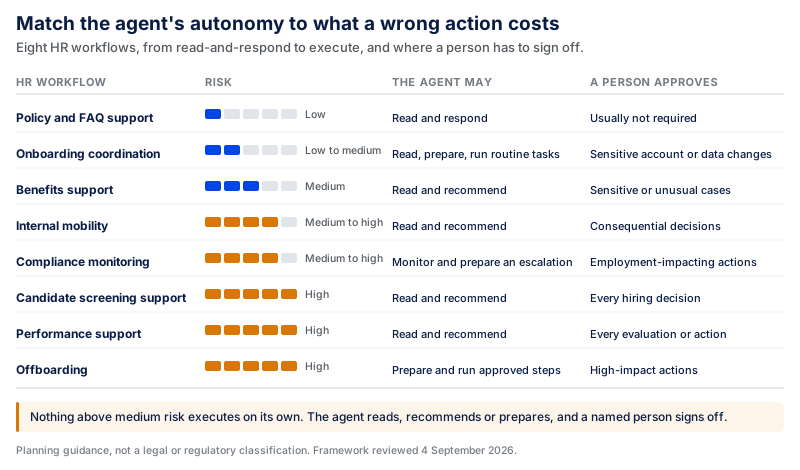
These risk levels are planning guidance rather than a formal legal or regulatory classification. They are based on the sensitivity of the data involved, the action being performed, applicable legal requirements, reversibility, and the potential impact on the employee or candidate. Organizations should reassess the level for their own workflow and jurisdiction.
Framework reviewed September 4, 2026
Build vs Buy: Should You Build a Custom AI Agent for HR?
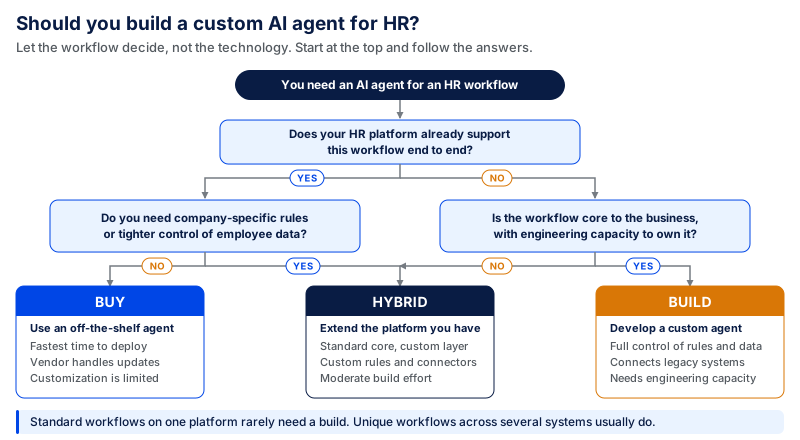
The workflow should drive the build-or-buy decision, rather than the technology. If your HR processes are fairly standard and are already running within a single HR platform, you might only need an existing agent. Custom development can be more beneficial when the workflow spans multiple systems, is subject to company-specific rules, or needs better control of employees' data and actions.
| Factor | Buy | Build | Hybrid |
|---|---|---|---|
| Best fit | Standard HR workflows | Unique or complex workflows | Standard core system + custom workflows |
| Time to deploy | Faster | Longer | Moderate |
| Customization | Limited | High | High where needed |
| Integrations | Best with supported platforms | Can connect legacy and internal systems | Existing integrations + custom connectors |
| Data control | Depends on vendor architecture | Greater control | Shared across vendor and custom layers |
| Business rules | Mostly platform-defined | Fully customizable | Custom rules around existing platform |
| Internal engineering need | Low | High | Moderate |
| Best choice when | Existing platform already covers the workflow | Workflow is specific to the business | Existing platform works but cannot support the complete workflow |
When an Off-the-Shelf HR AI Agent Makes Sense
An off-the-shelf HR AI agent can work well for standard HR service tasks, onboarding, employee requests, and answering policy questions.
It's particularly useful if the integrations you need are already available through your existing HR platform, such as Workday, SAP SuccessFactors, or Oracle Fusion Cloud HCM. It's quicker to deploy, since authentication, APIs, workflows, and basic security controls may already be in place.
The trade-off is flexibility. You might not be able to influence how the agent reasons, what information it uses, how it's customized for your workflow, or how far it can extend beyond the vendor's ecosystem.
When Custom AI Agent Development Makes Sense
Custom development is useful when your HR process isn't standard. For example, it could handle onboarding across an ATS, actions in an HRIS, IT provisioning, payroll, sending information via Slack or Microsoft Teams, and internal approval rules.
It also makes sense where legacy systems exist, where a business has specific workflows or business rules, or where there's a more stringent need for data access and permissions. A custom architecture gives teams greater control over what information the agent can access, what it can do with that information, when human approval is necessary, and what information is logged.
But no amount of customization can fix bad HR data. If employee information is stored across recruiting, payroll, performance, and benefits and is duplicated and inconsistent, the agent will inherit those issues. Therefore, data readiness needs to be assessed before moving to a custom build.
A Hybrid Approach
A hybrid approach can make sense when an existing HR platform covers standard workflows but the organization still needs custom logic, integrations, or controls for specific processes. Teams can keep their existing HR system and capabilities while still creating custom agents for cross-platform workflows or those that require company-specific logic.
For instance, the HRIS can be the system of record, with a custom agent bridging it to internal knowledge, IT systems, payroll, and approval workflows. This prevents the need to re-architect HR processes in mature system architectures and gives the organization more control in areas where it's unique.
The right approach depends on the uniqueness of the workflow and the degree of control needed: buy for standardized workflows, build for differentiated workflows, and use a hybrid for workflows that have a solid foundation in the existing platform but need a more comprehensive employee experience.
How to Implement AI Agents in HR: Step-by-Step Approach
Start with the workflow and the people involved. The objective should not be to automate as much as possible, but to eliminate repetitive tasks and maintain clear controls over employee information and high-impact decisions.
The timeline depends on the workflow, data readiness, integrations, and risk involved. As a practical reference point, CodingCrafts' AI development process puts most focused AI proofs of concept in the 2–6 week range. For an HR agent, that is enough time to test a limited workflow against real data, integrations, and agreed success criteria before committing to a broader production rollout. More complex HR workflows can take longer when they involve multiple systems, sensitive employee data, or additional approval and security requirements.
Step 1: Audit Your HR Workflows
Draw a flowchart of the procedures as they are carried out now. Determine the starting point of requests, the systems holding the pieces, the required HR information, points of delay, and the human judgment required.
Check for repeated work like documentation review, status updates, policy questions, and follow-ups on onboarding and ticket routing. Keep in mind that fragmented systems and poor data already cause problems, and an agent will inherit them.
Step 2: Identify High-Impact, Low-Risk Starting Points
Begin with workflows that have clear value and limited risk. As shown in the Risk and Autonomy Matrix below, policy and FAQ support sits at the lower end of the risk spectrum, while onboarding coordination is rated low–medium. Workflows involving hiring decisions, performance actions, or offboarding require more human oversight because their potential impact is higher.
Establish success criteria before building. These can include faster response times, fewer tickets, fewer manual hand-offs, or higher ticket completion rates.
Step 3: Define Governance and Decision Boundaries
Determine what the agent can read, recommend, prepare, and execute. Keep decisions that impact sensitive workflows with authorized individuals. For instance, an agent can put together a candidate summary, but should not be the final decision-maker on hiring. This also applies to compensation, promotion, performance, and termination.
Fairness, too, is to be taken into account here, not after launch. Examine historical data that will impact the work, who might be affected by the decision, and whether anyone might be treated differently.
Step 4: Choose Your Tech Stack and Integration Points
Determine the systems the agent must interact with, like HRIS, ATS, payroll, benefits platform, identity system, internal ticketing system, or knowledge base.
Don't see integration as just an API problem. Ensure that employee IDs, job titles, departments, manager relationships, and other important employee documentation are uniform across systems. If the data exists in multiple formats, identify the most critical quality issues and resolve them before building on top of it.
Step 5: Build, Test, and Deploy a Pilot
Keep the first version narrow. Use realistic employee inquiries, missing paperwork, contradictory policies, strange requests, permission issues, and circumstances that need to be escalated.
Critically assess more than technical performance. Review whether the agent accesses the correct information, follows the proper access rules, can clearly explain how it accessed it, and passes sensitive cases to the appropriate party.
Incorporate staff or managers into testing if applicable. If they don't understand what the agent is doing or trust it enough to use it, the pilot is not ready to scale.
Step 6: Measure, Iterate, and Scale
Once launched, monitor operational and human signals. Measures such as response time, resolution rate, escalation rate, manual overrides, workflow completion, employee satisfaction, and repeated use are helpful to consider.
Pay extra attention to access failures, wrong answers, out-of-the-ordinary activity, and changes in HR data. Update the test set with actual production failures to prevent future changes from causing the same issues.
Scale only when the workflow is measurable, dependable, and trustworthy. Rethink permissions, integrations, and evaluation, and reuse what works in new use cases.
Security, Privacy, and Governance for HR AI Agents
HR agents have access to employee records and can impact work processes with regards to hiring, compensation, performance, benefits, and offboarding. This means security must go beyond simply protecting data. Teams must define what an agent can see, what it can do, when a person needs to approve an action, and how the result can be reviewed after the action is performed.
Protect Employee and Candidate Data
HR systems have PII, compensation information, performance records, benefits, candidate information, and other sensitive records. Only information that is necessary for an agent's task should be provided to the agent.
Access can be limited by purpose, not only by role. A manager may have access to an employee's role, team, work schedule, leave status, goals, and performance information, but that does not necessarily mean that a performance-support agent must have access to compensation, benefits, medical information, or unrelated personal information. Specify what data workflows can access and avoid data that is gathered for one purpose being used for another purpose without appropriate controls. Prompts, retrieved documents, memory, and logs are subject to the same rule. Unless it is part of a workflow, sensitive data should not be replicated into them.
Role-Based Access Control
An agent should not be a "shortcut" to current HR permissions. The system should check the identity of the requester and what they are allowed to do before allowing them to retrieve or change a record.
For instance, staff may be able to review their own data, managers may have access to limited information about their teams, and HR administrators may have broader access to information. The agent should maintain this. Permissions should also be checked at the time of action, in addition to checks at the beginning of the user's session. This is important if more than one system/action is involved in a workflow.
Human Approval for High-Impact Actions
Each HR action will have varying impacts. Finding a policy is low risk. Rejecting an applicant, changing their pay, revising their performance history, or starting an offboarding process are not.
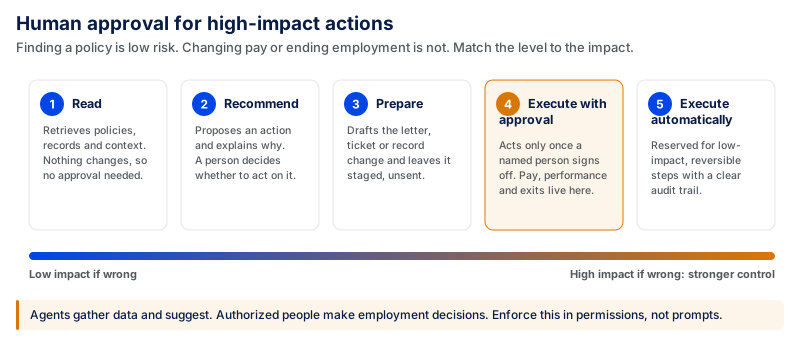
The greater the impact, the stronger the control will need to be. Agents can gather data and make suggestions; authorized individuals make final employment decisions. These boundaries should be enforced in application logic and permissions, not through prompts that instruct the agent to do or not do something.
Auditability and Logging
HR should be able to trace a critical workflow from start to finish. That includes the original request, data retrieved, any tools used, any recommendations made, any approvals received, records changed, and any errors and escalations. This matters if an employee doubts a result or HR has to investigate a mistake.
Logging must also include privacy controls. If teams record all prompts and responses, this creates an additional source of sensitive employee information that must be protected, even when those prompts and responses are needed for audit purposes.
Preventing Hallucinations
An incorrect response about leave, benefits, compensation, or company policy can impact an employee. Produce grounded responses from accepted, existing HR sources, and explain what happens if the system cannot locate adequate, reliable information. The agent can also include the policy or source it used for important answers, which helps employees and HR teams verify the information. If there isn't enough confidence or evidence, the right thing to do is escalate, not guess.
Bias and Fairness
Automation doesn't mean that an HR process automatically becomes neutral. Data from past hiring, promotion, compensation, and performance decisions may include individual judgments that can create unfair patterns in future recommendations.
This is why fairness should be explored when developing the workflow, not as a final compliance step. Teams need to discuss what data they use for recommendations, test results within the relevant population, monitor outliers and unusual patterns, and revise the process as production data evolves.
There should also be a suitable process for correcting incorrect information or escalating consequential outcomes for employees or candidates. Even the most “accurate” of systems can lose trust if employees and candidates can't understand or challenge what is being done with information about them.
Regulatory and Employment-Law Considerations
Requirements vary by jurisdiction, industry, data type, and use case. A policy-answering agent doesn't carry the same level of risk as a system used to screen candidates or assess employees.
Organizations also need to consider laws that specifically address automated employment decisions. New York City Local Law 144, for example, restricts the use of covered automated employment decision tools unless a bias audit has been completed within the required period, information about that audit is publicly available, and required notices are provided to employees or candidates.
Federal employment protections also continue to apply when AI is involved. The U.S. Equal Employment Opportunity Commission (EEOC) specifically identifies uses of AI in areas including recruiting, hiring, monitoring, promotion, pay, layoffs, and termination as situations where employment discrimination protections can apply.
For organizations operating in the EU, the EU AI Act (Regulation (EU) 2024/1689) classifies certain AI systems used in employment and worker management as high-risk, including systems used for recruitment or selection and systems that affect decisions about employment relationships, task allocation, or worker monitoring and evaluation.
For organizations with employees or candidates covered by the GDPR, HR agents must also follow data-protection rules when processing personal information. A lawful basis for processing is required, and data collection and use should be limited to what is necessary for a specific purpose. Additional protections apply where appropriate for special-category data. A data protection impact assessment (DPIA) may also be necessary if the processing is likely to pose a high risk to the rights and freedoms of persons, such as some automated evaluation and profiling uses. The GDPR also limits automated processing for making decisions that have legal or similarly significant consequences for the data subject.
For consequential workflows, engineering should involve HR, security, privacy, legal, and compliance teams early. They need to discuss what information is suitable and appropriate to use, when decisions should be made by people rather than by a computer, whether records should be kept, and how employees or candidates can raise concerns about the process.
Simply put, the more sensitive the data, and the more likely it is to be affected by an agent's actions, the more restrictive the boundaries, permissions, human oversight, testing, and auditability should be.
How Much Does It Cost to Build an AI Agent for HR?
There is no fixed price for building an HR agent. The development budget depends on what the agent needs to know, which systems it connects to, what actions it can take, and what controls those actions require.
| HR Agent Type | Estimated Development Budget | Typical Scope |
|---|---|---|
| Basic HR Knowledge Agent | $8,000–$25,000 | Policies, FAQs, employee handbook, RAG-based answers |
| Workflow Automation Agent | $25,000–$75,000 | Knowledge + APIs + actions + approvals |
| Enterprise HR Agent Platform | $75,000–$250,000+ | Multiple workflows, systems, business units, and permission levels |
These planning ranges are aligned with CodingCrafts' published AI agent development estimates. CodingCrafts estimates $5,000–$20,000 for a simple, single-purpose agent; $20,000–$60,000 for a custom agent with integrations; and $60,000–$250,000+ for a complex or multi-agent system. Enterprise agent platforms can start around $250,000+. These are general AI-agent development estimates, not fixed HR-agent prices, so the actual budget depends on the workflow and implementation requirements.
For broader market context, Clutch's AI Development Pricing Guide lists $10,000–$49,999 as its common AI development project range, while the average reviewed project cost is about $120,595. The higher average shows why the common range should not be treated as an average project price. These figures cover AI development broadly rather than HR agents specifically, so they are useful as market context rather than direct HR pricing benchmarks.
Basic HR Knowledge Agent
The agent answers questions based on RAG content from approved sources like employee handbooks, HR policies, benefits documents, or internal FAQs.
Preparing the knowledge base, establishing reliable retrieval, controlling access, and ensuring answer quality are the most important tasks. Operational costs depend on model usage, retrieval, storage, and infrastructure. For example, AWS charges for these pieces on a per-use basis.
Workflow Automation Agent
The more it must act on the information it finds, the more it costs. For instance, an onboarding agent may interact with an HRIS, generate IT requests, update employee records, provide reminders, and request approval prior to sensitive actions.
That translates to more engineering work involving APIs, user authentication, permissions, approval workflows, error handling, testing, and monitoring. Microsoft's agent infrastructure cost model is similar: the total cost of an agent is the sum of the costs of the models, tools, connectors, and data services the agent uses.
Enterprise HR Agent Platform
An enterprise platform can enable multiple workflows across recruiting, onboarding, employee support, benefits, performance, and offboarding. It may also need to work across multiple business units, regions, HR systems, and permission levels.
The model is only one part of the investment here. A lot of the effort is in data engineering, system integration, identity and access controls, guardrails, evaluations, audit trails, observability, security, and production infrastructure. This is reflected in how AWS prices its AgentCore service, with runtime, memory, identity, observability, evaluation, and other agent service costs split out.
These ranges are intended for preliminary budgeting, not quoted prices. Two HR agents that look similar to employees can require very different amounts of engineering work. One may use only two APIs and clean data, while another may need multiple legacy-system integrations, granular permissions, approval workflows, and controls around sensitive employee actions. The first step to estimating the budget is to create the workflow map; the second step is to determine the cost of integration, security, testing, deployment, and reliable operation.
How CodingCrafts Builds AI Agents for HR
Creating an HR agent is not as simple as plugging an LLM into corporate policies. CodingCrafts' business process automation service covers HR and onboarding workflows, system integration, approval routing, data processing, and monitoring.
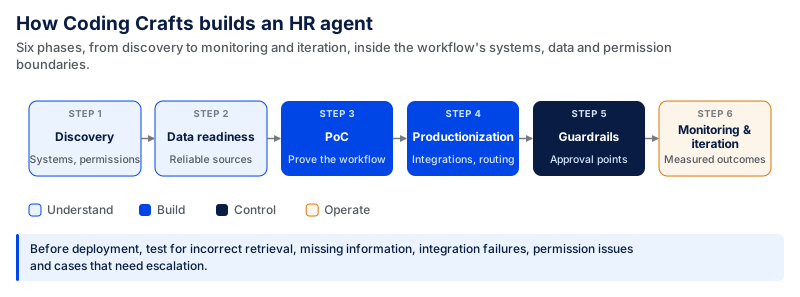
For an HR agent, we work within the workflow's systems, data, and permissions boundaries. This involves establishing reliable data sources, integrating with other business and HR systems, specifying the actions the agent can take, and routing sensitive decisions for human approval.
The workflow should also be tested before deployment for incorrect retrieval, missing information, integration failures, permission issues, and situations that need escalation. The specific architecture will vary based on the organization's HR environment, data quality, risk, and desired level of automation.
While it is not an HR-agent deployment, a CodingCrafts healthcare credentialing project shows how this approach works in an onboarding workflow. The platform had to coordinate provider information and documents, validation, admin review, status tracking, and follow-ups across a centralized workflow.
Before the new platform, onboarding took around 2–4 weeks, and admin teams spent 20–30% of their time following up on pending forms, missing documents, and status updates. After implementation, onboarding time fell to about 1–2 weeks, manual follow-ups dropped by 30–45%, and incomplete submissions decreased by around 25–35%.
An HR agent would involve different systems, data, and decisions, but the same principle applies: the workflow underneath the AI needs reliable data, clear permissions, defined approval points, and measurable outcomes.
CTA:
Build a production-ready AI agent for your HR workflow → Talk to CodingCrafts | Custom AI Development Services
FAQs:
What is the timeline for developing an AI agent for HR?
A focused AI agent proof of concept typically takes about 2–6 weeks based on CodingCrafts' published AI development process. A production deployment can take longer depending on data readiness, integrations, security requirements, approvals, and the complexity of the HR workflow.
Does an HR AI agent integrate with Workday, SAP SuccessFactors, Oracle HCM (Human Capital Management), or an ATS?
Yes, if the platform offers the appropriate APIs or other supported connection methods. Linking the systems is just the beginning, though. Records, identities, permissions, and business rules must also be consistently maintained across those systems for the agent to use them reliably.
What if an HR agent provides a wrong answer?
The workflow should specify what to do if the agent is unsure or lacks sufficient reliable information. It shouldn't guess, but should escalate to the proper person. These failures should also be recorded and included in the agent's test set, which will be used in future tests to identify the same failure. For sensitive questions, the agent must use approved HR sources and provide the source when verification is required.
Should AI agents be used to make hiring or performance decisions?
Intelligent agents can assist in collecting information, organizing evidence, generating summaries, and suggesting recommendations. However, hiring, performance, compensation, promotion, or termination decisions should remain the prerogative of authorized individuals. Human approval should also be obtained with input from HR, legal, privacy, and compliance departments.
An HR Agent Your People Can Trust
CodingCrafts builds HR agents with role-based access, approval steps for pay and employment decisions, and audit trails from day one.