
A software idea is just the start. Turning it into a real product takes planning, design, development, testing, and feedback. If the team makes the wrong choices early, it can lead to more work, higher costs, and delays later.
A clear process can help avoid these problems. The Project Management Institute’s 2025 Success Report found that 54% of software product development projects were successful in its combined 2024–2025 data. Another 37% had mixed results, while 9% failed.
Software product development covers the whole process of building a product. It starts with finding a real problem to solve. The team then decides what to build, designs the product, develops and tests it, launches it, and improves it over time.
In this guide, we explain each step of software product development. We also cover costs, timelines, development methods, and common problems that can affect a project.
What Is Software Product Development?
Software product development is the process of turning an idea into a working software product. It spans planning and design through development, testing, launch, and ongoing updates.
Writing code involves more than the process itself. Teams first need to understand the users and the problem they want to solve. They then select the right features, design the product, build it, test it, and prepare it for launch. After launch, they use results and feedback to determine what to improve next.
This lifecycle approach is also reflected in the ISO/IEC/IEEE 12207 standard for software lifecycle processes, which provides a common framework for managing software across its lifecycle, from its initial concept through development, operation, maintenance, and eventual retirement.
A software product may be a SaaS platform, mobile application, website, or internal business system. Regardless of the product, the job isn’t done at launch. It needs regular updates and improvements as user needs change.
Now, let’s look at the main stages of software product development.
Software Product Development Process
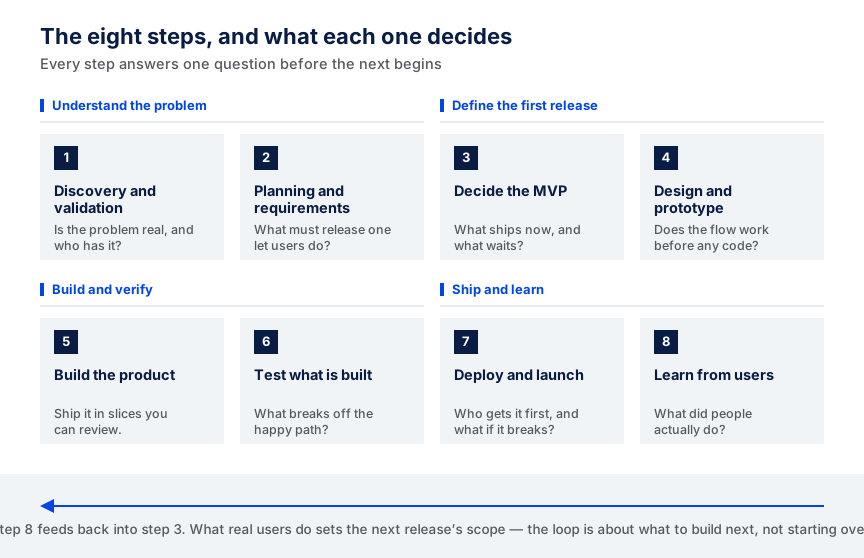
A product does not go straight from an idea to development. First, you have to do some work. You will need to find out if the idea is a solution to a problem, determine what the first version should look like, and determine how it will be constructed.
The following steps are a clear path for teams from concept to product release.
1. Product Discovery and Validation
If you want to talk about screens or features, you need to know if the problem is worth solving.
Who has this problem? What is their current situation? Would they use or pay for a better solution? A detailed feature list should come after these questions.
Teams can talk to prospective users, research rival products, conduct surveys, or conduct an early concept test. The goal is to confirm demand before spending months building.
Recent failure data shows what can happen when that early validation is weak. CB Insights analyzed 431 VC-backed companies that shut down since 2023. Of the 385 companies with an identifiable failure reason, 43% struggled with poor product-market fit. CB Insights also found that two-thirds of those product-market fit failures were early-stage companies that never found a market.
Consider an appointment-booking application, for instance. Discovery could start with interviews with small clinics and their patients. If you’re having trouble with repeated calls, missed appointments, and manually scheduling, the team has a specific challenge they can address.
2. Planning and Requirements
The booking idea now needs clear boundaries.
The team agrees on what the users should be able to do, and what the first release should do. Requirements must be sufficiently well-defined for designers and developers to be able to work from them without having to anticipate all the future requirements.
Patients might need to sign up for an account, view available appointments, schedule an appointment, cancel, and receive booking confirmation. The clinic staff might need a basic schedule management solution.
This is also the time to find hidden technical work. For example, sending reminders may require an SMS or email service that should be included in the scope from the start.
3. Decide What Goes into the MVP
Not all planned features should be included in the initial release.
A minimum viable product (MVP) focuses on the main problem the product is meant to solve. It gives real users something to play with, helping them get familiar with the product before it is fully complete.
For an appointment app, version one could include account creation, available time slots, booking, canceling, and notifications. There’s no need to delay loyalty points, detailed reports, or advanced patient profiles.
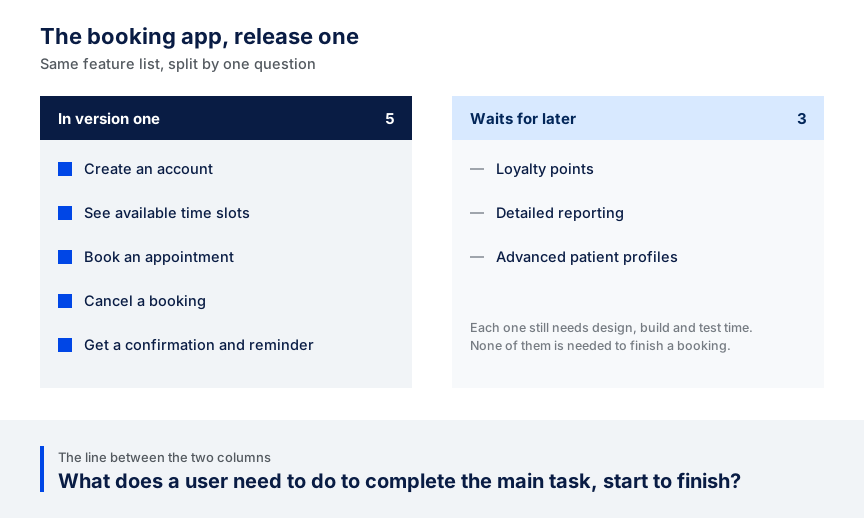
The question is simple: What does a user need to do to complete the main task from start to finish?
Start there.
4. Design and Prototype the Product
Now put that booking journey on a screen before writing the code. Designers can track the patient’s journey from selecting a clinic or service to booking and confirming an appointment. A clickable prototype lets people experience that journey without the hassle of changing it later.
Ask users to book an appointment without telling them where to click. When multiple users can’t find time slots or aren’t sure whether they’ve booked, the team identifies a design issue before it becomes a development issue.
5. Build the Product
Once that flow runs successfully in the prototype, engineers can transform it into functional software. Front-end developers create screens that patients and clinic staff use. The backend manages booking rules, the database, accounts, and external connections.
The work can be divided into smaller pieces. The team may finish account creation, login, the appointment calendar, booking, and notifications before finishing. Completed segments can be checked as each major segment is introduced.
The team can review changes and document what they build through code reviews and version control.
6. Test What Has Been Built
A successful booking is only one test. What happens if two patients try to book the same appointment? What if a patient clicks the booking button twice? What happens if the appointment is booked, but the confirmation message fails?
QA should cover these cases along with the normal user journey. Depending on the product, testing may also cover performance, security, integrations, different devices, and browsers.
The team should also check that a canceled appointment becomes available for booking again and that the clinic’s schedule matches what patients see in the app. These tests help catch problems that may be missed when QA covers only the expected user path.
7. Deployment and Launch
It is not necessary to send the first release to all clinics and patients in one go. A booking app could initially roll out to one clinic or a small pilot group. This gives the team an opportunity to review the live booking process, alerts, errors, and system performance before a mass deployment.
Production set-up is also required. That means infrastructure to deploy the product, backups, monitoring, and a response plan should something go wrong. If a serious issue arises, the team can resolve it before welcoming more users.
8. Learn from Real Users
Once launched, the assumptions made during discovery may not match real user behavior. Imagine patients are making appointments well, but many cancel just before the appointment. Or clinic staff repeatedly call for support because it takes too many steps to change a doctor’s schedule.
These are real product issues, not speculation.
The team can then use this information to determine what to include in the next release. If you have many missed appointments, a reminder function may become more important. If clinic staff have trouble using the existing roadmap, the team may move a faster one up. As the team learns what people need, the product is continually changing.
How Much Does It Cost to Develop a Software Product?
The cost of building a software product depends on its size and complexity. A product with one primary workflow and a few integrations costs far less than a platform with multiple user roles, complex workflows, and compliance requirements.
Based on CodingCrafts’ 2026 custom software development cost data, the table below shows planning ranges for three levels of project complexity, along with typical development timelines.
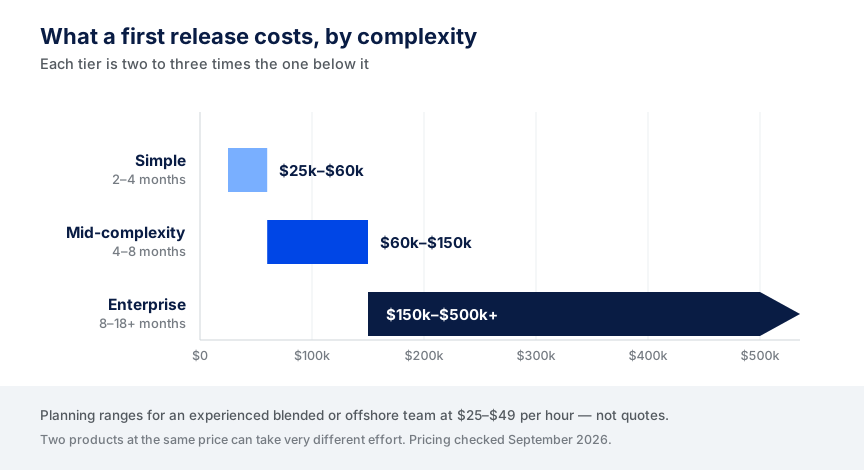
These ranges are broken down by project complexity:
| Project complexity | What it usually includes | Cost range | Typical timeline |
|---|---|---|---|
| Simple | One core workflow, standard UI, minimal integrations | $25,000–$60,000 | 2–4 months |
| Mid-complexity | Multiple user roles, integrations, custom design, reporting | $60,000–$150,000 | 4–8 months |
| Enterprise | Complex workflows, high availability, compliance, many integrations | $150,000–$500,000+ | 8–18+ months |
Pricing checked September 2026. Source data updated August 17, 2026.
These ranges are for an experienced blended or offshore development team that charges between $25 and $49 an hour. They are merely ideas for planning and not fixed quotations. Two products with the same price can have different levels of effort.
What Changes the Cost?
Scope and complexity have the biggest impact. Each feature, user role, workflow, and edge case requires design, development, and testing. For example, a single customer portal will have a completely different set of requirements than a multi-tenant platform with access levels for customers, administrators, and internal teams.
Integrations just increase the workload. Payment gateways, CRMs, ERPs, third-party APIs, and older business systems must exchange data properly. The failures and unusual cases of each connection should also be tested.
Work may also be added based on industry needs. If a healthcare product is covered by HIPAA, it may require controls to protect electronic health information, such as access controls and audit controls. Payment card data stored, processed, or transmitted by a product might require compliance with PCI DSS. Some businesses may also need additional systems and controls to support a SOC 2 examination. These requirements can introduce extra security, documentation, testing, and review tasks to the project.
Another factor that can affect the budget is the number of platforms. Starting with a web product is different from starting with web, iOS, and Android versions.
Plan for Costs After Launch
The development budget doesn’t run out on launch day. Hosting, third-party APIs, monitoring, security updates, bug fixes, and product updates are ongoing even after release. The same cost data in the table above suggests planning for about 15–25% of the original build cost each year for maintenance and support.
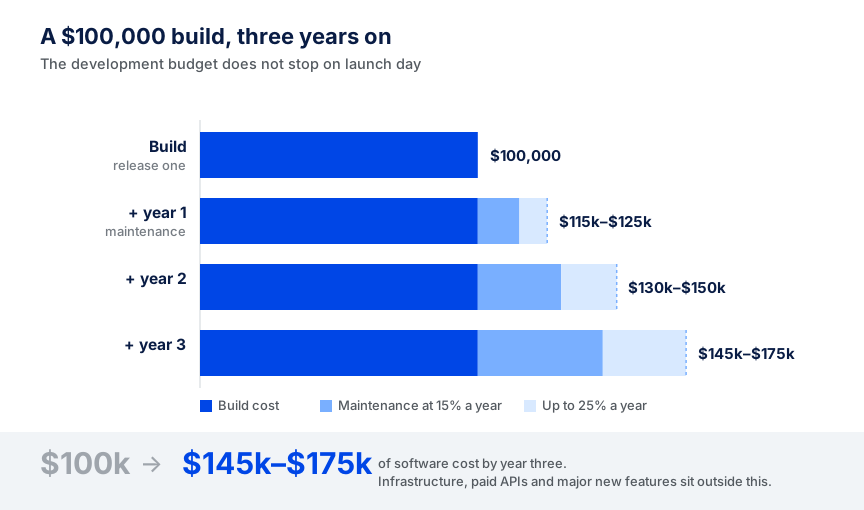
If the price range is $100,000, maintenance could be about $15,000–$25,000 per year. Infrastructure would be separate, as would paid APIs and major new features.
That’s why the first estimate should be according to the first release, not all the features the product may require in the coming few years. Determine what users need to do the primary task, cost that, and continue development if real use provides justification.
Software Product Development Methodologies
The development process determines how a team plans, builds, reviews, and changes work throughout a project. Some teams work in short cycles, modifying the product based on what they learn. Others define much of the work prior to development.
Three common approaches are Agile, Scrum, and Waterfall.
Agile
In Agile, you don’t treat the entire product as one big project; you treat each development cycle as a small project. Teams develop the product, evaluate it, gather feedback, and incorporate what they learn to plan the next cycle.
This allows products to adapt as needs evolve while users test early versions. For instance, a new SaaS product is a good example: the team can launch a handful of features and adjust priorities based on customer usage.
Agile is less effective when scope, budget, approvals, and delivery are defined in detail prior to development.
Scrum
Scrum is a structured way of working within Agile. Work is broken into short time units called sprints, typically one to four weeks.
The team chooses a set of tasks for each sprint. Finally, they review what they did and what they can do next. A product backlog is a place where new features, fixes and other work are stored.
Scrum works best when a team can divide a product into smaller chunks and check progress regularly. It is a weaker fit when stakeholders cannot participate in sprint planning, review, and prioritization. If there is no involvement, the work may roll over to the next sprint.
Waterfall
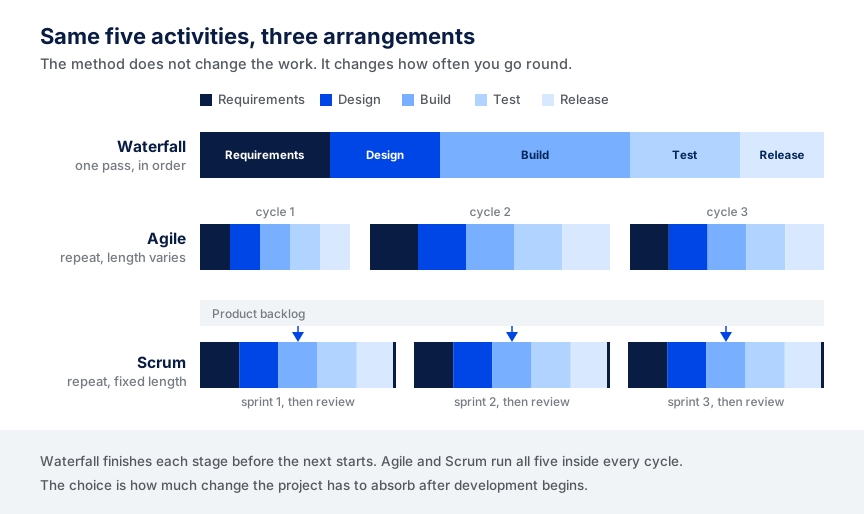
Waterfall follows a more predictable order. Requirements, design, development, testing, and release. Each stage is completed before the next one begins.
It works well for projects with stable requirements and few major changes after development begins. It also applies to tasks that require formal documentation and approval before moving to the next step.
The downside is that requirements can change later. Changing work from earlier development stages, if a major problem is found later, can be time-consuming and expensive.
Agile vs. Scrum vs. Waterfall
Here is a simpler way to compare the three before choosing an approach:
The main difference is how much change a project must accommodate and how the team prefers to organize work. Agile gives teams more flexibility to adapt, Scrum breaks work into clearly marked sprints, and Waterfall follows the same sequence. The following table shows where each solution is most suitable and when it might cause issues.
| Method | Best fit | Avoid or reconsider when |
|---|---|---|
| Agile | The product is likely to change as the team learns from users and early releases. | Scope and approvals must be fixed before development begins. |
| Scrum | The team can work in short sprints, and stakeholders can review priorities regularly. | The team cannot support regular planning, reviews, and backlog decisions. |
| Waterfall | Requirements are stable, and the project needs a clear sequence of stages and approvals. | Requirements are still changing or user feedback is likely to reshape the product. |
A team need not follow a single approach exactly. A product team can use Scrum while maintaining fixed security, compliance, and release points. The key is whether the working method fits the expected product changes and the required decision approvals.
Common Software Product Development Challenges
Sometimes issues only become apparent after development begins. The product can be impacted by integration limits, rushed technical decisions, security gaps, and more, even years after the initial release.
Integration Problems
Products often need to integrate with payment gateways, CRMs, ERPs, analytics tools, and more. These integrations aren’t always as smooth as they should be.
APIs can be limited, data can be in a different format, or an older system might not connect. A third-party product may also change its API or authentication method, or restrict usage even after you build on it.
Test key integrations at an early stage. Test the payment service or an existing business system before developing multiple features that rely on it if the payment service is core to the product.
Technical Debt
Quick fixes can save some time now, but cause more problems later. If teams repeat shortcuts, the code may become harder to test, modify, or expand.
Not all shortcuts are a problem. Teams need to know which ones are temporary and make time to clean them up before they slow future releases.
When the team keeps building on those temporary decisions, technical debt can become a bigger issue. If a quick fix is made in the first release, it can affect several features and become harder to change later.
Keep track of known shortcuts instead of leaving them hidden in the codebase. The team can then prioritize which ones to address in the next major feature or release.
Security Issues
Consider security while building the product. Without proper management, risks can arise in authentication, permissions, data storage, APIs, third-party services, and more.
The OWASP Top 10 list offers a strong guide to common web app security flaws, such as broken access control, security misconfiguration, and software supply chain failures.
Security testing methods should also match the product’s functions. A public content page is not as vulnerable as a product that stores payment information, health data or confidential business information.
These requirements are identified early, and the team can build the right controls into the product rather than adding them later, before launch.
When Custom Software Development Is Not the Right Choice
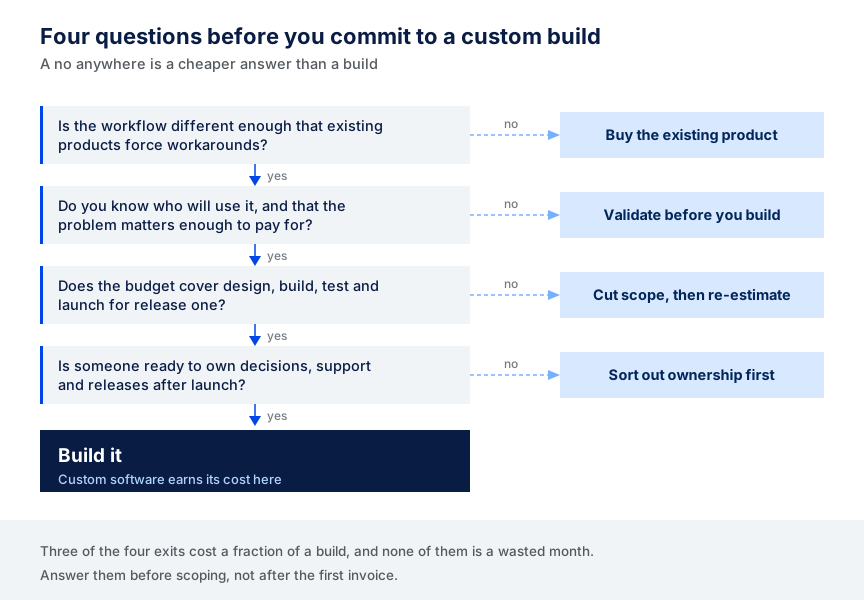
Developing it from scratch will provide you with control of the product, but it does not mean that every idea requires custom software. Sometimes the smart way to spend the money is to purchase an existing tool or to do more pre-tests.
An Existing Product Already Solves the Problem
First, see what has already been done. If you have a SaaS solution that addresses most of your needs and that can integrate into an existing workflow, a custom build can be more expensive than solving a new problem.
Custom development is easier to justify when the workflow is sufficiently different that it causes workarounds in current products or the core requirement can’t be met.
The Idea Has Not Been Validated Yet
If you still don’t know who will use the product and whether the problem is important to them, then you might be in the wrong phase of development.
Begin with customer interviews, a prototype, or a basic test of an idea. The goal is to confirm whether the solution is needed before spending more money on development.
The Budget Does Not Match the First Release
Even a first working version requires enough budget for design, development, testing, and launch. When the available budget falls significantly short of the ranges mentioned above, forcing the project to fit may create problems down the road.
It may be better to limit the initial release scope. Focus on one core workflow and eliminate features that can wait, then estimate the smaller version before committing to building.
The Business Is Not Ready to Support the Product
Starting the software is just the first step. Someone must receive user feedback, make product decisions, maintain it, ensure its security, and deliver future releases.
If it is not clear after launch who owns those decisions, it may be better to solve the problem first. Once a custom product is built, it requires ongoing maintenance.
How CodingCrafts Builds Software Products
We start by understanding what the first release needs to achieve. We assess users, business requirements, current systems, and technical constraints before deciding what to build.
Then, we design the architecture and integrations before we start development. We then break the work into smaller milestones to review working software during the build. We don’t test at the end; we do it throughout the development process.
The work isn’t finished once the product is live. We set up the production environment and monitoring before release. We also record the product for future development and handover. As the product expands, support and new releases can go on.
Here’s a recent customer journey platform demo that illustrates how this played out in a real project. The client needed a SaaS solution to create interactive product demos and monitor prospect progress through them.
The difficult part was the flow builder. Users needed to create different paths based on what a prospect clicked or selected. We built a node-based system using JSON-based configurations, which let us add new interactions and branching paths without repeatedly changing the database structure.
Media-heavy demos were also a requirement. We stored media in AWS S3, and compression and lazy loading helped minimize unnecessary loading. We also improved API calls to make the experience more efficient.
The team delivered the platform within 3 months. During testing, the drag-and-drop builder made creating and changing demo journeys 40–50% faster than the previous manual configuration process. The average asset load time was estimated to be reduced by 30–40% due to media and storage improvements. These are project test and estimate numbers, not published 3rd party benchmarks.
By the end of the project, the client could create branching demo journeys, manage media, track engagement, and control access to the platform through the working SaaS platform.
FAQs About Software Product Development
What Is the First Step in Developing a Software Product?
The first step is to understand the problem you want to solve and who has it. Don’t make too many plans before talking to the people who will use the product, learning more about what is already available, and verifying the need for the idea.
Should You Start with an MVP?
An MVP is helpful when you want to test your core product concept before spending money on a bigger build. It should have enough functionality to allow the user to perform the basic function and provide the team with useful feedback.
What Is the Difference Between Agile and Scrum?
Agile is a broader concept for building software in smaller iterations and adapting as the team learns. Scrum is a structured approach to applying the principles of Agile. It breaks up work into short sprints with a backlog, planning, reviews, and frequent priorities.
What Happens After a Software Product Is Launched?
Once the product is launched, teams check for errors, performance issues, security concerns, and user feedback. They can use what they learn to fix bugs, improve usability, and develop new features.
How Do You Decide Which Features to Build First?
Begin by identifying the core issue the product is addressing. Features that users need to complete that core task should come first. You can implement other features later based on user feedback, business goals, technical dependencies, and development effort.
Final Thoughts
A software product begins with an idea, and the choices we make before and during development can shape that idea. Understand the user problem, keep the first release simple, and test the user’s assumptions early to avoid wasted energy later.
Write down three elements before talking to the development team: the problem the product is going to solve, who will use it, and what users will be able to do in the first release. At this point, you don’t need a complete technical specification. Once you have a clear starting point, you can start talking about scope, cost, and timeline.
If you already have those answers, the next step is to turn them into a realistic development plan. Explore our software development services to discuss your product requirements and plan the first release.
Bring the Problem, the Users, and What Release One Has to Do
We will turn those three answers into a scoped first release with a cost range and a timeline, using the same ranges shown above.