Design Patterns for Cloud-Native Applications: A Practical Guide

As cloud applications grow, different parts of the system become more connected. A slow database can delay requests. A failed service can affect other services. Traffic can also increase quickly, putting more pressure on the application.

Cloud-native development is now widely used. According to the 2025 CNCF Annual Cloud Native Survey, published in January 2026, 98% of surveyed organizations have adopted cloud-native techniques. The survey also found that 59% use cloud native for much or nearly all of their development and deployment.
As applications grow, teams need to decide how services should communicate, how to handle failures, and how different parts of the system should scale.
Cloud-native design patterns offer proven ways to address these challenges. In this guide, we cover the main design patterns for cloud-native applications, when to use them, when to avoid them, and how different patterns can work together.
What Are Cloud-Native Design Patterns?
Cloud-native design patterns are proven ways to solve common architecture problems in cloud applications. They provide a structure for handling service communication, failures, data, and changing workloads.
Design patterns are not tools or ready-made solutions. A pattern describes how to approach a problem, while tools and cloud services help teams put that approach into practice.
The Microsoft Azure Architecture Center provides a broader catalog of cloud design patterns for recurring challenges in distributed systems. This guide narrows that wider catalog to 11 patterns that address communication, reliability, data management, scaling, and application modernization.
Key Design Patterns for Cloud-Native Applications
Each pattern solves a different architecture problem. The examples below show where they fit, which tools can help implement them, and when the added complexity may not be worth it.
1. Microservices Pattern
The Microservices pattern divides an application into smaller services. Each service handles a specific function and can be developed, updated, and scaled independently.
For example, a healthcare platform may separate appointments, billing, notifications, and patient records into different services. If appointment traffic increases, that service can scale without scaling the whole application.
Teams commonly use containers and orchestration platforms such as Docker and Kubernetes to deploy and manage microservices.
Microservices give teams more control over different parts of an application. But they also mean more services to deploy, connect, secure, and monitor.
Use it when: different parts of the application need to change, scale, or be deployed separately.
Skip it when: the application is small and separate deployment or scaling does not solve a real problem.
2. API Gateway Pattern
An API gateway gives clients one entry point to the application's services. A mobile banking application may use one gateway for requests related to accounts, payments, cards, and customer profiles. The gateway sends each request to the correct backend service.
It can also handle authentication, request routing, and rate limiting. Common options include AWS API Gateway, Azure API Management, Kong, and NGINX.
The gateway should stay focused on shared tasks. Adding too much business logic can make it harder to manage.
Use it when: clients need a simple way to connect with several backend services.
Skip it when: the application has only a few simple endpoints and another network layer would add more work than value.
3. Circuit Breaker Pattern
The Circuit Breaker pattern protects an application when another service is slow or unavailable.
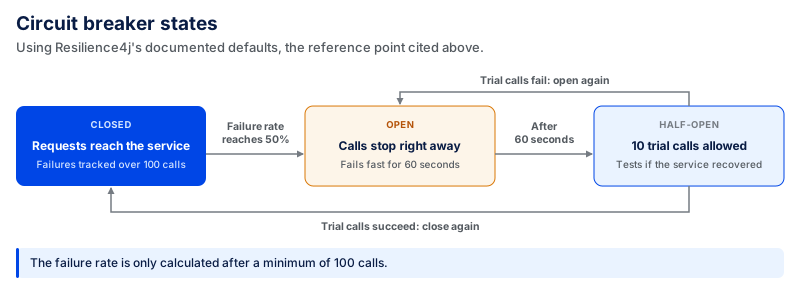
If failures continue, the circuit opens and temporarily stops requests to that service. After a set period, the application can test the service again to see whether it has recovered.
As a reference point, Resilience4j's documented defaults use a 50% failure-rate threshold, a 100-call sliding window, and a minimum of 100 calls before calculating the failure rate. The circuit stays open for 60 seconds before moving to half-open, where it permits 10 calls to test whether the dependency has recovered.
AWS documents a Circuit Breaker implementation using AWS Step Functions and DynamoDB to track circuit state. Libraries such as Resilience4j can also add circuit-breaker behavior at the application level.
This prevents repeated failed calls from consuming connections, threads, and other resources while the dependency is unhealthy.
Use it when: your application depends on a service that may remain slow or unavailable long enough for repeated calls to cause more problems.
Skip it when: the failure is only temporary and a limited Retry with backoff is enough, or when the platform already handles the failure without additional circuit logic.
4. Event-Driven Architecture Pattern
In an event-driven architecture, services communicate through events instead of calling each other directly.
A ride-sharing platform could publish an event when a trip ends. Billing, driver payments, analytics, and notification services can respond to that event independently.
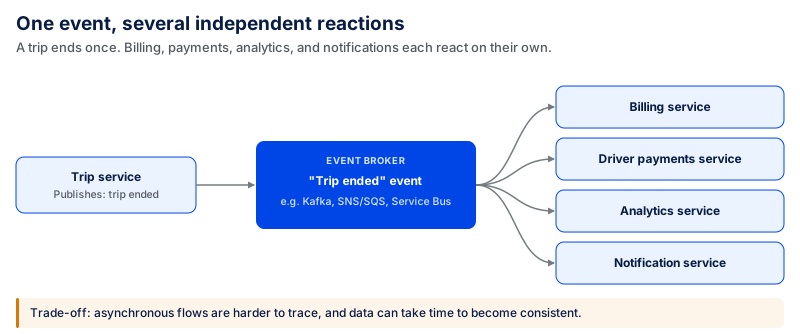
Common technologies for event-based communication include Apache Kafka, Amazon SNS/SQS, Azure Service Bus, and Azure Event Grid.
This reduces service dependencies, but asynchronous workflows can be harder to trace and debug. Data may also take time to become consistent across services.
Use it when: several services need to react to the same action or work can happen in the background.
Skip it when: every step needs an immediate response or direct communication between a small number of services is simpler.
5. Saga Pattern
Use the Saga pattern when one business process involves transactions across several services.
Take a travel booking that includes a flight, hotel, and payment. If the hotel booking fails after the flight has been reserved, a compensating action can cancel the flight reservation instead of leaving part of the booking active.
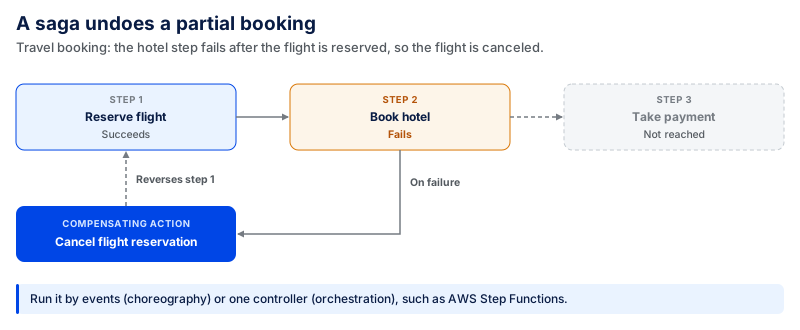
A Saga can be managed through events, known as choreography, or through one component that controls the steps, known as orchestration.
AWS Step Functions is one option for orchestrating this type of multi-step workflow on AWS.
Saga avoids one large distributed transaction, but compensating actions, retries, and eventual consistency make the workflow harder to build and debug.
Use it when: one process updates data across several services and failed steps may need to be reversed.
Skip it when: the operation can be handled safely with one database transaction or strong consistency is required throughout the process.
6. Command Query Responsibility Segregation (CQRS) Pattern
CQRS separates the part of an application that reads data from the part that changes data.
Consider an analytics or reporting platform where users read dashboards throughout the day but the underlying records are updated much less often. The read side can be designed for fast queries while the write side handles updates separately.
CQRS is an architectural pattern rather than a specific product. Teams may combine separate read/write data stores with messaging and event-streaming tools depending on the application.
The extra separation adds more components and data synchronization work, so it should solve a clear performance or scaling problem.
Use it when: reading and writing data have clearly different performance, scaling, or data-model needs.
Skip it when: standard database operations already meet the application's performance and scaling needs.
7. Cache-Aside Pattern
The Cache-Aside pattern keeps frequently requested data in a cache.
When the application needs information, it checks the cache first. If the information isn't there, it retrieves the data from the main database and stores a copy in the cache for future requests.
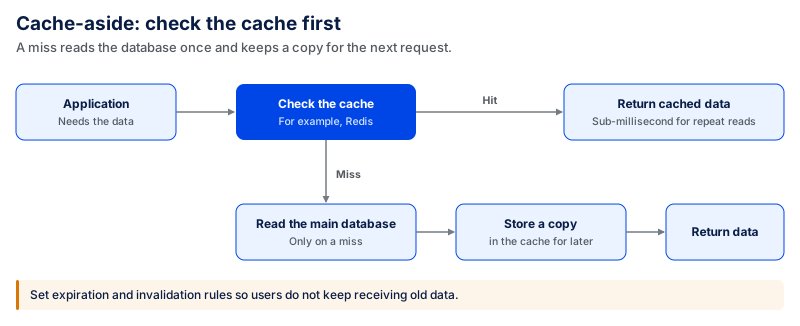
Redis is a common option for this pattern. Redis reports sub-millisecond latency for repeated cached reads, making cache-aside useful for read-heavy workloads where the same information is requested repeatedly.
The main challenge is keeping cached information current. Teams need rules for expiration and invalidation so users do not continue receiving old data.
Use it when: the application reads the same data often, and repeated database requests affect performance.
Skip it when: the data changes constantly, must always be current, or is not requested often enough for caching to provide much value.
8. Sidecar Pattern
The Sidecar pattern adds a separate component next to an application service. The component handles supporting tasks that do not need to be part of the main service.
These tasks can include logging, monitoring, security, configuration, and network communication.
Envoy and Dapr are examples of technologies you can use for sidecar-based functions. This lets teams keep shared infrastructure tasks separate from the main application code.
The sidecar still consumes resources and needs to be deployed, configured, and monitored.
Use it when: several services need the same supporting functions.
Skip it when: the supporting function is simple enough to handle directly in the application or the platform already provides it.
9. Strangler Fig Pattern
The Strangler Fig pattern helps teams replace an old application in smaller parts.
For example, a financial services company could move customer-profile functions out of a legacy application first. Requests for that function can be routed to the new service while the rest of the application continues using the old system.
An API gateway or reverse proxy can help route requests between the legacy application and the new services during the migration.
This reduces the scope of each migration step, but the team has to operate both systems until the move is complete.
Use it when: you want to modernize an older application without replacing everything at once.
Skip it when: the existing application is small enough to replace safely in one release or running old and new systems together would create unnecessary overhead.
10. Retry Pattern
The Retry pattern attempts an operation that fails temporarily, then tries again.
AWS lists three common use cases of the Retry pattern: service throttling, temporary network issues, and temporary service unavailability. For instance, a 429 response does not reject a request outright; it signals that the service is temporarily limiting requests.
One common strategy is Retry with exponential backoff. The application delays attempts between requests rather than resending them right away. In an AWS Step Functions example with a maximum of three retries and a 1.5 multiplier, the interval between retries grows from 3 to 4.5 to 6.75 seconds.
This was a challenge we faced while developing a government paperwork platform. About 15–20% of payments did not go through on the first attempt during high-traffic periods due to gateway issues, bank declines, or checkout issues. To avoid restarting the payment process after a few temporary failures, we used controlled retries and alternate merchant routes.
The number of retries should still be capped. Repeated calls can increase network traffic and add strain to a service that is already struggling. Operations should also be safe to repeat, so a retry does not create duplicate changes.
Use it when: a request fails because of a temporary problem and another attempt has a reasonable chance of working.
Avoid it when: the error is permanent, the request is invalid, or repeating it may cause unnecessary duplication of requests.
11. Bulkhead Pattern
The Bulkhead pattern isolates resources so that failure or high load in one section of an application does not cause failure or high load in other sections.
For instance, a SaaS application may partition resources for different workloads or customer groups. If one workload consumes all of its allocated resources, the other isolated workloads can continue operating.
Depending on the architecture, you can achieve bulkhead isolation with separate service instances, connection pools, concurrency limits, containers, or Kubernetes resource controls.
The drawback is that isolation adds configuration and may leave some resources unused.
Use it when: one dependency, workload, or customer group could consume resources and affect the rest of the application.
Skip it when: the application is simple, and resource exhaustion is not a meaningful risk, or the cost of maintaining separate resource pools is higher than the protection they provide.
How to Choose the Right Cloud-Native Design Pattern
No single design pattern suits all cloud applications. The right choice depends on the problem you need to solve and the additional complexity you are willing to deal with.
The table below gives you a starting point.
| If You Need To... | Pattern to Consider | Common Tools | Complexity | Main Trade-Off |
|---|---|---|---|---|
| Build services that scale and deploy separately | Microservices | Docker, Kubernetes | High | More services to deploy, secure, and monitor |
| Give clients one entry point to several services | API Gateway | AWS API Gateway, Azure API Management, Kong | Medium | Adds another layer to manage |
| Stop repeated calls to a failing service | Circuit Breaker | Resilience4j, AWS services | Medium | Failure and recovery settings need careful configuration |
| Let several services respond to the same action | Event-Driven Architecture | Kafka, Amazon SNS/SQS, Azure Event Grid | High | Asynchronous workflows are harder to trace and debug |
| Manage one process across several services | Saga | AWS Step Functions, event brokers | High | Compensation and eventual consistency add complexity |
| Handle read and write workloads separately | Command Query Responsibility Segregation (CQRS) | Separate read/write stores, messaging tools | High | More data models and synchronization work |
| Reduce repeated database requests | Cache-Aside | Redis, Memcached | Medium | Cached data can become outdated |
| Keep shared functions separate from application code | Sidecar | Envoy, Dapr | Medium | Adds another component to deploy and monitor |
| Replace an older application step by step | Strangler Fig | API gateways, reverse proxies | Medium–High | Old and new systems must run together during migration |
| Retry operations after temporary failures | Retry | AWS SDK retry policies, resilience libraries | Low–Medium | Too many retries can increase load on a failing service |
| Stop one workload from using resources needed by others | Bulkhead | Kubernetes resource controls, connection pools, concurrency limits | Medium–High | Reserved resources may not always be fully used |
Complexity is relative. Actual effort depends on the existing architecture, cloud platform, and team experience.
Where Cloud-Native Applications Go Wrong
While cloud-native architectures have patterns, poor implementation can introduce new issues. These are some of the mistakes teams should watch for as the application grows.
Using Microservices Too Early
More services mean more than more code. Each service has to be deployed, connected, monitored, and secured, and its failures have to be handled predictably.
Changes in a single app can now span APIs, services, and deployments. Microservices are better suited to scenarios where different parts of the application should be independently deployable, owned, or scaled.
Adding Patterns Without a Clear Need
Advanced patterns like CQRS and Saga add complexity in the form of components and failure paths that teams need to maintain.
For example, CQRS could involve multiple read and write models, plus a method for maintaining consistency between them. When one step succeeds and the other fails, you need recovery logic in a Saga. That work is overhead without an associated architectural need.
Ignoring Monitoring
A request can pass through multiple services before it completes. Logs from one service may not show where a problem started.
Teams without suitable logging, metrics, and distributed tracing may take longer to find the root cause of an incident before resolving it.
Poor Data Management
Problems start when services share data but nobody is clearly responsible for creating or updating it.
For instance, an order service could cancel an order, but a different service may still report it as active. That stale state can be passed to customer-facing screens, reports, notifications, or later business processes.
Define who owns each type of data, how changes move between services, and what happens if an update fails.
Ignoring Security Risks
Each API, service, data source, and connection to the outside world adds another attack surface.
A service that has an unnecessary set of permissions amplifies the effect of a stolen credential. Application code or configuration files can also leak secrets in repositories, logs, or deployment systems.
Grant least-privilege access, protect sensitive data and APIs, and store passwords, tokens, and API keys in a secrets-management system.
Planning for More Scale Than You Need
Building for heavy load can lead to unused infrastructure and a more difficult-to-modify architecture.
We took a more targeted approach while building a Customer Journey Platform with media-heavy interactive demos. We used AWS S3 for media storage and improved performance through compression, lazy loading, optimized API calls, and more efficient data retrieval. These changes cut average asset load time by an estimated 30–40%.
The scaling work should match the actual workload. For Yoga Joint, a fitness company with over nine studios across Florida, Coding Crafts built AWS EC2 and load-balancing infrastructure to scale with traffic fluctuations, rather than relying on a fixed-capacity model to cover peak seasons.
Focus optimization on real bottlenecks, and leave room to scale where growth is expected.
Need Help Building a Cloud-Native Application?
When selecting a cloud-native design pattern, it's not enough to just pick one; you have to pick the right one. You also need to understand which patterns go together, how complex each pattern is, and whether it fits the app in the first place.
At Coding Crafts, we help businesses plan and build cloud applications across AWS, Azure, and GCP. We specialize in cloud architecture, cloud-native development and migration, cost optimization, DevOps, and cloud operations.
If you are deciding how to structure a new cloud application or improve an existing one, explore our cloud services. We can help you choose an architecture that fits your workload, reliability needs, security requirements, and plans for growth.
Frequently Asked Questions
Do cloud-native applications require microservices?
No. An application can follow cloud-native practices without using microservices.
Even a well-designed monolith can benefit from cloud-native concepts like containers, automated deployment, managed cloud infrastructure, monitoring, caching, etc. Services are valuable when they have a clear, distinct need to be deployed, owned, or scaled separately from the rest of the application.
What tools are used to implement cloud-native design patterns?
The tools depend on the pattern and the cloud environment. Teams can adopt a container orchestration approach with Kubernetes, gateway-based architectures via AWS API Gateway or Azure API Management, event-driven solutions with Kafka or cloud messaging, cache-based solutions with Redis, and supporting functions and reliability via Dapr or resilience libraries.
A pattern is not the same as a tool. The pattern describes how to structure the architecture, and a tool is one way to implement it.
Can cloud-native design patterns be used with a monolithic application?
Yes. Patterns such as Cache-Aside, Retry, Circuit Breaker, and API Gateway are not limited to microservices.
A monolithic application can still require external services, cache frequently used data, deal with transient failures, or provide APIs via a gateway. Choose patterns based on what the architecture needs, not on whether it is labeled as microservices.
Do cloud-native design patterns belong to AWS or Azure or Google Cloud?
No. Most design patterns describe architecture concepts rather than one cloud provider's products.
For example, you can implement event-driven communication with Apache Kafka or managed messaging services from different cloud providers. The pattern remains the same; only the implementation changes.
Is it possible for a cloud-native app to combine multiple design patterns?
Yes. A single workflow can use an API Gateway to route messages, microservices to perform discrete business functions, events to communicate asynchronously, Saga for a multi-service transaction, and Retry for temporary failures.
The combination depends on the workflow and its reliability, data, and scaling requirements. This example shows how multiple patterns can take part in the same request while each does a different job.
Cloud-native architecture, without the buzzwords
Coding Crafts designs and builds cloud-native systems that scale and survive failure: microservices where they earn their complexity, monoliths where they do not. Senior engineers at $25 to $49 per hour.
More from the blog.
View all postsRelated reading from the Coding Crafts team.