How to Develop a Successful Enterprise Cloud Migration Strategy

Before an enterprise moves anything to the cloud, someone must decide what should move, what should stay, which approach fits each workload, how to handle dependencies, and how to measure success. Getting those decisions wrong is what makes a migration expensive and disruptive, not the move itself.
In an October 12, 2021 analysis, McKinsey reported that 38% of companies had seen their cloud migrations delayed by more than one quarter. The same research found that migration spending was, on average, 14% higher than planned.
A structured migration strategy is what turns that into something a team can control. Instead of moving everything at once, teams group workloads into migration waves, test them against clear success criteria, and roll back when a cutover doesn't go as planned.
This guide explains how to build that strategy step by step, from defining the business case and assessing the current environment to choosing migration approaches, planning waves, testing workloads, and optimizing the cloud environment after migration.
Enterprise Cloud Migration Strategy at a Glance
A successful enterprise cloud migration strategy follows seven steps:
- Define the business goals: Decide why you're moving to the cloud and how you'll measure success.
- Assess your current environment: Create a workload inventory, map dependencies, and check cloud readiness.
- Choose a migration strategy for each workload: Decide whether to retire, retain, repurchase, rehost, relocate, replatform, or refactor.
- Choose the right cloud model: Select public, private, hybrid, or multicloud based on your requirements.
- Choose the service model: Decide whether each workload needs IaaS, PaaS, SaaS, or another managed cloud service.
- Plan the migration in waves: Group workloads based on dependencies, risk, and business impact.
- Execute, validate, and optimize: Migrate workloads, test the new environment, use rollback criteria when needed, and monitor performance and costs after cutover.
Later in this guide, you'll also find a migration wave-plan table with rollback triggers, what an enterprise cloud migration costs, what to do with your data-center contracts, and an enterprise cloud migration checklist.
What Is an Enterprise Cloud Migration Strategy?
An enterprise cloud migration strategy is a plan to decide which apps, data, and workloads will move to the cloud, how they will move, and in what order. But not necessarily shifting all of that. Some workloads may be better kept on existing infrastructure because of their business, technical, compliance, or cost requirements. The objective is to select the best option for each workload.
What Makes an Enterprise Migration Different
The same seven steps apply to any size. The price of getting it wrong at enterprise scale.
The assessment no longer becomes a task, but rather a project of its own. One architect can evaluate 10 applications through a spreadsheet, several hundred cannot, and that's where discovery tooling and a formal inventory become important. The results of that evaluation include applications that no one is currently using, as systems that are long-lived build systems that have been left behind by the original team, and a certain percentage of those applications are ripe for turning off instead of moving. Step 2 quantifies that.
Also, dependencies cease to be a one team confirmation. Because enterprise applications rely on other business units, other vendors, and often even other companies, a dependency map requires those teams to cooperate and review it. That determines the target: A single application can be rehosted on one design, but a portfolio of mainframe, virtualized x86, packaged vendor software, and in-house applications requires multiple architectures that must coexist.
Governance is the last difference, and the one most often left until it is expensive. Before the first wave of cloud provisioning, not after, the rules must be established regarding who can create what, who reviews it, who pays for it, etc., when dozens of teams can provision cloud resources.
These are also why enterprise migrations run in waves instead of as a single cutover event.
What a Migration Strategy Actually Buys You
It's worth separating two things that often get discussed together: what the cloud gives you, and what the planning gives you. The cloud provides scalability, managed services and elastic capacity. You can have them with or without a well-planned move.
Strategy adds more to the narrow end. It gives everyone a decision they can make six months later and defend, a baseline to compare the bill to, and a shared option to exit a cutover that isn't working. None of that comes from the platform. It comes by choosing without anything being on fire, which is a difference between McKinsey's 14% over plan being a number you catch and a number you discover.
The seven steps below are how that gets built. The first one decides what you are measuring.
Step 1: Define the Business Goals
Start by asking: Why does your business want to move to the cloud?
The “everybody's moving to the cloud” movement is not a business objective. You need a clear reason for change. That could be cutting costs, improving performance, handling more traffic, or recovering faster when something goes wrong.
Then, determine how you'll assess each target. Record your current numbers before the migration so you can compare later.
| Business Goal | What to Measure | Where the Target Comes From |
|---|---|---|
| Lower infrastructure costs | Current vs. target monthly cost | Current infrastructure and cloud spending reports, approved budgets, and expected cloud usage |
| Improve performance | Response time and latency | Current application performance, user requirements, and existing service-level targets |
| Improve reliability | Uptime and error rate | Existing SLAs, business requirements, and the workload's current availability baseline |
| Improve disaster recovery | RTO and RPO | Business continuity and disaster recovery requirements based on how much downtime and data loss the business can accept |
| Handle more traffic | Performance during peak traffic | Historical peak-traffic data, demand forecasts, and expected business growth |
| Release updates faster | Deployment frequency and lead time | The development team's current delivery baseline and release requirements |
For example, if your goal is to improve disaster recovery, use your business continuity requirements to determine how quickly the system needs to be restored and how much data loss is acceptable. If you want to save money, compare your existing infrastructure costs with your target cloud costs.
Select the objectives that are most important for your company. These goals will guide your migration decisions and help you measure the results after the move. The targets will vary by workload, so set them against your current baseline, business requirements, and service commitments rather than using the same numbers for every system.
Step 2: Assess Your Current Environment
Know your current environment before moving anything. An enterprise environment may include many applications, servers, databases, legacy systems, and large amounts of data.
First, list your workloads. For each workload, record:
- Application name and owner
- Server and database
- Operating system
- Storage and data size
- Current cost
- Business importance
- Security and compliance needs
- Downtime limits
- Key dependencies
This inventory provides a view of what you have and can identify workloads that require additional effort prior to migration. For instance, before moving a workload, you might need to upgrade its operating system or application, change its license, apply a security patch or make dependency changes.
But assessment can also indicate that certain workloads don't need to migrate at all. AWS Prescriptive Guidance notes that it is not unusual for more than 10% of workloads in an enterprise IT portfolio to be no longer useful and suitable to be turned off. Identifying them early reduces the number of workloads the team needs to migrate, secure, and operate.
Map Application Dependencies
Most applications are not standalone. They can be linked to databases, APIs, identity, or other apps.
These connections are not often in a straight line. The web app and the API that powers it can share a common authentication system, with one service serving at two different paths; remove one service, lose both.
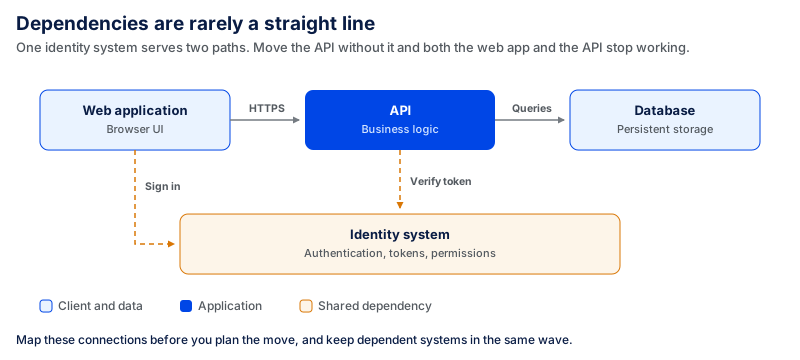
Map these connections before you plan the move. If you move one system without its dependencies, the application may stop working or face performance issues.
Check Cloud Readiness
Then determine whether each workload can be deployed to the cloud as is. These are the checks that most often change the answer:
- Operating system support status. A workload running on an OS approaching end of support needs the upgrade planned into the migration rather than discovered during it. Microsoft has confirmed that extended support for Windows Server 2016 ends on January 12, 2027; Windows Server 2019 runs to January 2029. An estate with a significant Windows Server 2016 footprint has a deadline whether or not it migrates.
- License portability. Not all licenses are workload compliant. Determine if each commercial product allows for deployment in shared cloud platforms, if it requires dedicated hosts, and if the agreement can be moved with you or needs to be repurchased. This is often what makes an easy rehost a repurchase decision.
- Data volume against available bandwidth. The constraint isn't the size of the data itself, it's the size compared to the transfer window and the bandwidth you actually use. AWS advises using a physical transfer device for large-scale data transfers and migrations when bandwidth is not available for a high-speed online transfer service. Calculate the transfer time before committing to a cutover window.
- Latency dependency on systems that aren't moving. When a workload is calling an on-premises system that does not move, moving the workload introduces network round-trips to each of those calls. Both move together or the load remains.
- Compliance and data residency constraints. If a data or contractual need exists that does not allow data to be transferred outside of the jurisdiction or infrastructure then that is the answer, not a technical assessment.
Usually workloads that pass the five can be rehosted. If one workload fails, then it might require remediation before it can be used. Workloads that do not pass compliance or hardware checks might not qualify at all.
Use Cloud Assessment Tools
If you have many workloads to review, you can use cloud assessment tools to collect infrastructure data and evaluate migration readiness. AWS Migration Evaluator can help teams assess existing infrastructure and build a business case for migration. Azure Migrate supports discovery and assessment of servers, databases, and web applications, including readiness, cost, and dependency analysis. Google Cloud Migration Center is another option for discovering infrastructure, mapping dependencies, comparing migration scenarios, and estimating costs.
The assessment can take time in a large environment.Google Cloud notes that a typical discovery can take on average a few weeks to complete, because the discovery client needs to collect data over multiple days to build a complete picture. Assessment tools can help, but the team still needs to consider business value, risk, dependencies, and compliance requirements when making migration decisions.
By the end of this step, you should have a workload inventory and dependency map. These will help you choose the right migration strategy for each workload in the next step.
Step 3: Choose a Migration Strategy per Workload
If you know why you want to migrate, you may need to answer the question of how each application will migrate. Not all workloads are the same and can't be migrated equally. In some cases, applications can be migrated with minimal modification; in other cases, they may need to be rebuilt, replaced, or remain where they are.
AWS defines seven common migration strategies, often called the 7 Rs. These strategies help teams decide what should happen to each application based on its business value, technical condition, dependencies, and migration effort.
The 7 Rs of Cloud Migration
| Strategy | What It Means | Use When | Main Trade-Off |
|---|---|---|---|
| Retire | Remove the workload | You no longer need it | You may need to archive important data first |
| Retain | Keep it where it is | Moving it brings little value or is not possible yet | You keep the existing maintenance costs and technical debt |
| Repurchase | Replace it with a SaaS product | A suitable cloud product already exists | Moving data and changing tools can take time |
| Rehost | Move it with few or no changes | You need a faster migration | Existing technical issues move with it |
| Relocate | Move the existing infrastructure or virtualized environment to a cloud version of the same platform without changing the applications | You need to move many servers or a virtualized environment without rewriting applications or changing existing operations | The application architecture stays largely the same, so you gain fewer cloud-native benefits |
| Replatform | Move it and make a few cloud improvements | You want better performance without rebuilding the application | It takes more work than rehosting |
| Refactor | Redesign the application for the cloud | The application has long-term value and needs more flexibility | It takes the most time, effort, and cost |
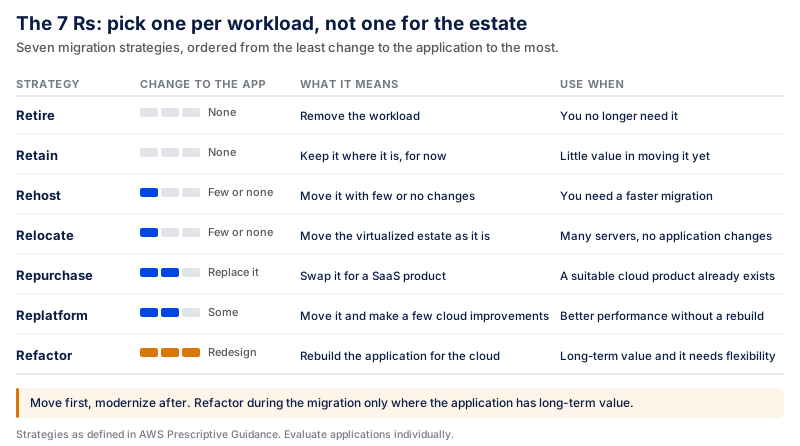
The right choice depends on the workload. A stable internal application may only need to be rehosted, while a customer-facing system with scalability problems may benefit from replatforming or refactoring.
For large migrations, avoid refactoring during the migration where possible. Teams can rehost, relocate, or replatform an application first and modernize it after the migration is complete. This can reduce the amount of change happening at the same time and make the migration easier to control.
The goal is not to choose one strategy for the whole organization. Evaluate applications individually and choose the approach that balances business value, migration effort, risk, and long-term needs.
When Should You Not Migrate a Workload to the Cloud?
Not every application needs to move. Sometimes, it makes more sense to keep a workload in its current environment; that's the business and technical choice.
About the migration strategies, AWS lists Retain as one of its seven migration strategies and sets out nine common use cases for it: data-residency requirements that make migration difficult, a system that was recently upgraded, another application that needs to move first, or no clear business value in migrating.
There are also applications that require special hardware that is not available in the cloud. Some mainframe and mid-range applications might need more evaluation before migration, and applications with a limited number of internal users may not be worth the investment and effort. If a SaaS version is coming soon, you can also consider keeping the vendor application temporarily.
This should be a business decision. Sometimes, when moving an application will add cost, risk, complexity without adding scalability, reliability, delivery speed or any measurable result, then don't move the application.
Step 4: Choose the Cloud Model
Then you can choose where to deploy your workloads. The right cloud model depends on your security requirements, budget, performance needs, and control requirements.
The basic choices include:
Public cloud: The cloud services provided by a company like AWS, Microsoft Azure, or Google Cloud. It offers flexibility and rapid resource scaling. Costs are generally usage-based, so spending can increase or decrease as resource use changes.
Private cloud: Your organization uses a dedicated cloud environment. It provides greater control over infrastructure and data but typically requires more resources to manage. It may also require greater infrastructure and operational investment because the environment is dedicated to your organization.
Hybrid cloud: You use both cloud and on-premises systems. It's effective in situations where some workloads can be shifted to the cloud, but others still need to remain on-premises. Costs can span both environments because the organization continues to operate on-premises infrastructure alongside cloud resources.
Multicloud: You use services from more than one cloud provider. This can be useful if you have different workloads requiring different services, but it also increases operational and management complexity, and with it the cost of running and governing more than one environment.
Here is a simple way to compare them:
| Business Need | Cloud Model to Consider | Main Cost Consideration |
|---|---|---|
| Need to scale quickly | Public cloud | Usage-based spending needs ongoing monitoring |
| Need more control over infrastructure | Private cloud | Dedicated infrastructure and management can require more investment |
| Need to keep some systems on-premises | Hybrid cloud | Costs may continue across both cloud and on-premises environments |
| Need services from different cloud providers | Multicloud | Managing multiple providers can add operational complexity and cost |
Avoid selecting a cloud model based on its popularity. Consider your workloads, data, security requirements, compliance policies, and current infrastructure.
For instance, companies that store, process, or transmit payment card data may need to meet PCI DSS requirements. U.S. healthcare organizations that qualify as covered entities or business associates may be subject to HIPAA, while organizations processing personal data covered by EU data protection law may need to comply with the GDPR.
Decide How Much Lock-In You Are Willing to Accept
That's where you make the choice on how much lock-in you're willing to do; it's easier to make that choice purposefully now than to find out later. It is formed by three things.
The first is data gravity. Providers charge for pulling data off their platform, and pull costs are volume-based, which can be the largest line in an exit estimate on a big estate... and thus is the reason for the subterfuge. The other is proprietary managed services: a managed database, queue or identity service is typically cheaper to run, and more expensive to leave. This may be a good trade, but it must be one that you intended, and one where the operational saving is genuine. The third is your own tooling, as pipelines, infrastructure-as-code, monitoring around one provider will incur rebuild costs if you move.
There's one rule that you should plan for. Under Article 29 of the EU Data Act, providers may impose only reduced switching charges, capped at the costs directly linked to the switching process, until 12 January 2027. From that date, providers cannot impose switching charges on customers for the switching process. The cost of abandoning a provider on that date changes significantly for in-scope organizations, which will affect the importance of lock-in in a decision made today.
The key to the practical solution is not to avoid provider-specific services. Instead, understand what workloads they use, what leaving entails, and keep workloads in more neutral territory where portability actually becomes an issue.
Step 5: Choose the Service Model
After picking the cloud model, decide what amount of infrastructure you want your team to deal with. The three main options are IaaS, PaaS, and SaaS.
A combination of these service models can be used in enterprise environments. Your choice depends on each workload's needs and the migration strategy you selected in Step 3.
Infrastructure as a Service (IaaS)
IaaS offers cloud-based server, storage, and networking services. Your team is responsible for the operating system and applications.
IaaS is often suitable for rehosting. You can move an application to cloud infrastructure without major changes.
Platform as a Service (PaaS)
PaaS offers developers a managed environment for creating and deploying applications with the cloud service provider taking care of the infrastructure.
It can support replatformed or refactored workloads since teams can rely on managed databases, application platforms, and other cloud services instead of managing the underlying infrastructure themselves.
Software as a Service (SaaS)
SaaS provides ready-to-use software that the provider manages for you.
It is directly linked with the repurchase strategy. You don't move an existing application; instead, you replace it with a cloud-based application that addresses the same business need.
Here is how all seven strategies connect with the service models:
| Migration Strategy | Service Model | Why |
|---|---|---|
| Retire | None | The workload is decommissioned, so no target environment is needed. Plan for data archiving instead |
| Retain | None | The workload stays on existing infrastructure. It still belongs in the inventory and the dependency map, because migrating workloads may depend on it |
| Repurchase | SaaS | You replace the application with a vendor-managed product instead of moving it |
| Rehost | IaaS | The application moves unchanged, so it still needs an operating system and servers your team manages |
| Relocate | IaaS | Moving a virtualized environment to its cloud equivalent keeps the same hypervisor and operating model, so the layer you manage does not change |
| Replatform | IaaS or PaaS | Depends on how far you go. Moving to a managed database while keeping the application on virtual machines spans both |
| Refactor | PaaS, or serverless and other cloud-native services | The application is redesigned to use managed platform services directly |
The two "None" rows are not omissions. Retire ends in no target environment, and Retain leaves the workload where it is, so neither involves a service-model choice at all. Both still belong in the table, because both are decisions made in Step 3 that the wave plan has to carry.
You do not need to choose one service model for your entire enterprise. For example, you may use IaaS for legacy applications, PaaS for modern applications, and SaaS for common business tools.
Choose the right model for each workload based on the control, flexibility, cost, and management effort your team needs.
Step 6: Prioritize and Plan in Waves
Don't shift all the workloads at the same time. Break the migration into smaller groups, or waves. This simplifies the process and minimizes risk.
Begin with smaller and less complex workloads that have fewer dependencies. You can test the migration process on these workloads before moving more important systems.
Decide What to Move First
A good first wave usually includes workloads that:
- Have fewer dependencies
- Are easier to test
- Have manageable amounts of data
- Can handle some downtime
- Are easy to roll back if something goes wrong
Avoid putting your most critical or complex systems in the first wave unless you have a strong reason.
Create a Migration Wave Plan
For each wave, decide what you will move, how you will measure success, what you will do if the migration fails, and who decides. What should change between waves is not just the workloads; it's how much validation each cutover requires and how senior the decision gets.
| Wave | Workloads | What Success Additionally Requires | Rollback Trigger | Who Signs Off | Parallel Run |
|---|---|---|---|---|---|
| Wave 1 | Few dependencies, manageable data, low business impact, downtime tolerable | Functional parity: features, integrations, and data checks pass against the Step 1 baseline | Any required test fails, or data cannot be reconciled | Migration lead | Usually none. These workloads tolerate a maintenance window, and a straight cutover is cheaper and simpler than running twice |
| Wave 2 | More dependencies or greater business impact | Everything in Wave 1, plus upstream and downstream systems verified against the dependency map, and performance held under production-equivalent load against the agreed targets | Wave 1 triggers, plus a dependency failure in a connected system, or performance outside the agreed threshold | Migration lead and the application owner | Where the workload writes data other systems read. Run until a full reconciliation cycle completes clean |
| Wave 3 | Business-critical and regulated workloads | Everything in Wave 2, plus security controls re-validated, a recovery test completed against the RTO and RPO set in Step 1, and compliance sign-off where the workload is in scope | Wave 2 triggers, plus loss of a critical service, any data-integrity finding, or a failed security or recovery check | Application owner and a named business or executive sponsor | Yes. Cover at least one complete instance of the workload's longest business cycle — a month-end close, payroll run, or billing cycle — so the new environment is tested against its real peak, not an average day |
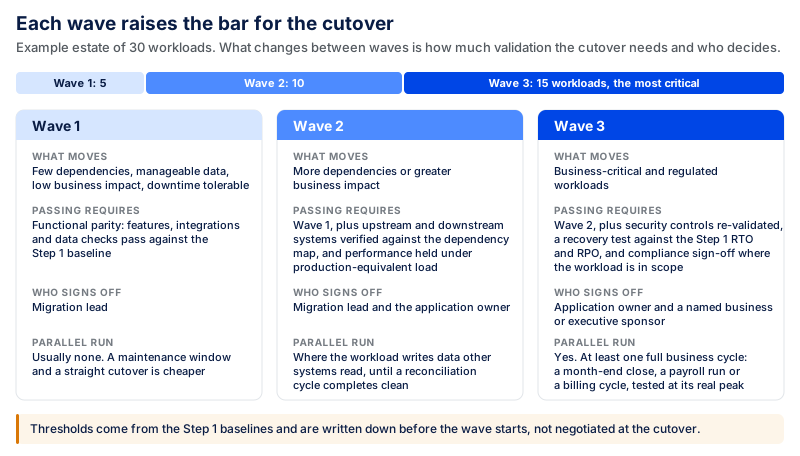
The threshold values behind "the agreed threshold" come from the baselines and targets you recorded in Step 1. These must be written down prior to the wave beginning and not negotiated at the cutover.
The number of waves should be based on the dependency map, the business impact, migration strategy, and the requirements for rollback, not just on workloads. As an example, an estate comprised of 30 workloads could begin in Wave 1 with 5 lower-risk workloads, add 10 more high-dependency workloads to Wave 2, and reserve the remaining 15, such as the most critical systems, for Wave 3.
Plan a Parallel-Run Window
In the case of critical systems, it may be necessary to operate both systems in parallel for a specific period or validation window, during which the team can compare the two systems and validate that the new version satisfies the requirements for success before switching off the old system.
Set the length before the migration. The most important rule: The window should span at least one full execution of the workload pattern that it is designed for. This is not a validated system if it only acts differently when the month ends. If there is no meaningful cycle for the workload, the window is based on the duration of recon convergence to return to a clean reconciliation.
Running two environments means paying for two environments and keeping their data synchronized, so this is a cost and a risk as well as a safeguard. Plan for it in the budget and not during the wave.
The clear wave plan provides your team greater control over the migration. It also enables you to detect and fix issues before they impact larger workloads.
Step 7: Execute, Validate, and Optimize
When you have your migration plan in place, begin migrating workloads in phases. Follow the plan you created in Step 6 and check each workload before moving to the next wave.
Migrate and Test the Workloads
Move the application, data, and other required resources to the new environment. Maintain data consistency if the existing system continues to receive updates during migration.
After the move, test the workload carefully. Check:
- Application features
- Data accuracy
- System integrations
- Performance
- Security
- Availability
Compare the results with the goals you set in Step 1.
Make a Go/No-Go Decision
Validate the new environment against the success criteria you defined in Step 6 before shutting down the old environment.
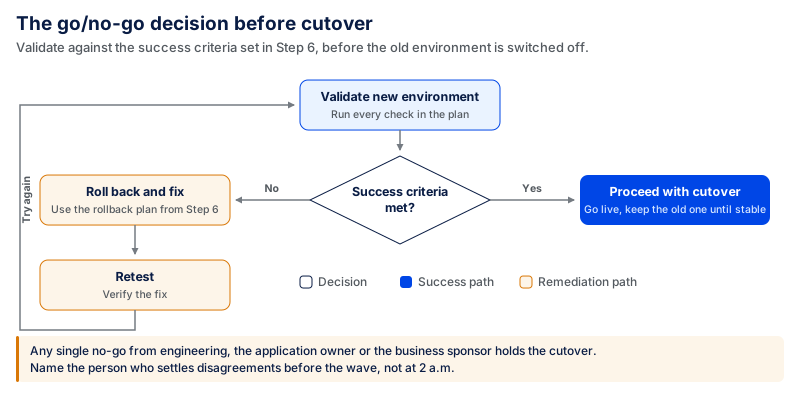
Determine this group prior to the wave, not during the wave. The sign off should be aligned with the wave as defined by the above wave plan: migration lead for early waves, application owner for increasing business impact, and a named business or executive sponsor for critical systems.
There are two rules to prevent this from happening at the worst time:
- Any single "no-go" holds the cutover. If engineering or the application owner or the business sponsor does not sign-off, the cutover waits. Rollback triggers are in place to ensure that there is no negotiating the decision at 2 a.m.
- Name a decision-maker for disagreements in advance. If the engineering deems the criteria met and the business owner does not agree, it is up to someone to make the decision. On the enterprise level, not having that name is what makes a 2-hour cutover window become a missed cutover window.
If the tests pass and the success criteria are met, you can move forward with the cutover. If you find a serious problem or a rollback trigger is reached, use the rollback plan from Step 6 and fix the issue before trying again. Maintain old environment until Go / No-Go decision is made and cutover is confirmed.
Monitor After the Migration
Monitor the workload after go-live. Track performance, errors, availability, security, and cloud costs.
This allows your team to identify issues early and compare the new environment with the baseline and targets you set in Step 1.
Optimize Cloud Resources and Costs
The initial cloud configuration might not be optimal. Check the CPU, memory, storage, and other resource usage per workload. Cut back or ramp up resources as necessary.
Tracking cloud spending from the outset is important too. FinOps is an operational framework and practice that helps engineering, finance, and business teams work together to maximize the business value of technology spending. Schedule owners to review cloud usage and spending on a routine basis and explore any discrepancies between actual and target spend defined in Step 1.
Lastly, look at what went well and what failed in the migration. Use these lessons to enhance the next migration wave.
Common Enterprise Cloud Migration Challenges
Cloud migration can create new problems when teams underestimate dependencies, costs, security requirements, or operational changes. Planning for these risks before migration makes them easier to control.
Here are some common challenges and how to reduce the risk:
| Challenge | Why It Happens | How to Reduce the Risk |
|---|---|---|
| Downtime | Poor cutover planning or missed dependencies extend an outage window past what the business agreed to. The financial exposure is significant: Uptime Institute's 2026 outage analysis found that 57% of respondents said their most recent major outage cost more than $100,000, and for the second consecutive year, 1 in 5 reported costs above $1 million. | Plan cutovers carefully, test rollback procedures, validate dependencies, and monitor critical services during migration. |
| Cost overruns | Migration and cloud operating costs exceed the original estimate when resource usage, data transfer, licensing, or ongoing services are underestimated. The Flexera 2026 State of the Cloud Report found that 17% of respondents had exceeded their public-cloud budgets in the past year. | Define a baseline, model expected costs, monitor spending during migration, and review cloud usage after workloads move. |
| Data loss or corruption | Large transfers, incomplete cutovers, and systems still writing during migration can leave records missing, duplicated, or inconsistent between environments. | Reconcile record counts and checksums before and after transfer, keep a verified backup you have actually restored from, and define the point of no return for each cutover. |
| Legacy system constraints | Older applications may depend on unsupported operating systems, specific hardware, or undocumented behavior, and the people who built them may no longer be available. | Assess them early, decide between retain, replatform, and retire before wave planning, and budget discovery time for systems with no current owner. |
| Security and compliance | Moving applications and data can introduce new access, configuration, and regulatory risks. | Define security requirements before migration and test controls before production cutover. |
| Application dependencies | Moving one workload without understanding the systems it depends on can cause failures elsewhere. | Map dependencies before defining migration waves. |
| Data migration | Large or sensitive datasets can take time to transfer and need validation after the move. | Plan transfer methods, test data integrity, and define recovery procedures. |
| Performance problems | An application may behave differently after moving to a new environment. | Establish performance baselines before migration and test against them afterward. |
| Skills gaps | Cloud environments may require skills the existing team does not yet have. | Identify capability gaps early and decide where training or outside expertise is needed. |
| Vendor lock-in | Heavy dependence on provider-specific services can make future changes harder. | Decide deliberately where provider-specific services create enough value to justify the dependency. |
These risks can be mitigated in a large migration by identifying them early. The seven-step process helps you deal with them before they turn into bigger problems.
For example, dependency mapping in Step 2 ensures that dependencies are not broken and the wave plan in Step 6 reduces downtime and migration risk. Then, Step 7 helps you validate the new environment and address any issues that arise before more critical workloads are moved.
A migration strategy does not remove the risk. It provides your staff with a straightforward procedure to identify, monitor, and respond to those risks while migrating.
Security and Compliance in Enterprise Cloud Migration
Security needs extra attention during an enterprise cloud migration. The process involves transfer of sensitive data, business applications, and critical systems between environments. If there is a security gap during the move, it can expose data and operations.
Before you move a workload, review the security and compliance requirements for it. Focus on these areas:
- Data encryption: Protect sensitive data at rest and in transit, especially during bulk data transfers between environments.
- Access control: Give users and systems only the permissions they need. Review copied roles and permissions before cutover to make sure access rules have not changed during migration.
- Migration credentials: Limit temporary accounts, credentials, and elevated permissions created for the migration, and remove them when they are no longer needed.
- Backups and recovery: Keep reliable backups and test that you can restore them.
- Data location: Know where your cloud provider stores and processes your data.
- Parallel-run security: If the old and new environments run together during the validation window in Step 6, monitor both environments and control how data and access are synchronized between them.
- Logging and monitoring: Track access, changes, and unusual activity throughout the migration and after cutover.
- Security testing: Test each workload for security issues before the final cutover and validate its security controls again after migration.
- Cloud configuration: Check storage, network, identity, and other settings for security gaps.
Compliance requirements will depend on your industry, location, and the type of data you handle. As discussed in Step 4, this may include requirements such as PCI DSS, HIPAA, or GDPR. Make sure the controls required for each workload remain in place during data transfer, cutover, and operation in the new environment.
Cloud governance is also important for large enterprises. Develop policies for resource provisioning, access, security, ownership, and cost of cloud resources. Decide who can create or modify resources and who is responsible for reviewing them. These rules become more important as more workloads and teams move to the cloud.
The controls above are not a one-time gate. Each workload needs the same review before it moves and the same monitoring after it lands, wave after wave.
What an Enterprise Cloud Migration Costs
Migration expenses are not related to company size, they are related to scope. The primary variables are the number and complexity of workloads, the migration approach selected for each workload, the volume of data to be transferred, the target platform, testing needs, and support requirements post cutover.
Coding Crafts' cloud migration services estimate a focused single-workload migration at around $20,000–$75,000, while larger multi-application environments typically start around $100,000. These are indicative ranges as of September 2026, not fixed prices; the final figure depends on the environment and scope.
What Moves the Number
- Migration strategy, more than anything else. Refactoring and rehosting are two distinct projects to the same end. Refactoring usually requires redesigning application components, changing integrations, and running more extensive testing. It is more costly and time-consuming than moving workloads that require minimal changes.
- Assessment and discovery. This is a project itself if on a large estate, and it precedes any work load moving. It also cuts down on total costs as it eliminates workloads from scope.
- Parallel running. Each workload that is deployed to two environments for validation is billed twice for that period of time, plus the cost of maintaining synchronization between the two. This cost is often left out of an initial estimate.
- Data transfer and egress. The upfront cost of moving large amounts of data is there, as is the cost of moving it again later.
- Licensing changes. If the license cannot be migrated to a shared cloud platform, there are options available, such as dedicated hosting, new licensing, and replacement products, but all come with a price.
- The cloud bill after cutover. Migration is a project; the cloud is an operating expense. Flexera's 2026 report found organizations estimated that 29% of their IaaS and PaaS spending was wasted, that is, spent on resources sitting idle or provisioned larger than the workload needed. It measures waste inside the bill, not an overrun against a budget, and it is what the right-sizing work in Step 7 exists to recover.
Model the operating cost as well as the migration cost, and schedule the first post-cutover cost review date prior to migration. If the migration wasn't completed on budget and then no one optimizes the estate, they haven't accomplished the step 1 goal.
How Long Does an Enterprise Cloud Migration Take?
There is no timeframe for enterprise cloud migration. The time depends on the size and complexity of the environment. Enterprise programs are often referred to as taking months, or over a year, depending on the number and complexity of workloads, modernization needs, and organizational readiness. For example, Cygnet. One gives a range of 3 to 18 months for enterprise AWS migrations, while Newt Global says phased enterprise migrations can take a few months and large multi-application transformations can take more than a year. These are planning benchmarks, not fixed timelines.
One part of the timeline is more predictable than the rest: discovery.Google cloud typically completes infrastructure discovery in a few weeks, and that work happens before any workload moves.
An environment that has few applications and few or no dependencies will typically require less time to evaluate and migrate than an enterprise estate that has hundreds of interconnected workloads.
Many factors can affect the timeframe, such as data volume, application needs, security requirements, and downtime restrictions. It's also crucial how the migration is done. Rehosting typically involves less effort, since teams change fewer applications. Refactoring may take more time because teams may need to redesign and test parts of the system as part of the migration.
Lastly, the testing and approval process can take time, especially for workloads that are critical to business operations. Teams should verify applications, integrations, data, security, and performance to ensure successful cutover as per the success criteria defined for the workload. If a wave contains a parallel run tied to a monthly or quarterly business cycle, then the wave will complete at the minimum speed of that business cycle.
That is why enterprises should decide on different waves for migration and not one date for the entire environment. Estimate the duration of each wave individually, after reviewing the workloads, dependencies, and risk assessment and migration strategy.
A realistic enterprise cloud migration strategy allows teams the time to test each wave, address problems, and leverage lessons learned for the next wave. This means that there is less pressure to relocate critical systems prior to their readiness.
What to Do With Data-Center Infrastructure and Contracts
Moving workloads out of a data center is only part of the job. Your contracts do not automatically end when you stop using the servers.
A company can complete its cloud migration and still keep paying for old hardware, software, or data-center space. Plan for these costs before the migration starts.
- List all existing commitments. Check hardware leases, software licenses, support agreements, colocation contracts, maintenance contracts, and other data-center commitments.
- Check renewal and end dates. Compare each contract date with your migration schedule. If a contract renews two months before the related workload moves, you could end up paying for another full term. You may need to move that workload earlier or change the contract.
- Check how much notice you need to give. Some contracts require several months' notice before they can be ended. Review these terms early so you do not miss the deadline.
- Do not shut down old infrastructure too early. First, move the workload and test that everything works properly. Keep the old setup available until the new environment has been approved and the agreed parallel-run period is over. You may still need it if you have to roll back.
- Plan what to do with the old data. Some data may need to be kept for legal or business reasons. Archive what you need and securely remove anything that no longer needs to be stored.
These details have a direct effect on migration costs. If old contracts continue after the move, the company may end up paying for both the cloud and the data center at the same time.
Enterprise Cloud Migration Strategy Checklist
A large cloud migration has a lot to manage. Use this checklist for each migration wave so your team can track what is ready and what still needs attention.
Before Migration
- Define your business goals and how you will measure success.
- List your applications, data, and infrastructure.
- Map which applications and services depend on each other.
- Mark critical and older systems that need extra care.
- Review security and compliance needs.
- Record current performance and infrastructure costs.
- Choose one of the 7 Rs for each workload.
- Decide which workloads should stay where they are.
- Choose the cloud provider and services you need.
- List data-center contracts and check renewal dates and notice periods.
Before Each Migration Wave
- Confirm which workloads are moving.
- Give each workload an owner.
- Check dependencies again.
- Back up important data and test that you can restore it.
- Set clear targets based on the measurements from Step 1.
- Decide when a rollback should happen.
- Decide who makes the final go/no-go decision.
- Prepare the testing plan.
- Decide if the old and new environments need to run together for a set period.
- Set up monitoring before the move.
- Check security settings, access rights, and migration credentials.
After Migration
- Test the application and its integrations.
- Check that the data moved correctly and compare record counts with the source.
- Compare performance with your original numbers and targets.
- Review security settings and user access.
- Compare cloud costs with your planned budget.
- Adjust cloud resources if you are using too much or too little capacity.
- Check for errors and service problems.
- Remove temporary access and credentials used during the migration.
- Shut down old infrastructure and close related contracts.
- Write down what you learned before starting the next wave.
You do not have to move everything at once. Work through the migration in smaller waves. After each one, review what worked, fix any problems, and use what you learned for the next move.
Build the Right Cloud Migration Strategy for Your Enterprise
A cloud migration starts with knowing what should move, what should stay, and how each workload should be moved safely.
Coding Crafts can review your current setup and help you plan the move based on your applications, business needs, costs, security needs, and technical limits.
Our cloud migration services cover assessment, planning, migration, testing, and support after the move. We map dependencies before workloads move and split larger migrations into planned waves.
For more sensitive workloads, the old and new environments can run together during testing. We also keep a rollback plan in place until the new setup has been checked and approved.
For larger enterprise migrations, we move in phases. Your team can check each phase before the next group of workloads moves.
Talk to Our Cloud Migration Experts
Frequently Asked Questions
What Should You Do if You Find a New Dependency During Migration?
Check the dependency before moving ahead. Find out what it connects to and whether the migration could affect data, security, or another application.
If it is safe to include in the current migration wave, add it to your dependency map and update the migration plan. If the risk is too high, stop the cutover. Use the rollback plan if the move has already started.
Should You Upgrade an Application Before or After Moving It to the Cloud?
Upgrade it first if the current version will not work properly in the cloud or no longer meets security or support needs.
If the application can move safely in its current form, it may be better to migrate it first and upgrade it later. Making both changes together can make problems harder to trace.
Check the application and its dependencies before choosing either option.
Should an Enterprise Use One Cloud Provider or Multiple Providers?
One provider is often simpler to manage. Your teams have fewer platforms, tools, and processes to learn.
Using more than one provider can make sense when certain workloads need services from different providers. Some companies may also have regulatory, business, or availability needs that require more than one cloud.
Adding another cloud provider also adds more work. Use multiple providers when there is a clear reason for doing so.
Who Should Own the Cloud Migration Strategy?
Cloud migration usually needs people from several parts of the business.
Technical leaders can manage workload assessments, migration plans, and migration waves. Business and application owners should decide what a successful move looks like for their applications. Finance can track costs against the original budget and expected savings.
Before each migration wave, decide who has the final say on whether the cutover can go ahead.
What Happens if a Workload Fails Testing After Migration?
Move it back to the original environment using the rollback plan for that migration wave. Keep the source environment available until the new version has passed its checks and the cutover is approved.
Find the cause of the failure, fix it, and test the workload again before another attempt.
If the same workload keeps failing, review its migration plan again. A different migration method may work better.
Bottom Line
Enterprise cloud migration needs careful planning before workloads start moving. Decide what belongs in the cloud, map the connections between applications, and choose how each workload should move.
Move workloads in smaller waves and set clear targets for each one. Keep a rollback option available until the new environment has been tested and approved.
After each move, check performance, costs, and service issues. Use what you learn to plan the next migration wave.
Migrations that land on schedule
Coding Crafts plans and executes cloud migrations workload by workload: assessment, strategy, execution, and optimization, with senior cloud engineers at $25 to $49 per hour.
More from the blog.
View all postsRelated reading from the Coding Crafts team.